Enable AUX/Video input while driving

Status
Not open for further replies.
it's a non-NAV 2010 vehicle

:smile (2): I purchased it a month ago

From the picture try the Far Bottom Right plug. Wire 92 (RED) Is the Speed sensor, Wire 93 (BLACK) is E-brake that you have to ground. Should be the bottom left two wires on that plug


******************

Had this problem when I did mine.. Saleen is correct. For a 2010 non-nav the wires are located on the connector that is on the opposite side of the 3 black antenna wires. If you're sitting in the car and facing the front of the AV unit, the plug is on the bottom left of the unit. Cut the red and ground the violet (wire coming from the plug)...
Cheers.
 
Saleen:
Cut RED, ground BLACK
PMG:
Cut RED, ground VIOLET

there is no consensus :confused:

anyway, I'll be doing this on weekend, just wanted to be as clear as possible, to avoid issues like I had previously :tdown:
 
Saleen:
Cut RED, ground BLACK
PMG:
Cut RED, ground VIOLET

there is no consensus :confused:

anyway, I'll be doing this on weekend, just wanted to be as clear as possible, to avoid issues like I had previously :tdown:

I ment Violet for grounding...... Black sticks in my head when it comes to ground.
 
I bought it too a few weeks ago...have yet the time though to install it.

Let me know what they say and how it goes...I'll keep you posted. Maybe it's a 2010/2011 issue...

Jribs,

DOes the around view camera work while the vehicle is in motion with this prestigious society module? Thanks!
 
Jribs,

DOes the around view camera work while the vehicle is in motion with this prestigious society module? Thanks!

No. That I did myself but very easy mode and easy to put it back if you ever want to because all it is is pulling out one of the wires from the harness.
 
A followup:
on Saturday I've connected a Garmin GVN53 to my car, plus did the "recommended" manipulations with "red" and "violet" wires.
It took me ~6 hours (I know, it's a lot, but I did everything very careful and very neat and clean).

Coming from a car with built in NAVI, I'm still not 100% satisfied with current configuration:
- no touch screen; have to use RF remote - not difficult, but not the best solution. I saw on youtube a Ukranian guy integrated somehow an overlay with Infiniti native system, so there is a solution :smile (2):
- Garmin is connected to AUX, so either music, either navigation!! Ce n'est pas possible!!! But again, found VCI NIS1. The only minus - 400$. For what?!?!? Will keep investigating :wink (2):

I can post pics, if you want, just not sure what to post - everything is hidden.
 
Mod Confirmed to work on a NAV equipped FX. I did it to mine yesterday and works perfectly. I figured out 2 ways to do this mod. Ill post and explain both and let you guys choose which one to do.

The two colored wires you are looking for are:

PINK - VSS (speed sensor) Cut and run a ON/OFF switch between.
PURPLE - Ground, Ground this wire the way it was explained on Page 1 for the NON-NAV units.

FIRST WAY: This is the normal way where only the NAV and A/V units are affected. This will allow you to input destinations while moving and also allow video to be displayed while moving (gotta ground the purple also for the video to work).


SECOND WAY: If you choose to go this route you will still have to ground the purple wire that is squared off in black above. But instead of working with the VSS wire shown above, we will be working with a different VSS wire. This second method, if you choose to go this route, will allow you to work with the NAV, watch DVD, look at the 360/Front view cameras, and more.

I have some questions regarding the 2 methods.

1. Does the first method enable video through the AUX inputs?
2. Does the second method enable video through the AUX inputs?
3. If I already did the around view mod by disconnecting the wire near the parking brake, does the second method affect anything related to that function? As the second method also enables the around view while moving.

Thanks
 
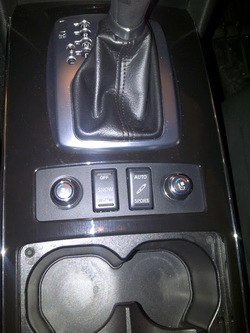
I just did this mod over the weekend along with the paddle shifter mod and am really happy with these new functions.

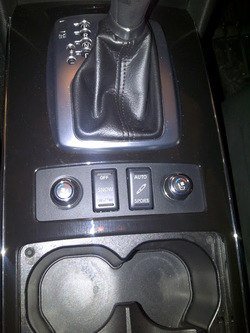
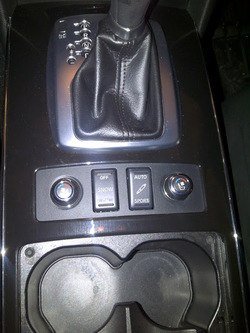
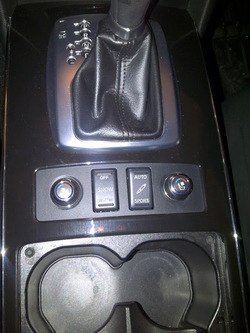
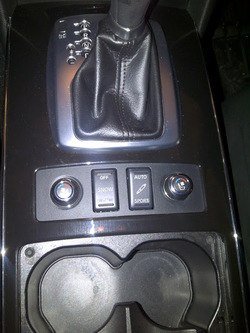
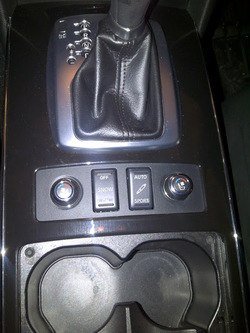
For the VSS switch, I used the FX50's Continuous Damping Control button and mounted it right next to the Snow Mode button:

IMG-20120603-00105.jpg


Took me a really long time to finish the two mods because I like to solder wires together and heatshrink them afterwards.
 

Attachments

  • IMG-20120603-00105.jpg
    IMG-20120603-00105.jpg
    64.2 KB · Views: 67
  • IMG-20120603-00105.jpg
    IMG-20120603-00105.jpg
    64.2 KB · Views: 51
  • IMG-20120603-00105.jpg
    IMG-20120603-00105.jpg
    64.2 KB · Views: 54
  • IMG-20120603-00105.jpg
    IMG-20120603-00105.jpg
    64.2 KB · Views: 86
  • IMG-20120603-00105.jpg
    IMG-20120603-00105.jpg
    64.2 KB · Views: 58
Nice job, i ended up doing this also. Only thing i didn't like is how it had to be in sport mode for the navi to work. i ended up taking the switch apart and i moved the little copper contacts so it can work while in auto and cut out in sport mode. Also hooked up the illumination wires. If you would like it to illuminate at night, tap the red wire from the snow switch and connect it to pin 4, also have to tap the Grey wire from the snow switch and connect it to pin 2

heres a quick reference to the damper switch, sorry no time for a picture:

5 6
--3
--2
4 1

Oh and 1 and 3 are used for the VSS wires for the people that want to do this mod
 
Last edited:
hello every one i hope some one can help me out or give me a hand on this i never done any modding on any of my car but i really wanna get this mod done for road trip with my wife i read 9 page of this mod on page 4 PGM-704 did indicate that 2010 FX35 no/nav wires is completely different then 09 fx picture in page 1 would some one be kind enough to take a PICTURE of 2010 wires and tell me which one to cut out i am a noob on a mission just don`t wanna mess up my car then i would not know how to fix it i know it mite be easy for some forks here but a noob like me to get this done i gotta copy an follow every step in the picture can some one please help me out thank you
 
******************

Had this problem when I did mine.. Saleen is correct. For a 2010 non-nav the wires are located on the connector that is on the opposite side of the 3 black antenna wires. If you're sitting in the car and facing the front of the AV unit, the plug is on the bottom left of the unit. Cut the red and ground the violet (wire coming from the plug)...
Cheers.

No picture, but this is what it is.


TapaTalkin'
 
No picture, but this is what it is.


TapaTalkin'

thats what worry me the most that ì mite cut then wrong wires what i will do is take it apart take a picture can you point me into the right wires? is better for me to be safe then mess up and say FML :smile (2):
 
thats what worry me the most that ì mite cut then wrong wires what i will do is take it apart take a picture can you point me into the right wires? is better for me to be safe then mess up and say FML :smile (2):

If you are worried about cutting the wrong wire and especially since you haven't done any modding, starting with this may not be the best choice and if you really want it, I would buy a plug and play device that will let you do this. Check out the DIY enable everything thread.
 
Status
Not open for further replies.
Back
Top