Enable AUX/Video input while driving

Status
Not open for further replies.
Me and my friend successfully did on it on the NAV09 FX50s... Everything seemed good until I tried it again later tonight, and it seems that the airbags light were flashing. Also the passenger airbags seems to be off even with someone sitting with seat belts on....

Maybe I turn on/off when certain thing were unplugged?

Any advice will be appreciated, thanks

EDIT:
Reset the ECU and everything is okay now!
did this:
1. Turn ignition switch from OFF to ON.
2. Within 1 second after air bag warning lamp is on for 7 seconds and turns off, turn off ignition switch.
3. After ignition switch is turned off, wait for more than 3 seconds.
4. Repeat steps 1-3 two more times (3 OFF to ON sequences in total)
5. Turn ignition switch to ON.
6. Turn ignition switch OFF and wait for more than 1 second then turn it back ON.


EDIT2:
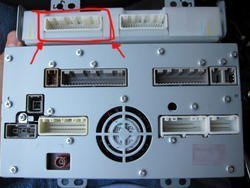
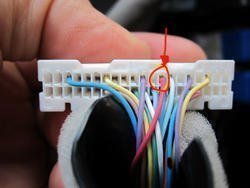
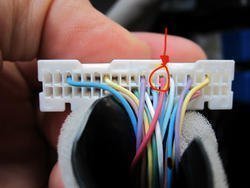
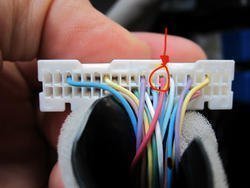
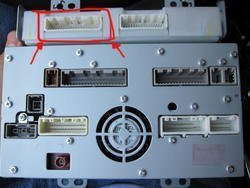
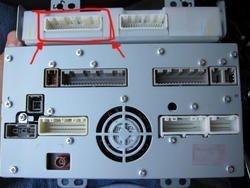
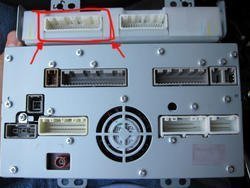
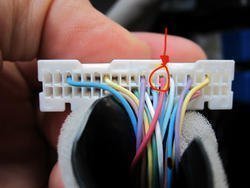
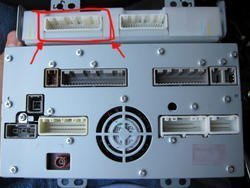
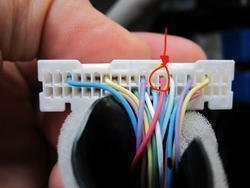
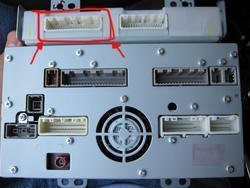
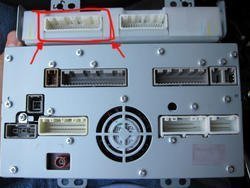
I have 2009 FX50s with Nav, so the way the mod was done is the same thing as this picture (minus the lower part):
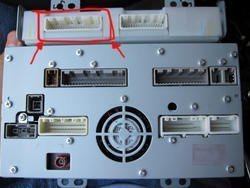
1582sn.jpg

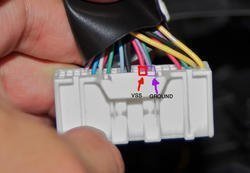
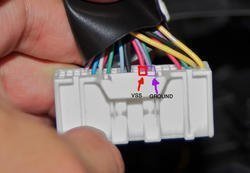
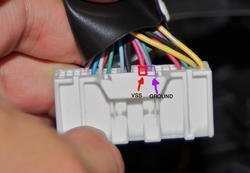
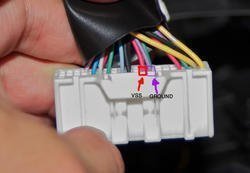
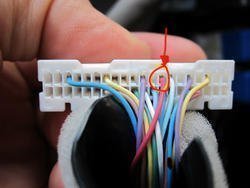
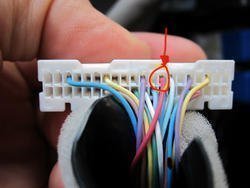
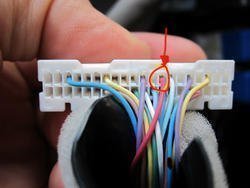
I don't have picture but it is VERY similar to the 2010 with Nav one (FUSCHIA, not light pink, you can't miss it) Made a button next to the auto/sport button to enable/disable the VSS (will put picture another day0:
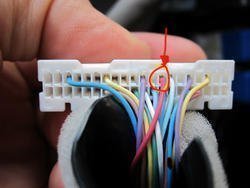
24bvwgi.jpg

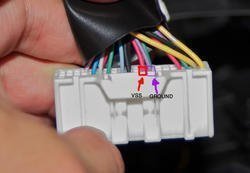
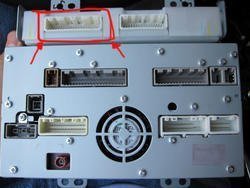
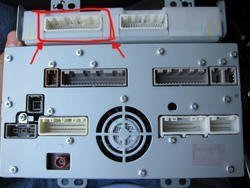
and for the ground it is exactly this picture (Cut off and grounded):
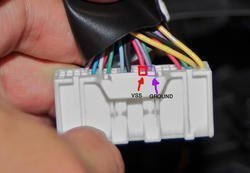
aaakcx.jpg


Something we noticed when doing the Mod is that the ground thread really needs to be cut off and grounded (can't be grounded and plugged)

Also, in order to watch the video you must absolutely have the VSS switch to off. The video detects both the VSS and the Ground sensor.

hope this helps for people with 09 Nav

---------- Post added at 01:11 AM ---------- Previous post was Yesterday at 10:54 PM ----------

do you guys think by putting a rocker switch right next to the auto/sport switch will make the dealership make my life harder by b*tching at me saying warranty is void etc?
 

Attachments

  • 1582sn.jpg
    1582sn.jpg
    40.3 KB · Views: 568
  • aaakcx.jpg
    aaakcx.jpg
    31.3 KB · Views: 336
  • aaakcx.jpg
    aaakcx.jpg
    31.3 KB · Views: 335
  • aaakcx.jpg
    aaakcx.jpg
    31.3 KB · Views: 939
  • 24bvwgi.jpg
    24bvwgi.jpg
    29.3 KB · Views: 308
  • 24bvwgi.jpg
    24bvwgi.jpg
    29.3 KB · Views: 299
  • 24bvwgi.jpg
    24bvwgi.jpg
    29.3 KB · Views: 628
  • 1582sn.jpg
    1582sn.jpg
    40.3 KB · Views: 258
  • 1582sn.jpg
    1582sn.jpg
    40.3 KB · Views: 254
  • aaakcx.jpg
    aaakcx.jpg
    31.3 KB · Views: 306
  • 24bvwgi.jpg
    24bvwgi.jpg
    29.3 KB · Views: 302
  • 1582sn.jpg
    1582sn.jpg
    40.3 KB · Views: 297
  • 1582sn.jpg
    1582sn.jpg
    40.3 KB · Views: 286
  • 24bvwgi.jpg
    24bvwgi.jpg
    29.3 KB · Views: 284
  • aaakcx.jpg
    aaakcx.jpg
    31.3 KB · Views: 287
Last edited:
do you guys think by putting a rocker switch right next to the auto/sport switch will make the dealership make my life harder by b*tching at me saying warranty is void etc?

I'm suspecting it could, because even thought this is the first infiniti I've owned, I've heard stories from my friends about them running into warranty issues with dealerships.
 
any pics of the switch? what gauge wire should be used to run the switch? Seems to be the only thing holding me back
 
they man your wheels look sick! you have any big pictures of them? thanks..


Thanks! I can't take full credit though, got the idea from one of the guys here on IS Robb I think is the name. He went with 24's though which I am slowly wishing I had done. I'm hoping I won't feel that way once I lower it a bit. I'll get some pics up as soon as I get a chance.
 
I just used a normal wire from a friend's leftover ethernet cable... We sold it to the right wire.... I'll take a pic of the outside soon... As for inside, I'm kind of lazy to unmount everything :P
 
Mod Confirmed to work on a NAV equipped FX. I did it to mine yesterday and works perfectly. I figured out 2 ways to do this mod. Ill post and explain both and let you guys choose which one to do.

The two colored wires you are looking for are:

PINK - VSS (speed sensor) Cut and run a ON/OFF switch between.
PURPLE - Ground, Ground this wire the way it was explained on Page 1 for the NON-NAV units.

FIRST WAY: This is the normal way where only the NAV and A/V units are affected. This will allow you to input destinations while moving and also allow video to be displayed while moving (gotta ground the purple also for the video to work).

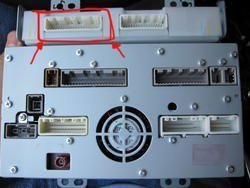
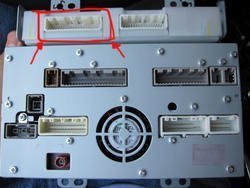
This is how the back of the NAV unit looks. The plug that we have to work with is squared off in red.


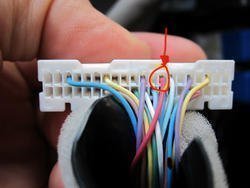
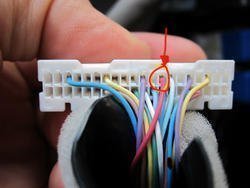
Here is a close up of the plug with the wires you will have to work with. The one i squared off in red is the VSS wire that you have to cut and run a switch between. The purple wire is squared off in black, just ground this wire as stated earlier in the post.


thats it! you are done :tup:


SECOND WAY: If you choose to go this route you will still have to ground the purple wire that is squared off in black above. But instead of working with the VSS wire shown above, we will be working with a different VSS wire. This second method, if you choose to go this route, will allow you to work with the NAV, watch DVD, look at the 360/Front view cameras, and more.

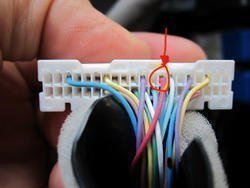
Like i said before, ground the purple wire mentioned in the FIRST way. For the VSS wire we will be working with this harness.

1582sn.jpg

Now, there is only ONE pink wire in this bunch. That is the VSS wire that you will put on a switch.

24bvwgi.jpg

Hope this helps.

Elmo

if I choose the SECOND WAY then I do not need to take off the driver kick panel to do the AROUND VIEW CAMERA MOD right?
Will the SECOND WAY work for a 2010 FX35 with NAV and TECH package (Canada model)?
I just finished my interior LED light mod and want to do this mod to be able to watch DVD and input GPS while driving, AROUND VIEW CAMERA MOD is a bonus if I can get it when choose the SECOND WAY, if not then I can live without it...:smug:
 

Attachments

  • 1582sn.jpg
    1582sn.jpg
    40.3 KB · Views: 108
  • 1582sn.jpg
    1582sn.jpg
    40.3 KB · Views: 134
  • 24bvwgi.jpg
    24bvwgi.jpg
    29.3 KB · Views: 107
  • 24bvwgi.jpg
    24bvwgi.jpg
    29.3 KB · Views: 133
  • 24bvwgi.jpg
    24bvwgi.jpg
    29.3 KB · Views: 123
  • 1582sn.jpg
    1582sn.jpg
    40.3 KB · Views: 101
  • 1582sn.jpg
    1582sn.jpg
    40.3 KB · Views: 93
  • 24bvwgi.jpg
    24bvwgi.jpg
    29.3 KB · Views: 97
  • 1582sn.jpg
    1582sn.jpg
    40.3 KB · Views: 108
  • 24bvwgi.jpg
    24bvwgi.jpg
    29.3 KB · Views: 114
I just picked up a 2010 fx35 w/ nav today. I'm in Westchester, NY. Anyone in the area that can help me do this or I can pay to do it. I hate taking my car to audio places, god only knows what they do to it. If you can help me out hit me up, I have a huge warehouse in White Plains so we could do it indoors. Thanks
 
Thank you for posting these tutorials. I'll be trying this soon and I'll try to post the results.

The audio places I've spoken to say that they do this all the time for many cars. I saw them working on a BMW X5 for the same reason. They offer to look into it for me, and are very happy when I have the information already.
 
Sorry about the double post. Just finished this modification.

The "second method" worked on a 2010 FX50. There's a hole under dash on the driver's side where a switch can fit nicely without any drilling. It's fun to drive around with the cameras on. The switch really is necessary, since the GPS can lag behind by a significant distance with the modification enabled. This does affect speed-sensitive volume, but who cares. The cameras turn off after a long while, but it's just fun to look at the plumes of exhaust behind the car. I haven't driven around with a DVD playing for long, but it seems to work perfectly.
 
Thanks! I can't take full credit though, got the idea from one of the guys here on IS Robb I think is the name. He went with 24's though which I am slowly wishing I had done. I'm hoping I won't feel that way once I lower it a bit. I'll get some pics up as soon as I get a chance.

Where are those pictures? :smile (2): I'm thinking about those wheels.
im new to the forum and i was thinking of doing this to my fx also. will this mod work with the 2010 fx35 (non nav)?

Yes... first parts of thread.
 
rijc99;127034[COLOR=#000000 said:
[/COLOR]

View attachment 194959

The top row left most two wires are what we will be working with. Wire 107-RED is the Vehicle Speed Sensor wire. Wire 106-VIOLET is the Parking Brake Ground wire. Cut the RED wire and tape them up on both sides so the wire is not exposed. All we want to do is make sure the signal does not reach the AV unit. Next, cut the VIOLET wire and take the side coming out of the connector and connect it to a ground. (One of the four mounting screws is good)

View attachment 194960


This DOES NOT work for a 2010 non-nav as the wiring is different.. I could not believe that they changed the inputs/wiring after one year. In the above first pic, those three connectors aren't lined up that way; they are all next to each other.. The red and violet are still next to each other, but also has a black wire to the left of them.. For the hell of it, i know not too smart, I tried the hack anyway.... nothing worked.. no radio no heat controls though the heat runs... Freaked me out a sec then I just checked all the fuses and the audio/mirror fuse in the driver kick panel was blown.. replaced it and all works again...

Now, does anyone have a copy of the 2010 non-nav wiring for the media/hvac center? Much appreciated..
 
I may or may not do this mod but I'm curious to know if just grounding the brake wire will allow the DVD player to play. For instance, wife is driving and stops to run into the store. I'm in the passenger seat and to pass the time, I select DVD player to watch a movie. Instead of climbing over the console to depress the emergency brake, will just grounding the brake wire allow the DVD to be watched? Sorry if this is a hijack but it seems it's related to this mod. Thanks.

BTW, could someone PM me the info regarding the 1st vs the 2nd method? Don't have enough post to PM Saleen. Thanks.
 
Last edited:
^^^^ You would need to put a switch on the VSS wire and ground the e-brake wire.. I need to get a hold of the service manual for the 2010's as the connectors in the back are different.. I should have it in the next few days and I'll post it up. BTW, doing this will allow you to not only watch DVDs while in motion, but also input commands on your navigation.


Just the DVD unlock: can try what this guy did on the org.. last entry

http://www.infinitifx.org/viewtopic.php?f=61&t=20799
 
Last edited:
Status
Not open for further replies.
Back
Top