Enable AUX/Video input while driving

Status
Not open for further replies.
I promise I will look at it this or the next week. Sorry for the delay.

---------- Post added at 10:29 PM ---------- Previous post was at 10:28 PM ----------


Not sure about the wiring. I can take a look after the 09 navs. I assume you have nav?

You don't have to apologized. You have skills and my respect for your time and hard work. We all can wait like loyal dog. :biggrin:
 
For nav users : ground brake wire, and cut speed wire and make a switch to it and use it only when you wanna watch videos so not to loose nav ability to get location more exact.If no nav just cut speed wire,but if you have nav must do a swith to vss wire. Good luck ! That is the working way and most safest as well =) I am not responsible if you mess up your car,but it works on my friend's car. Audio shop has done it. No side effects so far noticed
 
Cool, thanks for getting the info for Nav'd vehicles.

BTW. For those of you that does this mod: If your car does not have built in bluetooth stereo, you can get a bluetooth A2DP unit (I use the BlackBerry Remote Stereo Bluetooth Gateway) and plug it into the AUX inputs. This will allow your phone to stream music to your stereo wirelessly.

I paid about $27 for the A2DP unit and used an old mini usb phone charger for power.
 
cut speed wire and make a switch to it and use it only when you wanna watch videos so not to loose nav ability to get location more exact.

An idea was tossed up that the speed wire for the NAV might not be the only signal feeding to both the NAV and the Audio/Visual system, and there could be a speed signal wire that can be cut without affecting the NAV. Any word of this?

Thanks for your info btw :tup:
 
An idea was tossed up that the speed wire for the NAV might not be the only signal feeding to both the NAV and the Audio/Visual system, and there could be a speed signal wire that can be cut without affecting the NAV. Any word of this?

Thanks for your info btw :tup:

As far as I know,this is the only wire they(audio shop in Moscow,Russia) cut. It won't affect nav,as they even charge 200$ for this service and noone ever complained. Some people put a swith for a vss wire,some completely cut it. ll options will be always available on nav as well as video. I am gonna do to my car this thing in a week or so.
 
i pulled out the audio unit from mine and noticed the wiring is much different than the non-navs. too scared to cut random wires by trial and error.
 
Would love to try this out on my '09 FX35 with Navi (no RES) if anyone has the pin out details from the service manual to show which wire is which...
 
when you disrupt the VSS signal, does it also stop the odo from advancing? Cause my friend found the two wires to enable video but when he cuts the vss signal it also stops his odo.
 
Last edited:
when you disrupt the VSS signal, does it also stop the odo from advancing? Cause my friend found the two wires to enable video but when he cuts the vss signal it also stops his odo.

I don't think so. As you not removing speed wire from the computer,you just remove it from nav ;-) . if it didi stop the cluster,i would cut it and keep my mileage low forever :tonguey:
 
Cause my friend found the two wires to enable video but when he cuts the vss signal it also stops his odo.

And those wire colors/pin numbers were...?

I'm pretty keen to do this; the traffic on my iPhone Navigon GPS is inifinitely better than the lame factory XM traffic. I have apps on the iPhone that allow me to send the iPhone screen out via composite video; all I need is the video hack and I have the iPhone GPS as the perfect replacement for the factory nav.
 
And those wire colors/pin numbers were...?

I'm pretty keen to do this; the traffic on my iPhone Navigon GPS is inifinitely better than the lame factory XM traffic. I have apps on the iPhone that allow me to send the iPhone screen out via composite video; all I need is the video hack and I have the iPhone GPS as the perfect replacement for the factory nav.


Sorry guys he didn't take any pictures cause he doesn't belong to any forum so he didn't really care to. If you guys wanna wait, I can take pictures when i open my baby up and post them. For the ones that don't wanna wait, someone send me a picture of the rear of the av unit and ill tell you exacly what two wires.

Also, we tested the problem people have with the nav not returning to the exact location. The problem is that when it senses you being off track it will adjust the pointer to the nearest street where it was left stopped. Since streets run parallel to each other, the pointer can run just fine even if its (lets say) 4 blocks off. In this case you can adjust the pointer yourself under options or you can wait till it fixes itself, this might be till you enter a street that has no other street running parallel to it or till you enter a freeway.

On the freeway is a different story, there's no multiple freeways running parallel to each other so the nav fixes itself quite quickly, sometimes instantly.


Edit: Other forums prohibit the talk of nav hacking. Is it ok to talk about it here?
 
Last edited by a moderator:
the nav hack is ok I think because it's intended purpose is for a passenger to be able to enter a destination while the driver drives... the hack does not encourage a driver to do something illegal... actually, is it even illegal for a driver to enter a destination into nav while driving? i don't think so... I think some of the tiny add on units allow this by default? I think the lockout is more of an infiniti avoiding any liability than actually being a law anyway... please refrain from any discussion of vss in regards to the odometer though, that is very much not good...
 
the nav hack is ok I think because it's intended purpose is for a passenger to be able to enter a destination while the driver drives... the hack does not encourage a driver to do something illegal... actually, is it even illegal for a driver to enter a destination into nav while driving? i don't think so... I think some of the tiny add on units allow this by default? I think the lockout is more of an infiniti avoiding any liability than actually being a law anyway... please refrain from any discussion of vss in regards to the odometer though, that is very much not good...


Thanks for the clarification and the edit. Other forums prohibit the talk of nav hack maybe because its messing with the electrical system? thus, illegal. I dono, but this is why there is so little information on this.
 
Last edited:
it's not illegal to mess with your electrical system... it is possible to affect your warentee though if they determine that the wiring work caused any damage... that's always a risk when playing, but not illegal...
 
I've done this to my MY20 FX50 with premium, tech and sport package today.
The emergency brake is on by grounding the e-brake wire and made the speed sensor signal never makes it to the control unit.
And it works fine. ;-)
 
I've done this to my MY20 FX50 with premium, tech and sport package today.
The emergency brake is on by grounding the e-brake wire and made the speed sensor signal never makes it to the control unit.
And it works fine. ;-)
Coool. Wanna do DIY?
 
Navigation A/V Mod

Mod Confirmed to work on a NAV equipped FX. I did it to mine yesterday and works perfectly. I figured out 2 ways to do this mod. Ill post and explain both and let you guys choose which one to do.

The two colored wires you are looking for are:

PINK - VSS (speed sensor) Cut and run a ON/OFF switch between.
PURPLE - Ground, Ground this wire the way it was explained on Page 1 for the NON-NAV units.

FIRST WAY: This is the normal way where only the NAV and A/V units are affected. This will allow you to input destinations while moving and also allow video to be displayed while moving (gotta ground the purple also for the video to work).

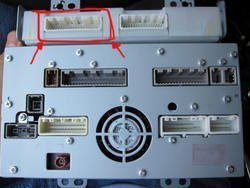
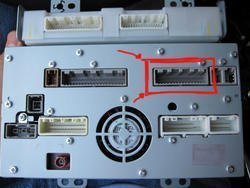
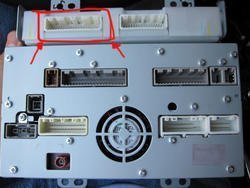
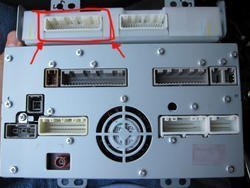
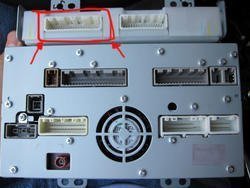
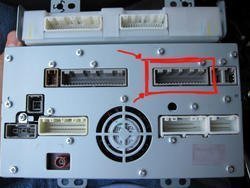
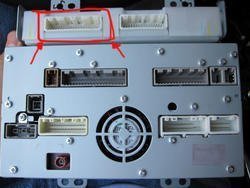
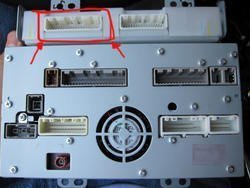
This is how the back of the NAV unit looks. The plug that we have to work with is squared off in red.

2a5xh79.jpg

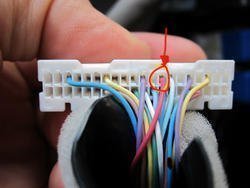
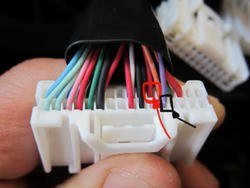
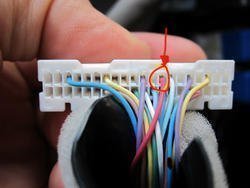
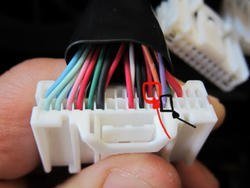
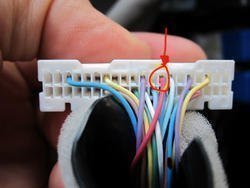
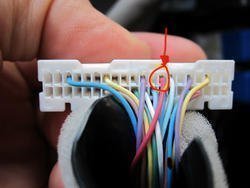
Here is a close up of the plug with the wires you will have to work with. The one i squared off in red is the VSS wire that you have to cut and run a switch between. The purple wire is squared off in black, just ground this wire as stated earlier in the post.

11ub5mu.jpg

thats it! you are done :tup:


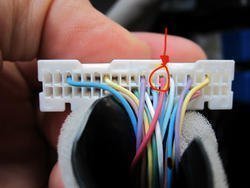
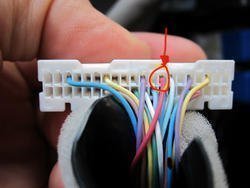
SECOND WAY: If you choose to go this route you will still have to ground the purple wire that is squared off in black above. But instead of working with the VSS wire shown above, we will be working with a different VSS wire. This second method, if you choose to go this route, will allow you to work with the NAV, watch DVD, look at the 360/Front view cameras, and more.

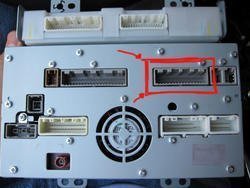
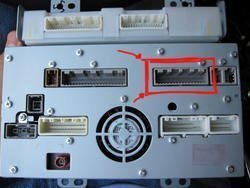
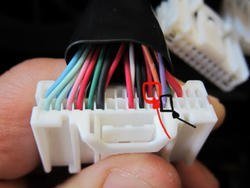
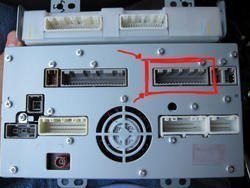
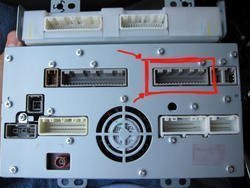
Like i said before, ground the purple wire mentioned in the FIRST way. For the VSS wire we will be working with this harness.

1582sn.jpg

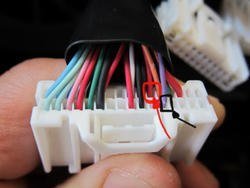
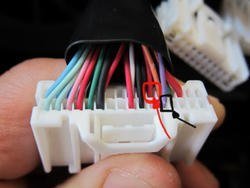
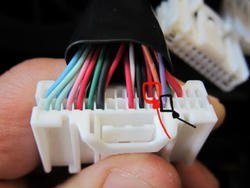
Now, there is only ONE pink wire in this bunch. That is the VSS wire that you will put on a switch.

24bvwgi.jpg

Hope this helps.

Elmo
 

Attachments

  • 2a5xh79.jpg
    2a5xh79.jpg
    40.4 KB · Views: 59
  • 2a5xh79.jpg
    2a5xh79.jpg
    40.4 KB · Views: 60
  • 2a5xh79.jpg
    2a5xh79.jpg
    40.4 KB · Views: 65
  • 11ub5mu.jpg
    11ub5mu.jpg
    26.8 KB · Views: 58
  • 11ub5mu.jpg
    11ub5mu.jpg
    26.8 KB · Views: 77
  • 11ub5mu.jpg
    11ub5mu.jpg
    26.8 KB · Views: 60
  • 1582sn.jpg
    1582sn.jpg
    40.3 KB · Views: 68
  • 1582sn.jpg
    1582sn.jpg
    40.3 KB · Views: 68
  • 1582sn.jpg
    1582sn.jpg
    40.3 KB · Views: 80
  • 24bvwgi.jpg
    24bvwgi.jpg
    29.3 KB · Views: 61
  • 24bvwgi.jpg
    24bvwgi.jpg
    29.3 KB · Views: 67
  • 24bvwgi.jpg
    24bvwgi.jpg
    29.3 KB · Views: 63
  • 2a5xh79.jpg
    2a5xh79.jpg
    40.4 KB · Views: 65
  • 11ub5mu.jpg
    11ub5mu.jpg
    26.8 KB · Views: 63
  • 1582sn.jpg
    1582sn.jpg
    40.3 KB · Views: 62
  • 24bvwgi.jpg
    24bvwgi.jpg
    29.3 KB · Views: 93
  • 2a5xh79.jpg
    2a5xh79.jpg
    40.4 KB · Views: 54
  • 11ub5mu.jpg
    11ub5mu.jpg
    26.8 KB · Views: 71
  • 1582sn.jpg
    1582sn.jpg
    40.3 KB · Views: 74
  • 24bvwgi.jpg
    24bvwgi.jpg
    29.3 KB · Views: 68
Status
Not open for further replies.
Back
Top