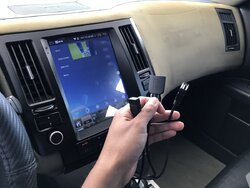
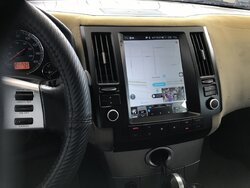
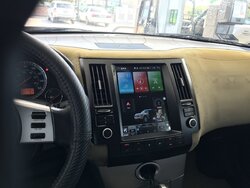
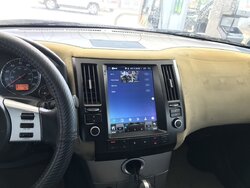
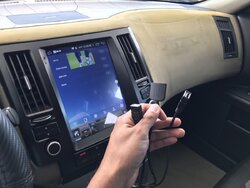
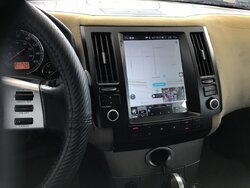
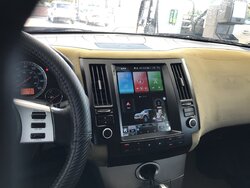
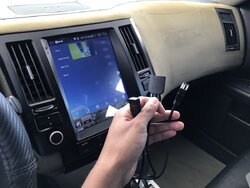
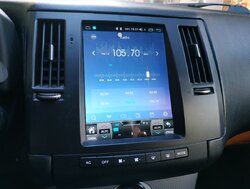
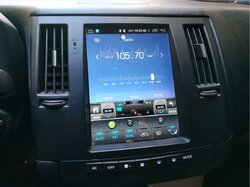
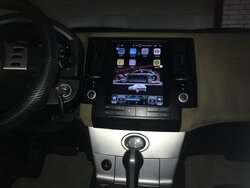
Ebay "Tesla" Style Center Dash Screen Console

Hello,
I have a 2005 FX45 AWD with OEM navigator and I also have a Kirinavi HU sold by another seller and wubbalubbadubdub has helped me a lot by publishing the first pdf with the instructions since my Aliexpress seller did not give me any instructions or help me.
Indeed Luis, that connector labeled in Chinese as "low version", in principle has to be plugged into the connector that was plugged into the old screen for the low version, the FX35 / FX45 that do not have oem navigator. In fact it is the same as it was in the first PDF, but without having to solder the two green wires in the lower version. It is important that you keep the OEM AC module plugged in the new HU configuration.
You will explain to us how it goes.
Regards
 
Hi guys,
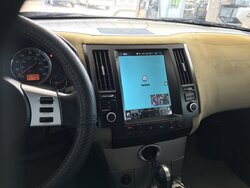
Hey Luis, when you finally get it installed, would you please post a bunch of pictures of the different areas of the UI? I’m heavily considering getting the OSTR brand instead of the Kirinavi because the OSTR one seems to have a better looking UI, but I would like to double check.

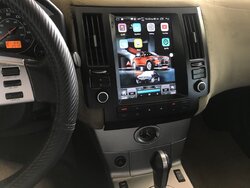
Hi, I finally got it installed. Everything is literally plug and play with this KiriNavi unit. After living with a tape adapter and zero features for 17 years. I like everything about this unit. I feel like a kid on Christmas morning.
 

Attachments

  • 72A865CD-490A-4489-8A17-D7179C789838.jpeg
    72A865CD-490A-4489-8A17-D7179C789838.jpeg
    144.1 KB · Views: 139
More6EBB8DEE-CE1D-4695-BA21-29F93CD2B806.jpeg3EFD7C01-8BC7-4928-BA79-1F46BC26636E.jpeg5AE2B0AA-1C84-4626-B88E-6E831D73CDF1.jpeg3A1A384B-13A4-4B54-8D5E-06869C8E26CE.jpeg015500E4-71C3-4FF7-9CD7-E274B2B1A39C.jpeg3B28938D-A910-46F2-88E4-0591C3EF69AC.jpeg
 

Attachments

  • 1E24A1CB-6BF9-4C8A-8C78-96EA8C54E8C2.jpeg
    1E24A1CB-6BF9-4C8A-8C78-96EA8C54E8C2.jpeg
    152 KB · Views: 51
  • CC119D69-4AA3-4B5D-9352-F958D315062B.jpeg
    CC119D69-4AA3-4B5D-9352-F958D315062B.jpeg
    160.7 KB · Views: 69
  • D9ADCC17-BF88-471D-AA14-301D0DFC7E51.jpeg
    D9ADCC17-BF88-471D-AA14-301D0DFC7E51.jpeg
    148.6 KB · Views: 73
Hello,
I have a 2005 FX45 AWD with OEM navigator and I also have a Kirinavi HU sold by another seller and wubbalubbadubdub has helped me a lot by publishing the first pdf with the instructions since my Aliexpress seller did not give me any instructions or help me.
Indeed Luis, that connector labeled in Chinese as "low version", in principle has to be plugged into the connector that was plugged into the old screen for the low version, the FX35 / FX45 that do not have oem navigator. In fact it is the same as it was in the first PDF, but without having to solder the two green wires in the lower version. It is important that you keep the OEM AC module plugged in the new HU configuration.
You will explain to us how it goes.
Regards

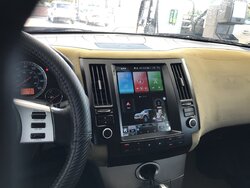
Hi there, I’m having a hard time to make it fit flush on the dashboard. I suppose I have to make more room for the wiring back there. Where did you put the gps antena and the -4g tube wiring?
As far as sound quality it is good to me and it can be easily upgraded.
 
Hi, I don't use 4g tube wiring (only wifi) but I still have it behind the HU. Regarding the GPS antenna I have it fixed with the magnet it has and a flange to fix on a steel tube just center above the multimedia radio and under the dash. In my case everything fits me well. The only thing that for FX35 / Fx45 with OEM navigator the wiring is not plug and play and also I have a problem with the canbus, the air conditioning works always in automatic, but the buttons do not work and I cannot control the climate and rear defrost. Everything else works fine for me. As it is under warranty, I have asked Kirinavi to send me again a wiring and a canbus that allow me to control the air conditioning. I am waiting and at the moment the seller (China Car Gps) and the manufacturer (kirinavi) have not treated me well.
Please, could you put a picture of the 2 wiring that the factory normally supply and that connect to the HU (black connector) and to the canbus, or at least the one you haven't installed, the one with the FX35 / FX45 with OEM navigator?
Thank you and congratulations on the success.
 
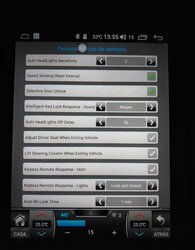
The 2 green cables read the data from the climate control sensors in automatic, the outside temperature shown on the screen, the user customization data, doors open, lights off when closing, etc., but the canbus that is The climate control manager does not allow me to control the climate using the buttons.
 

Attachments

  • HU_con_aire_acondicionado_en_automatico_01.JPG
    HU_con_aire_acondicionado_en_automatico_01.JPG
    121.5 KB · Views: 154
  • HU_con_aire_acondicionado_en_automatico_02.JPG
    HU_con_aire_acondicionado_en_automatico_02.JPG
    118.4 KB · Views: 175
  • Personalizacion_vehiculo.JPG
    Personalizacion_vehiculo.JPG
    62 KB · Views: 151
Wow, no knobs on yours. Anyways, here are the pics:
 

Attachments

  • 0306910F-7885-405F-B0FB-DAD818567D0C.jpeg
    0306910F-7885-405F-B0FB-DAD818567D0C.jpeg
    117.3 KB · Views: 191
  • A3D1ACB5-5498-4958-B346-8BBB7A62BFAF.jpeg
    A3D1ACB5-5498-4958-B346-8BBB7A62BFAF.jpeg
    132.5 KB · Views: 186
  • E3FA1FBD-DB6F-4A55-8360-1B4E72B39889.jpeg
    E3FA1FBD-DB6F-4A55-8360-1B4E72B39889.jpeg
    123 KB · Views: 195
  • 56FE9160-F48C-4034-A884-B89F9A4EA7F0.jpeg
    56FE9160-F48C-4034-A884-B89F9A4EA7F0.jpeg
    156.4 KB · Views: 158
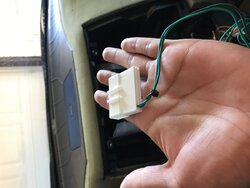
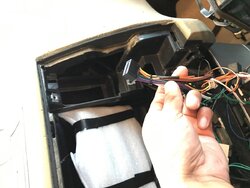
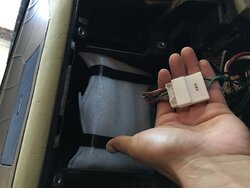
The first one I didn’t use because that’s for fx with tech package. Second one is for head unit (power cable). Third is for can-bus plug and play for non-tech fx. Last one is for the physical buttons to control climate control.
 
Thanks for the pictures.
In my case I am sure it is well installed but there is a problem with the canbus. I'll wait for Kirinavi to send the faulty part.
Thank you
 
Hey guys. I noticed some static noise when I increase volume without music and looks like I was supposed to ground some cable to the dash frame where the old head unit was bolted to. Any ideas? Am I supposed to run a wire from the audio cables? That’s the only thing that was not plug and play everything else is working great.
 
Update:

I connected a wire from RCAs to one screw on the back of the head unit. The static noise is gone.

Another tip related to CarPlay connection. I noticed that if I use Bluetooth for CarPlay I lose connection sometimes so I rather use usb connection. The fastest way to connect to CarPlay by usb on the first try is by turning on wifi and hotspot only, don’t turn Bluetooth on. Then, connect your iPhone with USB port, the iPhone lightning cable should be already connected to your Iphone, then connect and disconnect from USB port 2-3 times until you hear the connected sound twice in a row while connected and Boom! You are connected without interruptions for the whole road trip lol. Finally, turn on and off the wifi on the android head unit until you see your iPhone in the networks list and it will connect automatically. Now you should have solid connection for CarPlay and also for all the other apps on the android head unit like YouTube and Spotify (with album art and all).

CarPlay lets you talk to Siri for a total hands free experience and safe driving while texting or calling, but I don’t like Spotify on CarPlay because I can’t see album art or lyrics. I like using the Spotify app on the head unit because it lets me navigate thru Spotify completely. I split the screen and I have Waze on top and Spotify on bottom. However, if I’m going to be driving CarPlay is safer.

Anyways, I’m really enjoying this head unit, I have solid connection all the time by USB.
 
Last edited:
Best things first;
It looks cool. :tup:
It's near 6 lbs lighter than the stocker.:tup:

Now the bad-
Connectivity issues;
Carplay suggestion above doesn't work for me. It did at first. Then I wanted to try it again and it became unresponsive. Not sure if it's the phone, the radio, my lack of patience for this silly bullshit or a combination of the 3.
I have personal and work phones. Android and apple. Neither works all that well. Android auto or apple carplay. My results are that the unit is unreliable at best. :tdown:
Bluetooth works well, maybe almost as well as my $30 fm transmitter in my other car. :unsure: :tdown:
Bluetooth mic is shit. I can barely be heard on the other end but I can hear well. :tdown:
Cannot find the offline GPS to save my life. :tdown:
When apple carplay is functioning, the lame-ass tablet (cheap Chinese bullshit) cannot keep up with the phone. :rofl::rofl::rofl::tdown:
1 of 2 usb's doesn't work. Tried both phones. No connection. No charging.
Fitment issues;
Bottom clips do not engage. I see others have this problem as well. Kirinavi said no one else had this problem. :tdown: Bullshit. Everyone has this problem because it doesn't fit. Modification to dash is required.

My overall opinion of the vertical radio so far is meh. Like some women, good from far but far from good. :tdown:
My opinion of Kirinavi the seller? :tdown::tdown::tdown: Gotta be someone better to buy from. They don't have answers to questions. :tdown: Maybe wait until an American manufacturer makes one, if ever.
 
Last edited:
They do not answer me or attend to me either. I shouldn't have done it, but I paid 78 $ to kirinavi aftersales (who told me it was a Canbus problem in mi HU and they didn't want to send me one as a guarantee) for new wiring, Canbus and shipping, and they don't send me anything or answer me.
Therefore, if something goes wrong, there is no guarantee and they also have no problem scamming you. I don't understand it, they really aren't serious. I do not recommend this company. Find another that has a better reputation.
It seems incredible that a company that manufactures hundreds of electronic devices looks bad for so little..
If everything works well it is a great product for our cars.
 
Last edited:
I'm trying to find out who the manufacturer is. I got a reply email from someone at Astral who is a Chinese manufacturer, I'm just not sure yet if they make the one we have. if they don't, I bet they know who does.
You should file a complaint with Aliexpress. I know I'm going to.
 
Best things first;
It looks cool. :tup:
It's near 5 lbs lighter than the stocker.:tup:

Now the bad-
Connectivity issues;
Carplay suggestion above doesn't work for me. It did at first. Then I wanted to try it again and it became unresponsive. Not sure if it's the phone, the radio, my lack of patience for this silly bullshit or a combination of the 3.
I have personal and work phones. Android and apple. Neither works all that well. Android auto or apple carplay. My results are that the unit is unreliable at best. :tdown:
Bluetooth works well, maybe almost as well as my $30 fm transmitter in my other car. :unsure: :tdown:
Bluetooth mic is shit. I can barely be heard on the other end but I can hear well. :tdown:
Cannot find the offline GPS to save my life. :tdown:
When apple carplay is functioning, the lame-ass tablet (cheap Chinese bullshit) cannot keep up with the phone. :rofl::rofl::rofl::tdown:
1 of 2 usb's doesn't work. Tried both phones. No connection. No charging.
Fitment issues;
Bottom clips do not engage. I see others have this problem as well. Kirinavi said no one else had this problem. :tdown: Bullshit. Everyone has this problem because it doesn't fit. Modification to dash is required.

My overall opinion of the vertical radio so far is meh. Like some women, good from far but far from good. :tdown:
My opinion of Kirinavi the seller? :tdown::tdown::tdown: Gotta be someone better to buy from. They don't have answers to questions. :tdown: Maybe wait until an American manufacturer makes one, if ever.

Zlink CarPlay USB connection plus internet only:

Go to Iphone Settings/General/CarPlay then you should see zjinnova-blablabla... already.

Wifi in the head unit should be OFF

Hotspot and tethering should be all off (Go to: settings/wifi/more/hotspot &t tethering) Make sure all is off.

Turn ON wifi and hotspot in your IPhone, wifi should be ON but not connected. Bluetooth should be OFF. When your IPhone ask you what connection you want, always choose USB only.

Open Zlink (CarPlay) app. IPhone should have lightning cable connected already, then plug and unplug from USB port a couple of times (maybe more) until you hear 2 consecutive connected sounds. I noticed that if you don’t unplug it completely, it will connect faster, just wait for the connected sounds.

After CarPlay is connected. Go to the head unit settings and turn ON and OFF wifi a few times. If you don’t see your IPhone on the networks list then try turning ON and OFF hotspot in your IPhone a couple of times until you see your IPhone in the networks list in the head unit ( it will connect automatically). This last step is just to have internet from your phone for all the other apps in the head unit besides CarPlay.

I hope this helps. And yes, I couldn’t fit the bottom clips but now that I know what to trim in the dash to make it fit perfectly I have no complaints. I don’t like using Bluetooth because I have T-Mobile and my service is garbage. When I upgrade to Verizon, I hope to have better Bluetooth connection but for now I like USB connection because it is solid.
 
Last edited:
I’m working on the 2nd gen fx logo which I hate. I took a snapshot of a 1st gen from google pictures in the head unit and put it as background. I will update on how to get rid off the 2nd gen FX. It is a matter of changing a picture to png file, put it in a flashdrive and save it in the head unit png file folder. When you press and hold on the 2nd gen fx logo, the folder will pop up with a gallery of png cars, save the 1st gen png file in there and Boom!. It should work. I’ll update soon.

F42E0FB3-909F-4090-83A5-071337AA0542.jpeg
 
Last edited:
Yes, thanks and I'll try it again. Maybe I'll find out why it's been hit and miss, what I did wrong.
Looking forward to your progress and instruction on the logo.
 
1st gen logo update. It took me 5 minutes guys:

Get a USB drive.

Gooogle Infiniti fx45 png (tons of websites).

Download png pictures of your favorite color FX.

After downloading the png pictures, save them in the USB drive. The name of the png will be too big, rename the png with one word (for example “grey.png“).

Connect the USB drive to the head unit. Go to File Manager app and open USB file, select your pngs pictures and copy it to Internal/Portrait folder. Your new pngs should be there with all the other png pictures from other cars.

Go to home screen, press and hold on the 2nd gen Fx logo and the gallery should pop up with your new pngs. Once you choose the one you like, post it by clicking the button far left.

There are websites where you can convert jpg to png. If it is too small you can edit and crop it. I got 5 so far black, brick, grey, red, white.

Grab a beer and enjoy.

18E83B2A-3CF2-487E-BF4C-9B6E01EF87DE.jpeg
 
Last edited:
Back
Top