Play virtually anything on your Nav screen.

Hi Kingrick05,... I want to play video from my smartphone or tablet and do the things everyone wants to accomplish in this thread. Infiniti got rid of the aux AV for 2012+ that exist in previous gen2 fx center console. I was hoping there was an easy mod to add Aux AV with NavTool or Naviks. Unfortunately, I may have to come up with my own mod to accomplish this.
 
Last edited:
Will the Samsung hub power up with the cig lighter with the use of a micro USB car charger?

Tapa on Note III
 
Hi all.

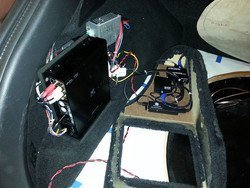
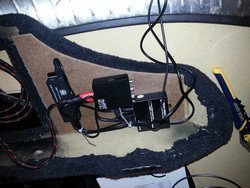
As some of you may know I did a similar mod to my FX over a year ago. I've gone through several iterations, lot's of trial and error, since (with lots more to come). I thought I'd share my perspectives on this and some info. I'm going to add some photo's of the interface setup to my own stereo build thread sometime in the next few days (need to take some shots specific to this and upload them). I'm also going to do a walkaround video and upload to Youtube and link here tomorrow. But for now here's some details to those with questions.


There's several approaches to accomplish this (from a source to car perspective)... a "wired or wireless" source via "analog or digital" interface or connection. You need to decide if your goal is a quick connection with low relative audio/video quality or if you desire a higher quality interface with more cost and complexity but with much better audio and video results.

Note: that one of our challenges today is that there are virtually no source units available that output composite video directly. Because of this a an HDMI converter is required. More below.

Note: The ability to bypass video while driving is not really the topic here either. That said just for full disclosure I picked up the bypass kit from Carkit company and installed it behind my head unit. I programmed my mirror's buttons to operate the bypass kits features. If you are interested check it out here: http://www.carkitcompany.com/infiniti-bypass-kits/g37-2010

Methodologies for integrating mobile media sources to your Infiniti

1. Your phone wired via converters to the car's analog inputs (RCA connections). This is what NOT the youtube video was showing. This is the simplest implementation.

Pros:
a) No fiddling with wifi/bluetooth to get your source talking to a "media hub".
b) No audio degradation due to compression to the hub.
c) Screen mirrors directly (ie what you see on the car's display is what the device is also displaying, if a phone). Much easier to control the unit (unlike when video shows on screen but only controls on source)
d) Works with little modification. Could realistically stuff all the required pieces into the center console easily.

Cons:
a) Audio quality is so-so. Frankly the interface sucks for quality audio playback.
b) Did I say the audio quality sucks?

2. Wireless to a hub/receiver that is then wired via splitters to RCA inputs (or maybe even digital, see below). This is what the video was showing.
Same as above except you add a media hub "receiver" that is supported by your source (your phone or tablet). This hub could be anything like the following: Google Chromecast (needs internet connectivity), Samsung Media Hub, a Airplay to an AppleTV, etc. The idea is source sends content wirelessly to the hub/device which outputs via HDMI to a converter and then into your car's inputs as above in number 1.

3. Direct wire your source into car + audio processor via SPDIF + a bad ass stereo overhaul :) https://www.infinitiscene.com/search/1/?q=19046-Santiago-s-sound-system-build-out-stealth-SQ-build!
This is the route I took. Essentially I can switch between the vehicles head unit or my source which plays back digital via HDMI > Audio Processor (digital audio) and Car (video)

Pros:
a) Superior audio quality
b) Capable of 5.1 surround (assuming your processor is and you wire your system appropriately)
c) Good video quality (within the boundries of standard def/composite)
d) Lot's of flexibility in choices. You could, for example, have more than one source. For example; a fixed source like an installed media player with integrated storage and playback (directly wired into digital source "1") AND a wireless source (your phone sending content to a hub receiver which is wired into digital source "2") plus your vehicles stock head unit (wired into analog source 1).
e) More cool factor

Cons:
a) Expensive. We're really talking about a complete sound system overhaul here. With a good processor, amps, speakers and install you are talking several thousand +.
b) Requires some expertise up front but if done right will operate wonderfully.


Supplies

Many have covered what you'd need already with some links to Amazon and such. I'll just list what I've done here (with more details to follow at some point in my system thread).

What you need:
Your Source
(generally a phone or media hub of some sort).
Signal splitters to get from your source into the vehicles AV system. Generally HDMI to RCA audio/video
Wiring (source device to HDMI cable, RCA cables, etc).

Here's how my gear is setup with multiple sources:
Source 1: Infiniti FX50s stock head unit connected via analog (tied into head unit's line level outputs BEFORE the Bose amp) to Alpine H800 Processor via wired in RCA. Essentially 4 channel in.
Source 2: Samsung Galaxy Note 2 connected via Digital SPDIF to Alpine H800 Processor's Digital 1 input (audio) and Infiniti's Video IN.
Samsung out via [MAXAH 2 meter MHL MicroUSB to HDMI adapter] > [J-Tech HDMI to HDMI/SDIF adapter] > [ViewHD HDMI to Composite adapter].
Source 3: Working on wireless via Google ChromeCast. This will require a slight revamp of the adapter setup.

Power: CarNetix CNX-P2140 Intelligent DC regulator. This provides timer controlled, remotely triggered (ie via my Viper alarms aux signal) 12v and 5v regulated power supply. All of the above adapters have had their 5v DC power cables powered via the CarNetix. The CarNetix can, for example, keep a car PC device (like a Raspberry PI, Google TV or other PC) powered on for some time after the vehicle is shut off (like while you are getting gas in your car) so it doesn't have to be booted every time you start the car. It can also power them on BEFORE you start the car when the alarm is turned off remotely.


Photos (more to come later)
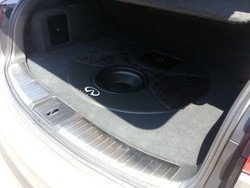
Here's the interface setup. Alpine H800 processor with the HDMI splitters and wiring. This is an early version using an Android stick PC controlled via Bluetooth cable. I now wire my Samsung Galaxy Note 2 in directly with it "floating" via a goose neck to the right of my dash/shifter. Much better setup.
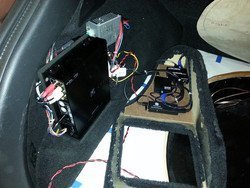
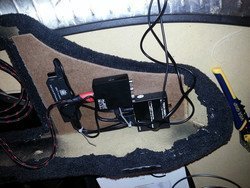
2013-05-04%2000.53.03-M.jpg


2013-05-02%2019.25.49-M.jpg


2013-08-03%2015.09.25-M.jpg

---------- Post added at 11:08 PM ---------- Previous post was at 10:17 PM ----------

Will the Samsung hub power up with the cig lighter with the use of a micro USB car charger?

Tapa on Note III


It should. You'd definitely want to use a 2amp charger for it. You could probably just drop it into the center console. However you'll also need to find power for the converters to get it back into the system. They would also take 5v.

 

Attachments

  • 2013-05-04%2000.53.03-M.jpg
    2013-05-04%2000.53.03-M.jpg
    69.3 KB · Views: 74
  • 2013-05-02%2019.25.49-M.jpg
    2013-05-02%2019.25.49-M.jpg
    74.8 KB · Views: 78
  • 2013-08-03%2015.09.25-M.jpg
    2013-08-03%2015.09.25-M.jpg
    46.2 KB · Views: 109
I tested all equipment on all TVs at my house. First I tested RCA/HDMI cable (connected HDMI male input directly to Samsung dongle). RCA male inputs connected to TV, this didn't work. Next, I ordered HDMI2AV converter, connected all cables and devices, This didn't work.

I couldn't figure out how to this MOD is done. I'm sure the more we try at it. It will happened.

If it is not working on your TV at home then it will not work in your FX because it is the same principle. All you are doing is pushing media to your TV or in the case of the FX your LCD screen using a wireless hub device via your RCA inputs. You will have to keep troubleshooting until you figure out why it is not working. Once you get it working on your home TV then the same setup should work in the FX if hooked up properly. Try using a different RCA to HDMI cable.
 
sweet install and video!!! was wondering about the earth magnet on the phone. Wont it messup the phone like whip out the phone? how strong is that magnet?
 
%EC%A0%9C%EB%AA%A9%20%EC%97%86%EC%9D%8C.png


Getting Orei XD-M600 MINI HDMI to AV RCA PAL/NTSC video Converter Adapter
and Samsung Wi-Fi All Share Cast Hub- Wireless HDMI

Can't wait to try it on my car!!
 
%EC%A0%9C%EB%AA%A9%20%EC%97%86%EC%9D%8C.png


Getting Orei XD-M600 MINI HDMI to AV RCA PAL/NTSC video Converter Adapter
and Samsung Wi-Fi All Share Cast Hub- Wireless HDMI

Can't wait to try it on my car!!


I used a similar converter and it didn't work for me. Once you get all your equipment. Let me know if it worked for you. I just might of had a bad converter.

---------- Post added at 09:37 AM ---------- Previous post was at 09:30 AM ----------

sweet install and video!!! was wondering about the earth magnet on the phone. Wont it messup the phone like whip out the phone? how strong is that magnet?


No the magnet won't mess up the phones memory. The only major issue users have claimed to have is spotty navigation use while connected to the magnets. I have a CD slot magnet holder for my Note 3 and I love it. It's simple and elegant, Manufactured by InfiniApps. Here's a hyperlink • http://www.amazon.com/InfiniApps-Sm...sbs_cps_1?ie=UTF8&refRID=15HQNE4N0C3CVV1MC9X4
 
sweet install and video!!! was wondering about the earth magnet on the phone. Wont it messup the phone like whip out the phone? how strong is that magnet?

No issues with the magnets, it works great. Everyone that see's it asks the same thing, along with saying wow!

There are two "sets" of magnets I'm using. The stronger magnets are on the base, weaker (and thinner) are in the phone case. They are aligned so that the two base magnets align with the two case magnets.

Bought from kjmagnetics.com.
[TABLE="width: 99%"]
[TR]
[TD="class: ecxcobhl ecxreceipthl, colspan: 2, align: left"]DX001-N52
[/TD]
[TD="class: ecxcobhl ecxreceipthl, align: right"][/TD]
[/TR]
[TR]
[TD="class: ecxcobhl ecxreceipthl, colspan: 2, align: left"]RE22CS-P
[/TD]
[/TR]
[/TABLE]

---------- Post added at 07:28 PM ---------- Previous post was at 07:27 PM ----------

No the magnet won't mess up the phones memory. The only major issue users have claimed to have is spotty navigation use while connected to the magnets. I have a CD slot magnet holder for my Note 3 and I love it. It's simple and elegant, Manufactured by InfiniApps. Here's a hyperlink • http://www.amazon.com/InfiniApps-Sm...sbs_cps_1?ie=UTF8&refRID=15HQNE4N0C3CVV1MC9X4

I tried this mount and found it to be too weak for me, plus it doesn't align the phone automatically. This is why I decided to DIY.
 
No issues with the magnets, it works great. Everyone that see's it asks the same thing, along with saying wow!

There are two "sets" of magnets I'm using. The stronger magnets are on the base, weaker (and thinner) are in the phone case. They are aligned so that the two base magnets align with the two case magnets.

Bought from kjmagnetics.com.
[TABLE="width: 99%"]
[TR]
[TD="class: ecxcobhl ecxreceipthl, colspan: 2, align: left"]DX001-N52[/TD]
[TD="class: ecxcobhl ecxreceipthl, align: right"][/TD]
[/TR]
[TR]
[TD="class: ecxcobhl ecxreceipthl, colspan: 2, align: left"]RE22CS-P[/TD]
[/TR]
[/TABLE]


---------- Post added at 07:28 PM ---------- Previous post was at 07:27 PM ----------


I tried this mount and found it to be too weak for me, plus it doesn't align the phone automatically. This is why I decided to DIY.


Yes it is somewhat weak and it won't align the phone automatically, but it holds the phone firmly. I saw a lot of DIY online and yours is by far top 5.
Magnet holders are the way to go, there's so easy to use. When in a rush I will just pick my Note 3 from my pocket and "toss" it towards the magnet mount. This Nav mod with a magnet holder is a must.

Kkssww10,

good of luck I hope it works.
 
Will the Samsung hub power up with the cig lighter with the use of a micro USB car charger?

Tapa on Note III

The pictures on their web site would suggest so.

http://www.samsung.com/us/mobile/cell-phones-accessories/EAD-T10JDEGSTA

I have these plugged into my cig/12v outlets in the front change holder and arm rest.

http://www.scosche.com/car-audio/ipad-usb-car-charger-two-port

---------- Post added at 09:58 AM ---------- Previous post was at 09:40 AM ----------

It should. You'd definitely want to use a 2amp charger for it. You could probably just drop it into the center console. However you'll also need to find power for the converters to get it back into the system. They would also take 5v.

He wouldn't need converters with the you tube video simple media hub setup, just the 12v power and the RCA to HDMI for the hub.

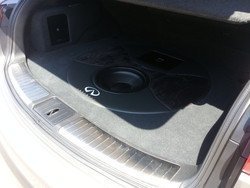
On an another note your set up is crazy, nice job. Do you use your trunk at all for practical storage or did you sacrifice that for the setup? I wouldn't want to sit any thing with any significant weight on top of the sub. I've had setups like this on previous cars, I usually put two 12" subs in the back of my cars, I love bass lol. I can't afford to sacrifice the space anymore for a setup like that. Even with the sub tucked away and covered with carpet, I would assume you don't want to put any real weight on it and risk damage.
 
Last edited:
Good question. My main goal was to keep full functionality (well except for losing the spare). I have a custom carpet piece that I place in the back when there's any chance of using it. I integrated a steel speaker grill with speaker cloth into the carpet over the sub. So I have full protection of the system plus I can carry literally anything in the back. I've had it full on two week driving trips already with no issues, including a couple of full luggage bags.

The mat is Lloyd® - Ultimat™ Custom Fit Cargo Mats

I'll take a shot of the carpet sometime and post to my stereo thread.
 
Got mine working now!
make sure you get a nice decent hdmi -> RCA converter (not a cable) and samsung dongle (haven't tried chrome cast)
and it is all set !!!!!!!
Thanks for all guys!
can't upload picture yet..... and i got a nice magnet holder for my cell phone too which doesn't take much space bought it from g market. the maker of the magnet holder is Steelie it's pretty neat.
google Steelie mount you will find it right away.
Thanks guys!
I need to unlock the aux video lock now!
 
Sorry if it has been mentioned already but a Kivic One will do the same. Small little unit and is able to airplay (mirror) to the screen.
 
I have the Naviks installed on my 12FX and works great with my iPhone 5/6. My Naviks model has rca input so I have an hdmi to rca bridge connected to iPhone hdmi cable. I'll send pix when I get back back home from Biz travel.
 
Back
Top