Hi all.
As some of you may know I did a similar mod to my FX over a year ago. I've gone through several iterations, lot's of trial and error, since (with lots more to come). I thought I'd share my perspectives on this and some info. I'm going to add some photo's of the interface setup to my own stereo build thread sometime in the next few days (need to take some shots specific to this and upload them). I'm also going to do a walkaround video and upload to Youtube and link here tomorrow. But for now here's some details to those with questions.
There's several approaches to accomplish this (from a source to car perspective)... a "wired or wireless" source via "analog or digital" interface or connection. You need to decide if your goal is a quick connection with low relative audio/video quality or if you desire a higher quality interface with more cost and complexity but with much better audio and video results.
Note: that one of our challenges today is that there are virtually no source units available that output composite video directly. Because of this a an HDMI converter is required. More below.
Note: The ability to bypass video while driving is not really the topic here either. That said just for full disclosure I picked up the bypass kit from Carkit company and installed it behind my head unit. I programmed my mirror's buttons to operate the bypass kits features. If you are interested check it out here: http://www.carkitcompany.com/infiniti-bypass-kits/g37-2010
Methodologies for integrating mobile media sources to your Infiniti
1. Your phone wired via converters to the car's analog inputs (RCA connections). This is what NOT the youtube video was showing. This is the simplest implementation.
Pros:
a) No fiddling with wifi/bluetooth to get your source talking to a "media hub".
b) No audio degradation due to compression to the hub.
c) Screen mirrors directly (ie what you see on the car's display is what the device is also displaying, if a phone). Much easier to control the unit (unlike when video shows on screen but only controls on source)
d) Works with little modification. Could realistically stuff all the required pieces into the center console easily.
Cons:
a) Audio quality is so-so. Frankly the interface sucks for quality audio playback.
b) Did I say the audio quality sucks?
2. Wireless to a hub/receiver that is then wired via splitters to RCA inputs (or maybe even digital, see below). This is what the video was showing.
Same as above except you add a media hub "receiver" that is supported by your source (your phone or tablet). This hub could be anything like the following: Google Chromecast (needs internet connectivity), Samsung Media Hub, a Airplay to an AppleTV, etc. The idea is source sends content wirelessly to the hub/device which outputs via HDMI to a converter and then into your car's inputs as above in number 1.
3.
Direct wire your source into car + audio processor via SPDIF + a bad ass stereo overhaul  https://www.infinitiscene.com/search/1/?q=19046-Santiago-s-sound-system-build-out-stealth-SQ-build
!
This is the route I took. Essentially I can switch between the vehicles head unit or my source which plays back digital via HDMI > Audio Processor (digital audio) and Car (video)
Pros:
a) Superior audio quality
b) Capable of 5.1 surround (assuming your processor is and you wire your system appropriately)
c) Good video quality (within the boundries of standard def/composite)
d) Lot's of flexibility in choices. You could, for example, have more than one source. For example; a fixed source like an installed media player with integrated storage and playback (directly wired into
digital source "1") AND a wireless source (your phone sending content to a hub receiver which is wired into
digital source "2") plus your vehicles stock head unit (wired into
analog source 1).
e) More cool factor
Cons:
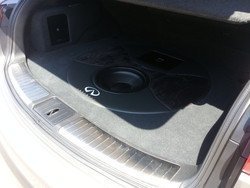
a) Expensive. We're really talking about a complete sound system overhaul here. With a good processor, amps, speakers and install you are talking several thousand +.
b) Requires some expertise up front but if done right will operate wonderfully.
Supplies
Many have covered what you'd need already with some links to Amazon and such. I'll just list what I've done here (with more details to follow at some point in my system thread).
What you need:
Your Source (generally a phone or media hub of some sort).
Signal splitters to get from your source into the vehicles AV system. Generally HDMI to RCA audio/video
Wiring (source device to HDMI cable, RCA cables, etc).
Here's how my gear is setup with multiple sources:
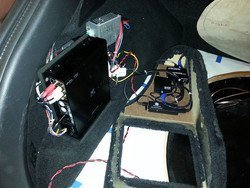
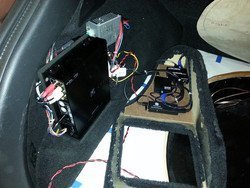
Source 1: Infiniti FX50s stock head unit connected via analog (tied into head unit's line level outputs BEFORE the Bose amp) to Alpine H800 Processor via wired in RCA. Essentially 4 channel in.
Source 2: Samsung Galaxy Note 2 connected via Digital SPDIF to Alpine H800 Processor's Digital 1 input (audio) and Infiniti's Video IN.
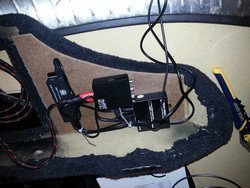
Samsung out via [MAXAH 2 meter MHL MicroUSB to HDMI adapter] > [J-Tech HDMI to HDMI/SDIF adapter] > [ViewHD HDMI to Composite adapter].
Source 3: Working on wireless via Google ChromeCast. This will require a slight revamp of the adapter setup.
Power: CarNetix CNX-P2140 Intelligent DC regulator. This provides timer controlled, remotely triggered (ie via my Viper alarms aux signal) 12v and 5v regulated power supply. All of the above adapters have had their 5v DC power cables powered via the CarNetix. The CarNetix can, for example, keep a car PC device (like a Raspberry PI, Google TV or other PC) powered on for some time after the vehicle is shut off (like while you are getting gas in your car) so it doesn't have to be booted every time you start the car. It can also power them on BEFORE you start the car when the alarm is turned off remotely.
Photos (more to come later)
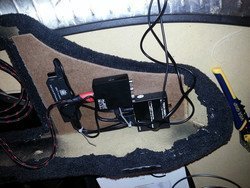
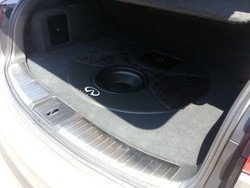
Here's the interface setup. Alpine H800 processor with the HDMI splitters and wiring. This is an early version using an Android stick PC controlled via Bluetooth cable. I now wire my Samsung Galaxy Note 2 in directly with it "floating" via a goose neck to the right of my dash/shifter. Much better setup.
---------- Post added at 11:08 PM ---------- Previous post was at 10:17 PM ----------
Will the Samsung hub power up with the cig lighter with the use of a micro USB car charger?
Tapa on Note III
It should. You'd definitely want to use a 2amp charger for it. You could probably just drop it into the center console. However you'll also need to find power for the converters to get it back into the system. They would also take 5v.