First Infiniti/Nissan

kahlilj

Member
Car
2006 FX35 AWD
Hey folks,
I recently bought a 2006 FX35 AWD after month of searching for the right SUV with the right features and at the right price. Hoping to learn as much ans share as much as I can.

Added pic:
View attachment 553219
 
Last edited:
I've had a device that allowed me to mirror my iPhone onto my stock screen, and now I made myself a custom iPad mini dash. Watch my vid.
iPad mini - Robert Rodriguez on Instagram: “#ipaddash #infinitifx35 #fx35 #customipad #fxing”
screen sharing - YouTube


Dude! That is sweet! Did you override the stock stereo? Or integrate with it like still utilize steering wheel controls?

I see you kept the stock screen by replacing the central front console storage bin. [emoji1474]
 
everything works the same. I just added the bluetooth to stock stereo and still able to use steering controls including changing songs.
 
everything works the same. I just added the bluetooth to stock stereo and still able to use steering controls including changing songs.

How is everything the same? Your stock stereo still connected too? If so then how do switch between the two sources?
 
Ok, So first I had to figure out where I wanted to put my iPad. It fit perfect where our stock display is now. Then I had to figure out where to put the stock display because i still need it for information on my car. I cut out and used bondo to create a nice seal with the stock display and center console. Next I had to figure out a way how to mount my iPad to my dash. I wanted it to look stock and found Soundman iPad Kits and Merch kit. Now the scary part. I had to do a lot of cutting and bondo to get this to look right and fit good on my dash. Once that is done I purchased GROM AUDIO BLUETOOTH STREAMING KIT which plugs into SAT on stock my stereo. It still has all the functions like:
  • Hands Free Bluetooth Car Kit for Select 2004-2013 Infiniti and NissanVehicles
  • Plug and play installation
  • Control your media from stereo or steering wheel using Bluetooth Wireless Audio Control (AVRCP)
  • Supports Bluetooth Music Streaming (A2DP) and Handsfree Calls (HFP)
  • Accept & reject phone calls, voice dial Bluetooth Audio streams directly from your phone to the stereo
  • iPod/iPhone/iPad Integration (cable sold separately)
  • Connect, play and charge iPod/iPhone/iPad Control with car stereo, steering wheel or iPod
  • For iPod functionality you will need the 5ft GROM Audio ISIPD5 or the 15ft GROM Audio ISIPD15iPod/iPhone Adapter
  • Fully compatible with GROM Audio's Free DashLinQ Android App for Simple and Safe Use of your Android Phone in Driving Mode
  • For Auxiliary Input with 5V USB charging you will need the GROM Audio C-35USB
Hope that answers everything.

 
Ok, So first I had to figure out where I wanted to put my iPad. It fit perfect where our stock display is now. Then I had to figure out where to put the stock display because i still need it for information on my car. I cut out and used bondo to create a nice seal with the stock display and center console. Next I had to figure out a way how to mount my iPad to my dash. I wanted it to look stock and found Soundman iPad Kits and Merch kit. Now the scary part. I had to do a lot of cutting and bondo to get this to look right and fit good on my dash. Once that is done I purchased GROM AUDIO BLUETOOTH STREAMING KIT which plugs into SAT on stock my stereo. It still has all the functions like:
  • Hands Free Bluetooth Car Kit for Select 2004-2013 Infiniti and NissanVehicles
  • Plug and play installation
  • Control your media from stereo or steering wheel using Bluetooth Wireless Audio Control (AVRCP)
  • Supports Bluetooth Music Streaming (A2DP) and Handsfree Calls (HFP)
  • Accept & reject phone calls, voice dial Bluetooth Audio streams directly from your phone to the stereo
  • iPod/iPhone/iPad Integration (cable sold separately)
  • Connect, play and charge iPod/iPhone/iPad Control with car stereo, steering wheel or iPod
  • For iPod functionality you will need the 5ft GROM Audio ISIPD5 or the 15ft GROM Audio ISIPD15iPod/iPhone Adapter
  • Fully compatible with GROM Audio's Free DashLinQ Android App for Simple and Safe Use of your Android Phone in Driving Mode
  • For Auxiliary Input with 5V USB charging you will need the GROM Audio C-35USB
Hope that answers everything.

Thank you. Did your car have factory Bluetooth and Nav?

Any pics of how/where you installed the various parts? The results look great!
 
I do have factory Bluetooth, but only worked for phone calls not music. I also have stock navigation, but I don’t use it because it sucks compared to most apps found on mobile devices. I’ll check if I have any pictures of the process, it’s been almost 2 years.
 
I do have factory Bluetooth, but only worked for phone calls not music. I also have stock navigation, but I don’t use it because it sucks compared to most apps found on mobile devices. I’ll check if I have any pictures of the process, it’s been almost 2 years.

Kool. Sooo what happened with your factory Bluetooth? Is it still active? Turned off? Removed?
 
I do have factory Bluetooth, but only worked for phone calls not music. I also have stock navigation, but I don’t use it because it sucks compared to most apps found on mobile devices. I’ll check if I have any pictures of the process, it’s been almost 2 years.

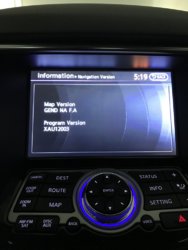
Did you check to see if your Nav version/maps needs updating? You can locate your version via Info via your display; deader advised the need to update about every 4-5 years, but I would think the updating needs to be sooner.
 

Attachments

  • Nav Version_2015 QX70.jpg
    Nav Version_2015 QX70.jpg
    145.9 KB · Views: 9
Back
Top