First Infiniti/Nissan

kahlilj

Member
Location
Pittsburgh
Car
2006 FX35 AWD
Hey folks,
I recently bought a 2006 FX35 AWD after month of searching for the right SUV with the right features and at the right price. Hoping to learn as much ans share as much as I can.

Added pic:
View attachment 553219
 
Last edited:
I've had a device that allowed me to mirror my iPhone onto my stock screen, and now I made myself a custom iPad mini dash. Watch my vid.
iPad mini - Robert Rodriguez on Instagram: “#ipaddash #infinitifx35 #fx35 #customipad #fxing”
screen sharing - YouTube


Dude! That is sweet! Did you override the stock stereo? Or integrate with it like still utilize steering wheel controls?

I see you kept the stock screen by replacing the central front console storage bin. [emoji1474]
 
Ok, So first I had to figure out where I wanted to put my iPad. It fit perfect where our stock display is now. Then I had to figure out where to put the stock display because i still need it for information on my car. I cut out and used bondo to create a nice seal with the stock display and center console. Next I had to figure out a way how to mount my iPad to my dash. I wanted it to look stock and found Soundman iPad Kits and Merch kit. Now the scary part. I had to do a lot of cutting and bondo to get this to look right and fit good on my dash. Once that is done I purchased GROM AUDIO BLUETOOTH STREAMING KIT which plugs into SAT on stock my stereo. It still has all the functions like:
  • Hands Free Bluetooth Car Kit for Select 2004-2013 Infiniti and NissanVehicles
  • Plug and play installation
  • Control your media from stereo or steering wheel using Bluetooth Wireless Audio Control (AVRCP)
  • Supports Bluetooth Music Streaming (A2DP) and Handsfree Calls (HFP)
  • Accept & reject phone calls, voice dial Bluetooth Audio streams directly from your phone to the stereo
  • iPod/iPhone/iPad Integration (cable sold separately)
  • Connect, play and charge iPod/iPhone/iPad Control with car stereo, steering wheel or iPod
  • For iPod functionality you will need the 5ft GROM Audio ISIPD5 or the 15ft GROM Audio ISIPD15iPod/iPhone Adapter
  • Fully compatible with GROM Audio's Free DashLinQ Android App for Simple and Safe Use of your Android Phone in Driving Mode
  • For Auxiliary Input with 5V USB charging you will need the GROM Audio C-35USB
Hope that answers everything.

 
Ok, So first I had to figure out where I wanted to put my iPad. It fit perfect where our stock display is now. Then I had to figure out where to put the stock display because i still need it for information on my car. I cut out and used bondo to create a nice seal with the stock display and center console. Next I had to figure out a way how to mount my iPad to my dash. I wanted it to look stock and found Soundman iPad Kits and Merch kit. Now the scary part. I had to do a lot of cutting and bondo to get this to look right and fit good on my dash. Once that is done I purchased GROM AUDIO BLUETOOTH STREAMING KIT which plugs into SAT on stock my stereo. It still has all the functions like:
  • Hands Free Bluetooth Car Kit for Select 2004-2013 Infiniti and NissanVehicles
  • Plug and play installation
  • Control your media from stereo or steering wheel using Bluetooth Wireless Audio Control (AVRCP)
  • Supports Bluetooth Music Streaming (A2DP) and Handsfree Calls (HFP)
  • Accept & reject phone calls, voice dial Bluetooth Audio streams directly from your phone to the stereo
  • iPod/iPhone/iPad Integration (cable sold separately)
  • Connect, play and charge iPod/iPhone/iPad Control with car stereo, steering wheel or iPod
  • For iPod functionality you will need the 5ft GROM Audio ISIPD5 or the 15ft GROM Audio ISIPD15iPod/iPhone Adapter
  • Fully compatible with GROM Audio's Free DashLinQ Android App for Simple and Safe Use of your Android Phone in Driving Mode
  • For Auxiliary Input with 5V USB charging you will need the GROM Audio C-35USB
Hope that answers everything.

Thank you. Did your car have factory Bluetooth and Nav?

Any pics of how/where you installed the various parts? The results look great!
 
I do have factory Bluetooth, but only worked for phone calls not music. I also have stock navigation, but I don’t use it because it sucks compared to most apps found on mobile devices. I’ll check if I have any pictures of the process, it’s been almost 2 years.
 
I do have factory Bluetooth, but only worked for phone calls not music. I also have stock navigation, but I don’t use it because it sucks compared to most apps found on mobile devices. I’ll check if I have any pictures of the process, it’s been almost 2 years.

Kool. Sooo what happened with your factory Bluetooth? Is it still active? Turned off? Removed?
 
I do have factory Bluetooth, but only worked for phone calls not music. I also have stock navigation, but I don’t use it because it sucks compared to most apps found on mobile devices. I’ll check if I have any pictures of the process, it’s been almost 2 years.

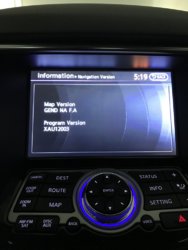
Did you check to see if your Nav version/maps needs updating? You can locate your version via Info via your display; deader advised the need to update about every 4-5 years, but I would think the updating needs to be sooner.
 

Attachments

  • Nav Version_2015 QX70.jpg
    Nav Version_2015 QX70.jpg
    145.9 KB · Views: 9
Back
Top