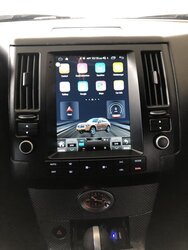
Ebay "Tesla" Style Center Dash Screen Console

I just ordered this for my 2007 from KiriNavi and it’s supposed to arrive tomorrow.
I saw that there is an option to insert a SIM card into a dongle. Wouldn’t that make things a lot simpler for constant internet connectivity?

Zlink CarPlay USB connection plus internet only:

Go to Iphone Settings/General/CarPlay then you should see zjinnova-blablabla... already.

Wifi in the head unit should be OFF

Hotspot and tethering should be all off (Go to: settings/wifi/more/hotspot &t tethering) Make sure all is off.

Turn ON wifi and hotspot in your IPhone, wifi should be ON but not connected. Bluetooth should be OFF. When your IPhone ask you what connection you want, always choose USB only.

Open Zlink (CarPlay) app. IPhone should have lightning cable connected already, then plug and unplug from USB port a couple of times (maybe more) until you hear 2 consecutive connected sounds. I noticed that if you don’t unplug it completely, it will connect faster, just wait for the connected sounds.

After CarPlay is connected. Go to the head unit settings and turn ON and OFF wifi a few times. If you don’t see your IPhone on the networks list then try turning ON and OFF hotspot in your IPhone a couple of times until you see your IPhone in the networks list in the head unit ( it will connect automatically). This last step is just to have internet from your phone for all the other apps in the head unit besides CarPlay.

I hope this helps. And yes, I couldn’t fit the bottom clips but now that I know what to trim in the dash to make it fit perfectly I have no complaints. I don’t like using Bluetooth because I have T-Mobile and my service is garbage. When I upgrade to Verizon, I hope to have better Bluetooth connection but for now I like USB connection because it is solid.
 
Guess you didn't see others have problems with kirinavi. Hope you don't. Good luck.

yes I saw yours and others posts. But some seemed to be satisfied so it seemed mixed, not necessarily all bad. Ultimately I was swayed by this youtuber https://www.youtube.com/channel/UC1dZLaNUVlZQiBoo63FqeKw
But after buying I saw Kiri Navi is linking his video in their listings so he may or may not have been sponsored.
Besides Kirinavi there didn’t seem to be any other retailer consistently being mentioned.
I ended up Whatsapping them directly and I asked them which unit should I purchase for my 2007 and they suggested this one:

US $399.00 50% Off | KiriNavi 10.4" 1 Din Android 10.0 Car Radio Automotivo Head Unit For Infiniti FX FX35 FX45 Car DVD Player Auto GPS Navigation 4G
US $399.0 50% OFF|KiriNavi 10.4

It was actually about $100 cheaper than the one I was considering but they said this was newer. It’s Android 10.0 and the other listing was Android 9.0. It does have a smaller screen but I don’t mind that and even prefer having some analog buttons. Anyways I felt that maybe with this newer Android 10.0 unit they worked out the kinks. So I hope. I will attempt to install it in a few days and I will try my best to document on this thread here.
 
im having the same issue with static noise. Can you share which RCA cable you used and also how you connected the wire?

my unit is mostly set up for my 2007 fx35 and it’s mostly working well. But 1) I have the static noise, 2) I haven’t figured out how to connect with my backup camera (previous owner installed an aftermarket Navi system and they spliced a bunch of the wires. Argh), 3) the 4G sucks, maybe because I’m using a Google Fi sim and I’m roaming. If I use WiFi and tether to my iPhone it works well.

Update:

I connected a wire from RCAs to one screw on the back of the head unit. The static noise is gone.

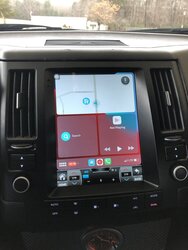
Another tip related to CarPlay connection. I noticed that if I use Bluetooth for CarPlay I lose connection sometimes so I rather use usb connection. The fastest way to connect to CarPlay by usb on the first try is by turning on wifi and hotspot only, don’t turn Bluetooth on. Then, connect your iPhone with USB port, the iPhone lightning cable should be already connected to your Iphone, then connect and disconnect from USB port 2-3 times until you hear the connected sound twice in a row while connected and Boom! You are connected without interruptions for the whole road trip lol. Finally, turn on and off the wifi on the android head unit until you see your iPhone in the networks list and it will connect automatically. Now you should have solid connection for CarPlay and also for all the other apps on the android head unit like YouTube and Spotify (with album art and all).

CarPlay lets you talk to Siri for a total hands free experience and safe driving while texting or calling, but I don’t like Spotify on CarPlay because I can’t see album art or lyrics. I like using the Spotify app on the head unit because it lets me navigate thru Spotify completely. I split the screen and I have Waze on top and Spotify on bottom. However, if I’m going to be driving CarPlay is safer.

Anyways, I’m really enjoying this head unit, I have solid connection all the time by USB.
 
yes I saw yours and others posts. But some seemed to be satisfied so it seemed mixed, not necessarily all bad. Ultimately I was swayed by this youtuber https://www.youtube.com/channel/UC1dZLaNUVlZQiBoo63FqeKw
But after buying I saw Kiri Navi is linking his video in their listings so he may or may not have been sponsored.
Besides Kirinavi there didn’t seem to be any other retailer consistently being mentioned.
I ended up Whatsapping them directly and I asked them which unit should I purchase for my 2007 and they suggested this one:

US $399.00 50% Off | KiriNavi 10.4" 1 Din Android 10.0 Car Radio Automotivo Head Unit For Infiniti FX FX35 FX45 Car DVD Player Auto GPS Navigation 4G
US $399.0 50% OFF|KiriNavi 10.4

It was actually about $100 cheaper than the one I was considering but they said this was newer. It’s Android 10.0 and the other listing was Android 9.0. It does have a smaller screen but I don’t mind that and even prefer having some analog buttons. Anyways I felt that maybe with this newer Android 10.0 unit they worked out the kinks. So I hope. I will attempt to install it in a few days and I will try my best to document on this thread here.

That's a good price. Paid $600 for mine minus shipping. Kirinavi sent it ultra-fast because they f'd up the first shipment, so I got it in less than 2 weeks. Sounds like the same one I got but for a 03-05. Perhaps they took my advice when I wrote that it's not worth $650, but more like $400. Son of a bitch.
 
the cheapest one is $399 but I got the one with more memory and comes with front and back camera and I paid $549.

That's a good price. Paid $600 for mine minus shipping. Kirinavi sent it ultra-fast because they f'd up the first shipment, so I got it in less than 2 weeks. Sounds like the same one I got but for a 03-05. Perhaps they took my advice when I wrote that it's not worth $650, but more like $400. Son of a bitch.
 
Ah. I was offered their rear view camera but damn that thing is too cheap. I didn't think I could trust it so I bought one from Crutchfield. Not installed yet.
 
the cheapest one is $399 but I got the one with more memory and comes with front and back camera and I paid $549.

So I took the plunge and bought a unit. I got this one from Aliexpress for about $494 Android 10.0, 8GB Ram 64GB Memory, Carplay & Rearview camera...

US $488.0 |Xdcradio 10.4

The installation has not been easy. I started a few days ago. There were no instructions and some of the connectors didn't match up to the original wiring. It was easy removing the old HU and installing this one. But my attempts to get support were not good initially. So the first time I connected everything, the knobs and buttons didn't work. Neither did my HVAC. A few days later after watching a few youtube videos and writeups here and on another site, I realized one connector was not plugged in the right port. I fixed that and now the buttons and knobs work, but still no HVAC. I'm pretty confident that I have to make that disconnection behind the glovebox as I've seen mentioned a few other times.

One youtube video that was pretty useful was this one:

....3368 is the correct code for the "tools" icon. Finally getting some feedback from the seller.
Kirinavi rep said they're gonna send another usb plug and a new mic. Alrighty then. Got some more issues to work out but things are starting to look up.

Shout out to @onthemove for sharing the password to unlock some of the android settings (3368). I was able to reconfigure the time format and some other features. Still can't figure out the temp format though. I thought I changed it to farenheit, but it keeps displaying celsius.

Finally today I heard back from the suppliers tech support. Even though it was not Kirinav on Aliexpress I bought my unit from, clearly it's the same company. After a third email (the first was in all Chinese, the 2nd was part English, but without enough detail for me), they finally sent installation instructions in English which I'll upload on here. The email domain from the support people were all Kirinav. Soooo...

Anyway I'm not in an enclosed space and protected from the cold right now so I won't be able to get to this until later, but I think I have enough info to make everything run right. Oh one other thing is I don't see where the factory connections are for the rear camera. I have a factory one, but I don't know where the factory connectors are and therefore which one from the Tesla radio connect to it. Any ideas?

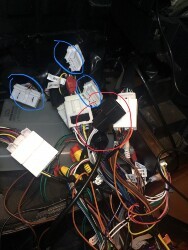
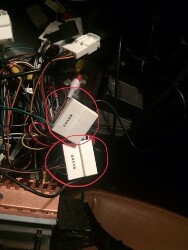
These are the connectors with no home (blue encircled are factory, red is Tesla):

tesla-connectors-jpg.jpg

tesla-connectors2-jpg.jpg

So the remaining issues I have are:
  • No HVAC control (thinking I need to access that metal box behind the glovebox & disconnect the factory connector?)
  • No Steering wheel control
  • Don't see the (factory) connection for rearview camera
Suggestions?
 
Last edited:
So after watching this video
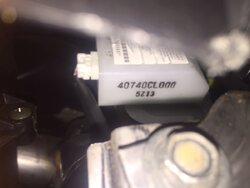
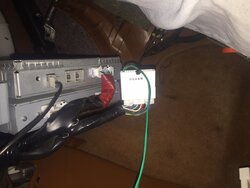
and accessing my dash behind the glove box, I eventually located the right module and disconnected it... but not before disconnecting the wrong device :( It is NOT this one. lol!
IMG_1352.JPG

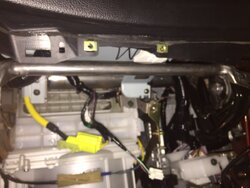
This is the correct box with the 36 pin cable disconnected.
IMG_1353.JPG
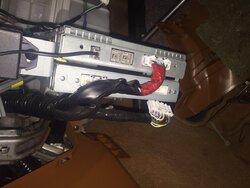
So one of my 2 Tesla radio connectors connects to the factory harness as shown:
IMG_1355.JPG

Now I see the HVAC displayed with values and it reflects changes from using the touchscreen or buttons, but it still is not blowing any hot or cold air! SMH

Now my issues are down to these 3 items:
  1. No forced air (hot or cold) from HVAC
  2. No steering wheel controls
  3. No rear view camera
 
So after watching this video
and accessing my dash behind the glove box, I eventually located the right module and disconnected it... but not before disconnecting the wrong device :( It is NOT this one. lol!
View attachment 606119

This is the correct box with the 36 pin cable disconnected.
View attachment 606120
So one of my 2 Tesla radio connectors connects to the factory harness as shown:
View attachment 606121

Now I see the HVAC displayed with values and it reflects changes from using the touchscreen or buttons, but it still is not blowing any hot or cold air! SMH

Now my issues are down to these 3 items:
  1. No forced air (hot or cold) from HVAC
  2. No steering wheel controls
  3. No rear view camera

are you wired up correctly with the blower motor?
 
are you wired up correctly with the blower motor?
I think so. I haven't knowingly disconnected or changed the motor wiring. I would have thought it would be contained in the same wiring as the one I disconnected and attached to the Tesla radio wiring.... Do you know which wiring is for the blower motor?
 
are you wired up correctly with the blower motor?
I think so. I haven't knowingly disconnected or changed the motor wiring. I would have thought it would be contained in the same wiring as the one I disconnected and attached to the Tesla radio wiring.... Do you know which wiring is for the blower motor?

Well turns out one of the connectors to the original HVAC box that was attached to the factory HU was not connected and should have been. It is one of the connectors i showed in a pic in my earlier post. https://www.infinitiscene.com/attachments/tesla-connectors-jpg-jpg.606117/
I rechecked all its cables and saw there was one missing and I reconnected and voila! forced air! Thanks @trentfromrid for the nudge. I was contemplating swapping back the original HU if I didn't figure this out soon because I'm planning to make a long drive over the holidays and it's freezing cold and snowing up here in the north. lol

So now it's down to:
  • No steering wheel controls
  • No rear view cam. I still can not locate a yellow composite cable on the factory wiring harness. DOES ANYONE KNOW WHERE THAT CABLE/CONNECTOR IS??
Fortunately these are not deal breakers nor detract from driving safely/comfortably, but I still expect them to work.
 
Glad to hear you figured out the wire to the glove box issue. I was stuck on that awhile too.
I too cannot find the cable from the factory rear camera to connect to the HU. I’ll share with you if I figure it out. Also I have a faint static noise that I can’t figure out. Someone said I had to set a ground wire but don’t know how.
 
Glad to hear you figured out the wire to the glove box issue. I was stuck on that awhile too.
I too cannot find the cable from the factory rear camera to connect to the HU. I’ll share with you if I figure it out. Also I have a faint static noise that I can’t figure out. Someone said I had to set a ground wire but don’t know how.

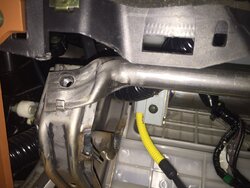
Thanks Stan, me too! What wasn't clear from any instructions or vids I saw was accessing that metal box with the 36 pin connector required removing this long, silver, metal bar:
IMG_1362.JPG

There are two 10mm, screws on each end that need to be removed.
IMG_1361.JPG

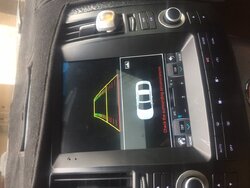
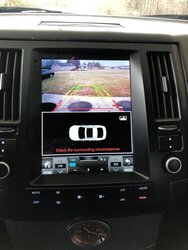
Also just to be clear, this is the image I'm getting for my rear view. It's a still not a camera view.
IMG_1363.JPG
 
Well turns out one of the connectors to the original HVAC box that was attached to the factory HU was not connected and should have been. It is one of the connectors i showed in a pic in my earlier post. https://www.infinitiscene.com/attachments/tesla-connectors-jpg-jpg.606117/
I rechecked all its cables and saw there was one missing and I reconnected and voila! forced air! Thanks @trentfromrid for the nudge. I was contemplating swapping back the original HU if I didn't figure this out soon because I'm planning to make a long drive over the holidays and it's freezing cold and snowing up here in the north. lol

So now it's down to:
  • No steering wheel controls
  • No rear view cam. I still can not locate a yellow composite cable on the factory wiring harness. DOES ANYONE KNOW WHERE THAT CABLE/CONNECTOR IS??
Fortunately these are not deal breakers nor detract from driving safely/comfortably, but I still expect them to work.

Iirc, the steering wheel controls are gonna be under one of the icons but I cannot remember which one. It's like when adding an amplifier, you've got to acknowledge it via the tablet. You just have to turn that function on so to speak. I can't help with the cam.
 
Touch the settings icon then the settings icon again, the one to the left of the tools icon. Steering controls are in there.
 
Touch the settings icon then the settings icon again, the one to the left of the tools icon. Steering controls are in there.
Thanks I think I had seen that menu before, if it's the same one it was looking for me to press the "learning button". Have no clue what that button is. I tried pressing the icon for the volume up (+) on the touchscreen. nothing happened. Then I pressed the volume up button on my steering wheel. Still nothing. sooo....
 
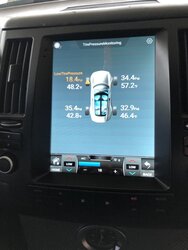
Just received my Android unit yesterday and installed it this morning. Mine was an Asvegen brand with Android 10 and Carplay built in. I added the external TPMS and already had a backup cam installed from my previous HU Upgrade. My camera is the same as the cheap one they sent so I left mine in. I replaced the OEM camera a while back (a pain the a$$ - for real). Everything works well and sounds good (i upgraded the speakers a while back as well). No real issues with the install at all. Carplay connects with no issues, TPMS monitor works no issues, as well as the back up camera. I am definitely satisfied. Shipped to me in about 7 days for a total cost of $468 for the android unit and about $30 bucks for the external sensors. Feels like a new SUV!! :tup:IMG-0692.jpg IMG-0693.jpg IMG-0696.jpg IMG-0697.jpg
 
Just received my Android unit yesterday and installed it this morning. Mine was an Asvegen brand with Android 10 and Carplay built in. I added the external TPMS and already had a backup cam installed from my previous HU Upgrade. My camera is the same as the cheap one they sent so I left mine in. I replaced the OEM camera a while back (a pain the a$$ - for real). Everything works well and sounds good (i upgraded the speakers a while back as well). No real issues with the install at all. Carplay connects with no issues, TPMS monitor works no issues, as well as the back up camera. I am definitely satisfied. Shipped to me in about 7 days for a total cost of $468 for the android unit and about $30 bucks for the external sensors. Feels like a new SUV!!

Thanks for sharing your pics. Can you share more about your FX? year? does it have the sport package?...

I've got everything working on mine now except the factory rear cam. Did you have to modify any connections to get yours working?
 
Thanks for sharing your pics. Can you share more about your FX? year? does it have the sport package?...

I've got everything working on mine now except the factory rear cam. Did you have to modify any connections to get yours working?
Yes I had already replaced the factory camera with an aftermarket camera. I had to remove the rear hatch cover to get to the internals. Not a hard job just time consuming and tedious in some spots. Also they used silicone on some of the parts so it’s sticky. Goo Gone helped a lot lol. Then I just ran the wires to the dash. And I tapped into the brake lights in the rear.
 
Back
Top