Accessing/Hacking the FX computer/Mainframe

  • Thread starter Thread starter FXPS
  • Start date Start date
F

FXPS

Guest
Okay so today me and some G's came to a discovery while we were messing around with our cars, While doing this i accidentally was holding the volume button and the setting button while turning the volume thinking i was raising the volume. Below i listed everything in the easiest format i can. Now i don't know if this will work on the older FX's as i have not tried it but hopefully if someone reads this they can check it out on their 08 and below. The benefits of this are on the 09+ if you actually loose your line up on the screen especially if you have rims you can fix it yourself by just using the dial and the up and down buttons. Also you can update your navigation yourself and on the plus side if you want to drive the car with the front or the back camera on you can do that as well by using this DIY now i have not been able to do that yet but i will get to it. You basically have the power over your car on your finger tips on any option you'd like you can also view and run diagnostics on your FX with this, which is the first option you get once you do this.

Plus if you don't trust your mechanic or your dealer you can actually check and make sure if they did what they promised to do :)


the car does not have to be on as long as its on the ac position it will work.
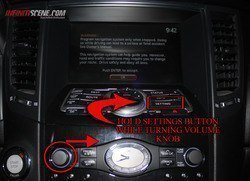
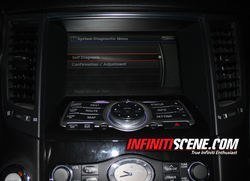
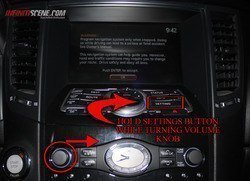
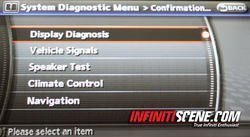
while holding the "settings" button turn the volume button to the right until you see the menu as it show's on picture (2)

IMG_2937.jpg

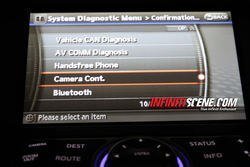
Here you can see the self diagnostic menu where you can run your own diagnostics with all the main frame options.

picture (2)
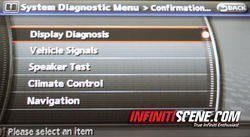
IMG_2940.jpg

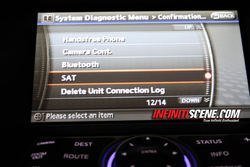
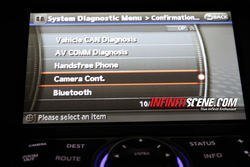
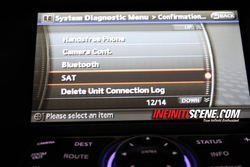
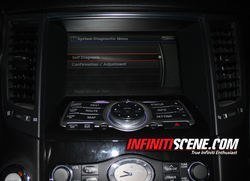
Here you have all your options from viewing all your "diagnostics" to "camera" & "i pod connectivity" options.

(Picture 3)


IMG_2946.jpg

IMG_2947.jpg

IMG_2948.jpg

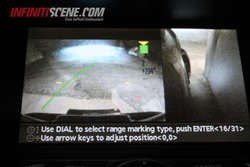
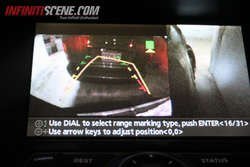
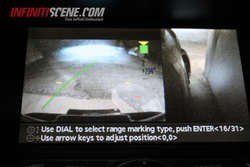
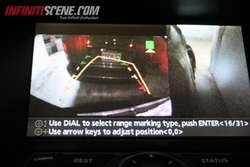
In these pictures you can see the control to fix your camera lines. If you recently got rims or dropped your car you might have to fix this so instead of paying the dealer $$$ you can do it yourself in an easy three steps going to the options and using the dial to fix the lines. (Picture 4)

picture(4)

IMG_2933.jpg

IMG_2932.jpg


comments welcome :) :tup:
 

Attachments

  • IMG_2937.jpg
    IMG_2937.jpg
    115.6 KB · Views: 341
  • IMG_2940.jpg
    IMG_2940.jpg
    96 KB · Views: 263
  • IMG_2946.jpg
    IMG_2946.jpg
    125.4 KB · Views: 293
  • IMG_2947.jpg
    IMG_2947.jpg
    99.3 KB · Views: 300
  • IMG_2948.jpg
    IMG_2948.jpg
    100.3 KB · Views: 228
  • IMG_2933.jpg
    IMG_2933.jpg
    103.2 KB · Views: 185
  • IMG_2932.jpg
    IMG_2932.jpg
    83.7 KB · Views: 180
Do you think this gonna work on 05 FX????:wub:

---------- Post added at 10:11 PM ---------- Previous post was at 10:09 PM ----------

I'll check this out tomorrow.lol
 
Do you think this gonna work on 05 FX????:wub:

---------- Post added at 10:11 PM ---------- Previous post was at 10:09 PM ----------

I'll check this out tomorrow.lol


i dont know but it takes 30 seconds to try it :) i would love to know if it does
 
Good find! I've heard of this before, but never tried it. Pretty sure the 1st gen can do it, but I don't remember where I read it.

Edit: From the Org http://www.infinitifx.org/viewtopic.php?t=286
It's fairly well known that you can access a number of "secret" menus on the FX if you have the tech package. These menus are mostly diagnostic in nature and can be accessed with this technique:

1. Turn the ignition to "ON" position (or start the car).
2. Turn the audio system off.
3. While pressing the "MUTE/II" button, turn the volume control dial clockwise or counterclockwise for 30 clicks or more. (When the self-diagnosis mode is started, a short beep will be heard.)
4. To shift from a current screen to a previous screen, press the "PREV" button.
5. To access one more layer of additional menus/options, perform step 3 again.

The service manuals do a fairly decent job of explaining each function.

While skimming through the manual, I came across a secret test mode that I have not seen discussed before so I'll share it now (don't get too excited, the neatest thing about this is that it is a secret mode -- what it actually does is rather boring. View attachment 211834)

A/C and AV Switch Self-Diagnosis Function

Description
It can check ON/OFF operation of each switch in the A/C and AV switch and diagnose the input signals to the steering switch (audio).

Starting the Self-diagnosis Mode
1. Turn ignition switch from OFF to ACC.
2. Within 10 seconds press and hold the switches “MUTE/II ” and “PREV” simultaneously for 3 seconds.

Then the self-diagnosis operates.

Exiting the Self-diagnosis Mode
- Turn ignition switch OFF. Then the self-diagnosis ends.

Diagnosis Function
- It can illuminate all the indicators (LED) in the A/C and AV switch.
- It can check for continuity of the switches by sounding the buzzer when the A/C and AV switch is pressed.
- It can check for continuity of harness between A/C and AV switch and steering switch (audio).
 
Last edited:
I really doubt anything important is so easily accessible from the UI. Not to say the backup cameras aren't important, but it's not like you can erase your ECU from the dash or anything. In general, "diagnose" means "to identify", which implies that the option will simply show you information rather than allowing you to alter any parameters. I'm totally guessing here though so if you aren't comfortable checking it out, definitely don't do it.
 
i just saw one on myg37.com for the g's never been on the .org before

---------- Post added at 12:22 AM ---------- Previous post was at 12:20 AM ----------

and im afraid illmess something up if i go into the diagnosis or something complicated like that without properly knowing what to do.


oh and stu thanks for looking up the .org link :-)))))
 
The diagnostic menu is also on the 1st gen FX but nothing too exciting from my recollection, I have not touched it a very long time.
 
i just saw one on myg37.com for the g's never been on the .org before

---------- Post added at 12:22 AM ---------- Previous post was at 12:20 AM ----------

and im afraid illmess something up if i go into the diagnosis or something complicated like that without properly knowing what to do.


oh and stu thanks for looking up the .org link :-)))))
No problem, I was getting worried that I might not find it.
 
I'm not afraid to check out the CAN interface on mine. I'll do it!

Thanks for the info. So this means I can update the navi myself. And no need for any wire cutting to have the around view monitor on all the time while driving.
 
So this means I can update the navi myself. And no need for any wire cutting to have the around view monitor on all the time while driving.

Is this true?

---------- Post added at 09:52 AM ---------- Previous post was at 09:46 AM ----------

Also, aaron, did you have another thread somewhere with this? maybe in DIY or something? I thought I remembered something similar from you also but not sure what it was about compared to this.

How easy is it to adjust the camera lines? don't want to screw it up.

Anybody been able to do the nav (maybe download free somewhere?) and the forward camera settings maybe?
 
I also would like to hear about those questions from Tyson:

Whats the most actual FW/Navi software, how much would it be to upgrade it with the official dealer and how would I get the software?

Do you mean "camera always on" by staying in the "secret menu" where you adjust the cams, or is there a hidden function that allows you to do this?
 
That is something I have never heard ..... That is it..... Doing it the very first thing in the morning

---------- Post added 06-16-2013 at 09:14 AM ---------- Previous post was 06-15-2013 at 10:42 PM ----------

Can you be more specific of how to??? I tried it today on my 09 FX35 Canada but nothing happened except the volume gone up.
 
On 1st generation FX, just push the mute/pause button while turning the volume knob, it is in the owners manual if I am not mistaken.
As some folks said, there is nothing of big deal in it, just some diagnostics related mainly to navigation and audio system, no erase / clear capabilities or such.


Sent from my iPad
 
Back
Top