F
FXPS
Guest
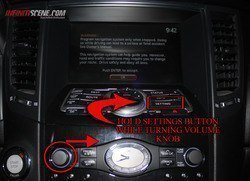
Okay so today me and some G's came to a discovery while we were messing around with our cars, While doing this i accidentally was holding the volume button and the setting button while turning the volume thinking i was raising the volume. Below i listed everything in the easiest format i can. Now i don't know if this will work on the older FX's as i have not tried it but hopefully if someone reads this they can check it out on their 08 and below. The benefits of this are on the 09+ if you actually loose your line up on the screen especially if you have rims you can fix it yourself by just using the dial and the up and down buttons. Also you can update your navigation yourself and on the plus side if you want to drive the car with the front or the back camera on you can do that as well by using this DIY now i have not been able to do that yet but i will get to it. You basically have the power over your car on your finger tips on any option you'd like you can also view and run diagnostics on your FX with this, which is the first option you get once you do this.
Plus if you don't trust your mechanic or your dealer you can actually check and make sure if they did what they promised to do
the car does not have to be on as long as its on the ac position it will work.
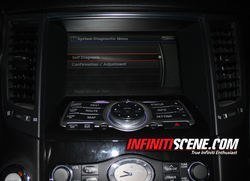
while holding the "settings" button turn the volume button to the right until you see the menu as it show's on picture (2)
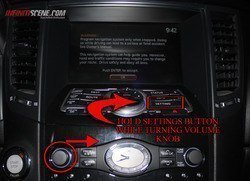
Here you can see the self diagnostic menu where you can run your own diagnostics with all the main frame options.
picture (2)
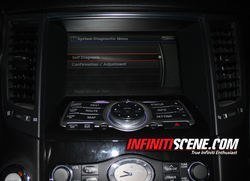
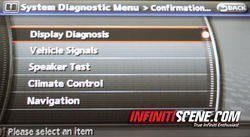
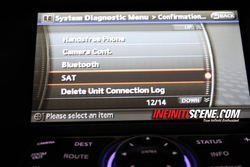
Here you have all your options from viewing all your "diagnostics" to "camera" & "i pod connectivity" options.
(Picture 3)
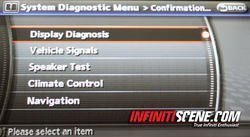
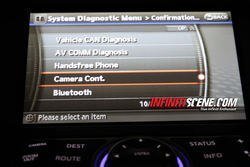
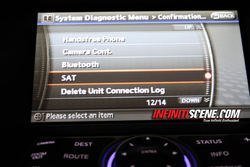
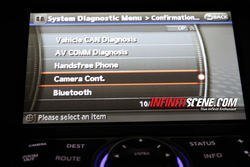
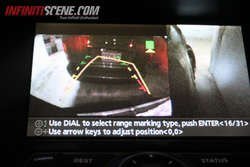
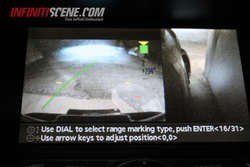
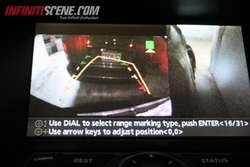
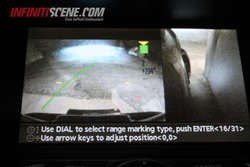
In these pictures you can see the control to fix your camera lines. If you recently got rims or dropped your car you might have to fix this so instead of paying the dealer $$$ you can do it yourself in an easy three steps going to the options and using the dial to fix the lines. (Picture 4)
picture(4)
comments welcome
Plus if you don't trust your mechanic or your dealer you can actually check and make sure if they did what they promised to do
the car does not have to be on as long as its on the ac position it will work.
while holding the "settings" button turn the volume button to the right until you see the menu as it show's on picture (2)
Here you can see the self diagnostic menu where you can run your own diagnostics with all the main frame options.
picture (2)
Here you have all your options from viewing all your "diagnostics" to "camera" & "i pod connectivity" options.
(Picture 3)
In these pictures you can see the control to fix your camera lines. If you recently got rims or dropped your car you might have to fix this so instead of paying the dealer $$$ you can do it yourself in an easy three steps going to the options and using the dial to fix the lines. (Picture 4)
picture(4)
comments welcome