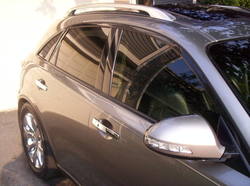
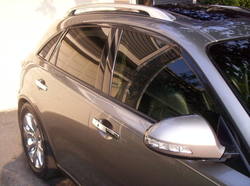
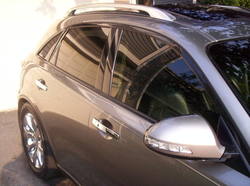
yup, I have the ones from ebay and I get a lot of compliments on them. Everyone always think that they are oem.
I'm also a little iffy about doing big projects like that myself.
I liked those too but when I saw what Turbocad6 did, no comparison.

yup, I have the ones from ebay and I get a lot of compliments on them. Everyone always think that they are oem.
I'm also a little iffy about doing big projects like that myself.
I do get the mickey mouse comment, I don't like the way those look either, def don't look factory & I wanted something that does look factory. I winded up fiting a S550 signal light to the fx mirror & it works out well. I have a pdf around somewhere for a template for this cut if you wanted to attempt this, the cutting is tedious on an already painted cover, but as you see it can be done. for a perfect fit I would do the cuts & finish the opening to perfect & then paint the cover, but even cutting an existing cover like this isn't bad results:


YouTube - Infiniti FX custom LED mirror covers
 Do you think he can do this to our FX. What do you think guys...
I do get the mickey mouse comment, I don't like the way those look either, def don't look factory & I wanted something that does look factory. I winded up fiting a S550 signal light to the fx mirror & it works out well. I have a pdf around somewhere for a template for this cut if you wanted to attempt this, the cutting is tedious on an already painted cover, but as you see it can be done. for a perfect fit I would do the cuts & finish the opening to perfect & then paint the cover, but even cutting an existing cover like this isn't bad results:
YouTube - Infiniti FX custom LED mirror covers
hey, i found the pdf. just print it out, transfer it to a vinyl contact paper or similar, then apply it to the mirror cover... the line up will become obvious when you do it, basically it goes to the outer edge & centered up & down of the flat area. try not to stretch it too much, there is a slight amount of stretching required as the mirror is not totally flat, just touch the template down all through the center first, then what ever minor stretching needs to take place should be shared between the top & bottom, if you just stretched the top or just the bottom then it will warp into like a smiley face type shape, try to keep you top & bottom lines straight. do not cut the opening out until after the template is applied to the mirror cover, then, xacto knife the opening out & cut inside the line, then file & sand out to the edge of your line. if it's done carefully enough you won't even need to repaint the mirror covers, just touch up the edge & that's it...
if when you print it tells you some cropping will occur then let it, don't allow it to resize to fit the page or you'll throw the scale off. also, even though I've done my last install of these with this very template, PLEASE double check the sizing before cutting your mirror cover, better to check twice & cut once rather than screwing it up
after you get the covers cut & the lights mounted, then the mirror housing needs to be cut too for clearance, I don't have a template for that but you'll have the modded cover as a guide...
good luck with it, I'm happy to share it & help others do this...

the new ebay ones look pretty similar to your guys' setup dont ya think?no offense the ebay ones look bad IMO....