ACC, Batt & Ground wires on HU

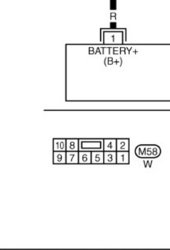
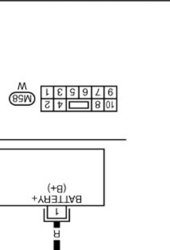
Did you try a voltmeter at the other pins? Could it be that the pins are mislabeled on the diagram that was posted? Reason I ask is because the 2005 FX35 service manual shows the plug in a different orientation that has the middle blank spot at the top. I think that diagram might be showing the pinouts on the radio side and not the harness side. Here are a couple of screenshots I took with both orientations. Hope it helps!

Service manual orientation
fx35 radio schem - Copy.jpg

Rotated to match the orientation posted
fx35 radio schem - Copy.jpg
 
Last edited:
Thanks for replying Mole. I tried a couple of other pins, but did not think it could be flipped as you've shown. I'll try that today and let you know what happened. Hopefully this is what the issue is. :)
 
Did you try a voltmeter at the other pins? Could it be that the pins are mislabeled on the diagram that was posted? Reason I ask is because the 2005 FX35 service manual shows the plug in a different orientation that has the middle blank spot at the top. I think that diagram might be showing the pinouts on the radio side and not the harness side. Here are a couple of screenshots I took with both orientations. Hope it helps!

Service manual orientation
View attachment 603388

Rotated to match the orientation posted
View attachment 603387

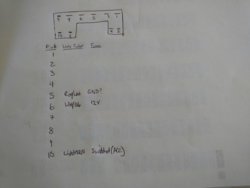
Thanks. That's exactly what the problem was I was looking at the pins in the wrong orientation, but mine also don't appear to exactly match the pin assignments. I measured voltage across what should be the 12V constant & ground and also to switched ign and ground, but could never get 12V with ignition key on or off. I tried other pins and finally located the ground to be on pin 5. I wrote the pinouts for my harness only for those 3.

FX35 Radio Rear Harness pinouts RSZ2.jpg


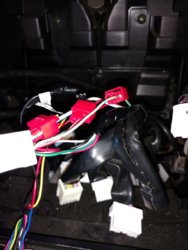
I also took a pic showing the 3 wires I tapped into. If you look carefully you will see these 3 wires (wht/ blu, lt grn & red/wht) are also not included in a second bundling of the other wires going to the 10 pin connector. As if they were routed from another source?
  • 12V+ (BATT or constant) - white with blue stripe
  • ACC (switched ign) - light green
  • Ground - red with white stripe
FX35 Radio rear harness wiring taps RSZ2.jpg

I hope this helps others if they come across this.


Now part 2: Getting the MB (Media Bridge) operational:
So after making those connections I had to reinstall the radio to see if the MB works. It did not. :( Now my dilemma is having to remove the radio once again and checking my connections to see if anything loosened or disconnected when I reinstalled the radio
 
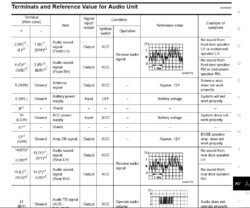
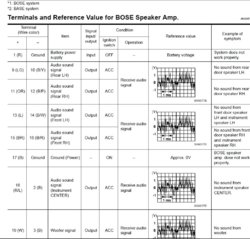
^Helpful info there. Ok I had a chance to look more at the fsm. Looks like the pinouts on the fsm are on the radio side and not the harness side so your handwritten diagram of the harness above does match.

Below are the wiring colors that I found in the fsm that might help to solve the issue. Looks like some of the wires might be mixed up.


*1: BOSE
*2: Base
2005 FX35 wire colors.jpg

2005 FX35 wire colors b.jpg
 
^Helpful info there. Ok I had a chance to look more at the fsm. Looks like the pinouts on the fsm are on the radio side and not the harness side so your handwritten diagram of the harness above does match.

Below are the wiring colors that I found in the fsm that might help to solve the issue. Looks like some of the wires might be mixed up.


*1: BOSE
*2: Base
View attachment 603400

View attachment 603401
Thanks Mole. I noticed in your wiring table it has pin numbers up to 21? Is that for the same one I'm using (it only has 10)?

Anyway, unit is still not working. I checked the voltage at the MB connector that attaches at the back of the MB device. I got 10.9 volts. Which is kind of odd to me because at the 10 pin connector on the HU radio harness I measured 11.6 volts. So I'm not sure why there is a significant voltage drop like that.

Regardless the MB does not seem to even power on. I say that because when I connect my iTouch to the MB's USB port and turn on the ignition, it does not show a charge indicator, light up or change its state in any way.

I'm going to try to activate the MB today by connecting it to their firmware update program on my laptop.
 
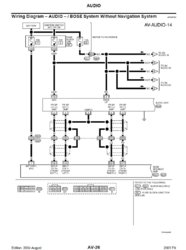
Bummer that its still not working. The wiring table goes up to 31, but I just cropped it so it shows 1 through 10. This is just for the pins to the Audio unit. Pins 1 through 10 are shown as M58 on the diagram below.

2005 FX35 m58.jpg
 
Last edited:
catch 22 situation now: well I can't update the MB firmware because it's not registered. and I can't register it because the product is not supported or simply don't have the right form to register it anyway. So.. it still is not working. odd thing is I feel that I can get it to work, but am missing something. I've tried changing the dipswitches to every possible combo, but still nothing.

For now I have to move on to the gazillion other things on my plate, but not willing to totally give up on this project.
 
My FX came with an aux adapter that uses the SAT function, which I'm sure is wired the same way. When I get a chance, I'll pull the radio to verify which wires are tapped to possibly rule out the wiring.
 
I was able to check the wiring earlier and found that it has an iSimple unit. Unfortunately, it has an integrated plug n play harness so there was no tapping of wires. Sorry couldn't be of any help!
 
I was able to check the wiring earlier and found that it has an iSimple unit. Unfortunately, it has an integrated plug n play harness so there was no tapping of wires. Sorry couldn't be of any help!
Thanks Mole. I appreciate you checking anyway. How do you like the iSimple?
 
Thanks Mole. I appreciate you checking anyway. How do you like the iSimple?

No complaints so far as it seems to be doing its job. I wanted bluetooth streaming for my music so I just attached an adapter and it works perfectly fine.
 
Back
Top