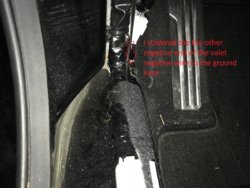
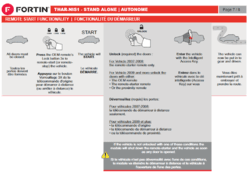
Sharing my experience installing the Fortin remote start kit. This will add remote start capability using your oem keyfob. In this tutorial I will describe all that you need and how it is used.
Install Time: Approximately 2 Hours (give or take depending on how familiar you are with where things are in your car).
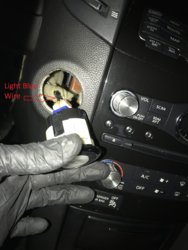
Process: This is a relatively simple install, the harness that comes with the module below is plug and play. The only splicing required is to connect one wire to the push to start button and optionally one wire for the parking lights. This is it and the car will start using the oem remote.
Cost: $110
Parts Needed:
1. Remote Start Module:
Fortin – EVO-NIST1 - Infiniti FX35 2012 Push-to-Start | Remote starter, bypass module and alarm system | Fortin
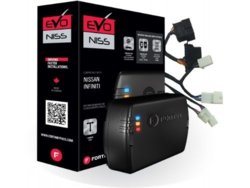
For second generation Infiniti FX/QX70 this is the NIST1 harness and EVO-ALL module. According to the instructions, version 6 is what is required. You may want to check with the seller to ensure the hardware version is correct. Here is the link to the one I ordered. http://a.co/8Nn8ISJ
2. Fortin Flash-Link 2 Module:
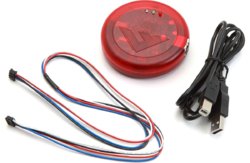
This module is required to install the necessary firmware onto the remote start module for our cars. If you buy both of these separately it will be more expensive. Some sellers offer to program the module for you prior to shipping. I recommend having it in case you need to make any changes to the software. Some of things that this module will allow you to customize is length of time that the car stays on, and various security options for shutting down the car.
I found both for sale together on Amazon. http://a.co/djvCYbv
3. Tools Required:
Quick Splice Connectors Link: http://a.co/e1Jx5Zy or solder the connections. This is used for the push to start button and the parking light wire.
 Flashlink Manager)
FlashLink Manager software download | Fortin
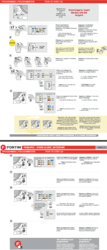
5. Review the manufacturer installation instructions. The guide for our cars is
GUIDE # 12661
http://fortin.ca/download/24031/standalone_thar_nis1_keyport_v1_revk20141015.pdf
6. Disconnect the negative terminal wire on the battery before starting, so not to short anything out. (10mm wrench)
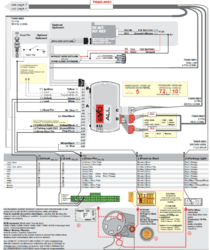
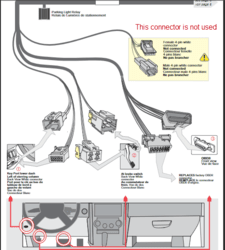
In the picture below I am showing all of the places where connections need to be made.
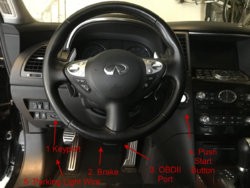
7. Remove the 2-10mm bolts behind the hood release handle. Once the bolts are out pull forward then down on the handle to separate it from the lower dashboard panel.
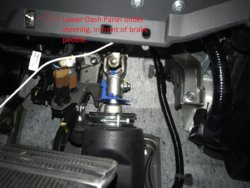
8. Remove the lower dashboard panel by gently pulling on both sides down on either side of the steering wheel. Start at the bottom on both side. This panel is clipped in on both sides.
9. Remove the 4-10mm bolts holding the metal bracket below the steering wheel.
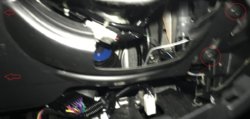
8) Pull up on the trim along the lower edge of the driver’s side door sill ( I found it easier to start with the side furthest away from the fuse box). This will make removal of the kick panel covering and the the fuse panel easier.
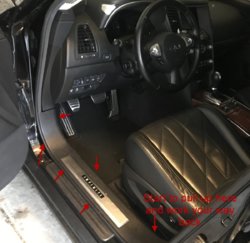
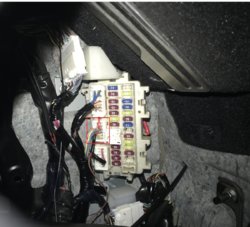
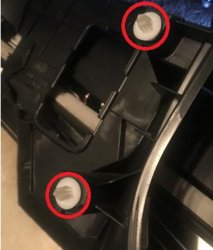
9. Remove the kick panel covering the fuses by pulling outward on it. It is held by two posts on the left side and the small tab under the parking brake.
10. Now to connect the wires. Follow the instructions in the manual to connect the connectors from the main EVO Harness. This is the white 24 pin connector.
-Continued steps will be below.
Install Time: Approximately 2 Hours (give or take depending on how familiar you are with where things are in your car).
Process: This is a relatively simple install, the harness that comes with the module below is plug and play. The only splicing required is to connect one wire to the push to start button and optionally one wire for the parking lights. This is it and the car will start using the oem remote.
Cost: $110
Parts Needed:
1. Remote Start Module:
Fortin – EVO-NIST1 - Infiniti FX35 2012 Push-to-Start | Remote starter, bypass module and alarm system | Fortin
For second generation Infiniti FX/QX70 this is the NIST1 harness and EVO-ALL module. According to the instructions, version 6 is what is required. You may want to check with the seller to ensure the hardware version is correct. Here is the link to the one I ordered. http://a.co/8Nn8ISJ
2. Fortin Flash-Link 2 Module:
This module is required to install the necessary firmware onto the remote start module for our cars. If you buy both of these separately it will be more expensive. Some sellers offer to program the module for you prior to shipping. I recommend having it in case you need to make any changes to the software. Some of things that this module will allow you to customize is length of time that the car stays on, and various security options for shutting down the car.
I found both for sale together on Amazon. http://a.co/djvCYbv
3. Tools Required:
Quick Splice Connectors Link: http://a.co/e1Jx5Zy or solder the connections. This is used for the push to start button and the parking light wire.
- 10mm Socket
- Wire stripper
- Soldering iron
- Solder, Flux
- Electrical tape
Flashlink Manager)FlashLink Manager software download | Fortin
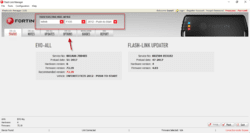
- Once you connect the Flashlink to the EVO Module, open the flashlink manager software. Select your vehicle. Follow the instructions to update the firmware on EVO-ALL and Flash Link.
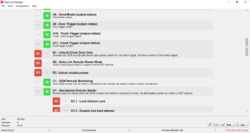
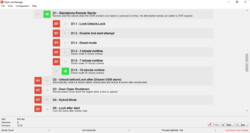
- Here are some pictures of the settings that are configurable. Note... In order for some of these to work you will need to connect additional wires which are included to the BCM. ( I avoided this option as the BCM is located on the passenger side of our cars and would require running wires behind the headunit)
- Under the EVO all options make sure to enable option C1 & D1. This will enable the EVO to use the oem remote to start the vehicle and enable the remote start functionality.
GUIDE # 12661
http://fortin.ca/download/24031/standalone_thar_nis1_keyport_v1_revk20141015.pdf
6. Disconnect the negative terminal wire on the battery before starting, so not to short anything out. (10mm wrench)
In the picture below I am showing all of the places where connections need to be made.
7. Remove the 2-10mm bolts behind the hood release handle. Once the bolts are out pull forward then down on the handle to separate it from the lower dashboard panel.
8. Remove the lower dashboard panel by gently pulling on both sides down on either side of the steering wheel. Start at the bottom on both side. This panel is clipped in on both sides.
9. Remove the 4-10mm bolts holding the metal bracket below the steering wheel.
8) Pull up on the trim along the lower edge of the driver’s side door sill ( I found it easier to start with the side furthest away from the fuse box). This will make removal of the kick panel covering and the the fuse panel easier.
9. Remove the kick panel covering the fuses by pulling outward on it. It is held by two posts on the left side and the small tab under the parking brake.
10. Now to connect the wires. Follow the instructions in the manual to connect the connectors from the main EVO Harness. This is the white 24 pin connector.
-Continued steps will be below.
Last edited: