View Backup Camera While Driving?

Here you go boys and girls (you know who you are)

This info is courtesy of Johnmax from the OTHER board :

Basically you need to break the reverse signal going to the display control unit, and the camera control unit. Using relays you have to send 12 volts to them on their reverse inputs, while breaking the wires to avoid sending power back the wrong way, which prevents the reverse lights from coming on and any other issues. The 2 relays are controlled by a switch which will turn the camera on only at will.

Your welcome

G
 
you can put a on/off switch. so you can keep it on and take it off whenever.

you just have to tap into a source thats always on. like i cigarette outlet

Here you go boys and girls (you know who you are)

This info is courtesy of Johnmax from the OTHER board :

Basically you need to break the reverse signal going to the display control unit, and the camera control unit. Using relays you have to send 12 volts to them on their reverse inputs, while breaking the wires to avoid sending power back the wrong way, which prevents the reverse lights from coming on and any other issues. The 2 relays are controlled by a switch which will turn the camera on only at will.

Your welcome

G

Umm i think i said that already.
 
you guys are too funny, felt like I was on g35driver for a second there, just without all the bouncing boob avi's :tongue:


getting the camera to display reverse while driving isn't too hard, likes been said just wire to the module to trick it into thinking it's in reverse.. a diode can keep it from backfeeding to trip the reverse lights & stuff, but not very useful for most either. to watch a hitch or something it'sd probably perfect, but for much more than that it's almost useless... if anyone wants to do this & can't find the specific info from johnmax then lmk & I'll look up the diagrams & put up a diagram of how to do it...

the better solution to me is to pop the rear wiper out & install another camera oin that hole for foward driving with rear view... that would require something like the navtv though to give you another input...
 
you guys are too funny, felt like I was on g35driver for a second there, just without all the bouncing boob avi's :tongue:


getting the camera to display reverse while driving isn't too hard, likes been said just wire to the module to trick it into thinking it's in reverse.. a diode can keep it from backfeeding to trip the reverse lights & stuff, but not very useful for most either. to watch a hitch or something it'sd probably perfect, but for much more than that it's almost useless... if anyone wants to do this & can't find the specific info from johnmax then lmk & I'll look up the diagrams & put up a diagram of how to do it...

the better solution to me is to pop the rear wiper out & install another camera oin that hole for foward driving with rear view... that would require something like the navtv though to give you another input...
A diagram would be greatly appreciated ... I'm sure by all

G

Oh ... and if I hit a deer or something because my rear view camera stops working, I promise I won't blame you
 
Last edited:
If anyone wants to share the service manual with me - I'll look it up :)

---------- Post added at 09:23 PM ---------- Previous post was at 09:17 PM ----------

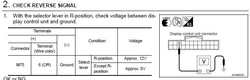
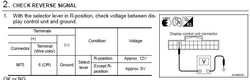
I couldn't find the service manual, so I searched and just got the AV service part of it from infinithelp.com

Looking at this:
j5zf43.jpg

You can probably feed that port 12v using a switch and it should trigger the Rear camera display.
 

Attachments

  • j5zf43.jpg
    j5zf43.jpg
    22 KB · Views: 14
sorry, been busy with other stuff forgot again:embarrassed:... that looks about right, the av control box should be the one behind the glovebox, if you try this use a diode in line with the oe wire, then tap your added power between this diode & the box so it don't backfeed the rest of the system. I'll try to remember to look at the whole thing later...
 
Back-Up Camera Mod

Was wondering if anyone knew of steps on how to create a switch to allow the back-up camera to be turned on on-demand.
Sorry if there is a post already on this but I search and cannot find it.
 
Reverse Camera On All the Time

This works on the M35 - I imagine it would be similar for the FX or might even work the same - google "diagnostic mode FX".

Steps:

Turn Stereo off
Hold down the Settings Button
Turn volume control 30+ clicks either way
Enters a secret diagnostic mode

1. Phone
2. Camera

Back button takes you back to previous menus

2 turns the camera on - you can do it anytime (although it's not recommended while driving) :alien:
 
Back
Top