VDC OFF and SLIP on plus U1000 Error Code

Ataher

Member
Location
Tripoli - Libya
I have a 04' FX45, it has the VDC OFF and SLIP warning lights on, I have run a diagnostic with PC based scan tool and I got the U1000 error code which I tried to clear but no success, I have been searching all over and went through many cases, however I did not find a case quite like mine, the most famous case is that you may have a U1000 error but with no MIL, in those cases they suggest checking the grounding ... Etc, I have went through all grounding terminals, cleaned them and put them back again, but no change. Any advise will be appreciated. BTW I do not have check engine soon light on, everything else in the car is quite normal.Any help is really appreciated.
 
The U1000 code is almost always the 2 grounding points under the dash. Only way to get to these is to pull the dash. Did you have the dash replaced under warranty recently? I have this same problem every once in a while. Dealer wants $1000 to pull dash and fix the grounding points. Not worth it for me. It only happens about once in 8 months.
 
I tried to remove the dash, I stopped half way as soon as I was able to actually see the two grounding points behind it through the metal and wire - up to this point the manual does not explain very well how to go on dismantling so I stopped fearing breaking something - and they looked clean and well tightened, so I called it a day and took it for granted that those were ok. As for the ECU ground as well as every grounding terminal under the hood, I removed them, cleaned them and put them back on.

The other thing that tells me it is not grounding issue is that the U1000 is not supposed to be accompanied by a MIL, is it? Well I have the VDC OFF and SLIP on. Do I make any sense?

---------- Post Merged at 09:34 PM ---------- Previous Post was at 09:28 PM ----------

BTW, I Reset the ECU successfully yesterday - desperate situations call for desperate measures - but again, no change!

---------- Post Merged at 09:40 PM ---------- Previous Post was at 09:28 PM ----------

I will take the risk of pulling the dash out over the weekend, and i will clean the two grounding points behind it, just to take this probability out and be certain. I will post how this will go.
 
Toy4x... I pulled the instrumentation panel - was a lot easier than I thought - cleaned & retightened the two grounding points underneath. I put everything back on and hooked up the diagnostic scan tool, cleared all trouble codes, however ... no change. The VDC-OFF and SLIP still on.
 
Not sure if this is related, but i get VDC OFF and SLIP light on when either 1) low brake pads, 2) low brake fluid, or both.
 
Good point there Pat. Those lights do lit when brake fluid is low, but I don't think there is code though.
 
Checked on the brake fluid level and brake pads... All ok.
i was unable to relate the VDC-OFF SLIP warnings to the U1000 code, I am coming to the conclusion that they are actually not related at all. I do also suspect the capability of the scan tool I am using "autoenginuity" with licensed Nissan expansion pack, as I noticed that it can not see some critical sensors such as the G-Sensor, which is a critical component of the VDC, it might as well be faulty.

I think I can live with that after all, as long as it stops there and does not get any worse.

Thank you all guys for your feedback.
 
Clean sensors

Checked on the brake fluid level and brake pads... All ok.
i was unable to relate the VDC-OFF SLIP warnings to the U1000 code, I am coming to the conclusion that they are actually not related at all. I do also suspect the capability of the scan tool I am using "autoenginuity" with licensed Nissan expansion pack, as I noticed that it can not see some critical sensors such as the G-Sensor, which is a critical component of the VDC, it might as well be faulty.

I think I can live with that after all, as long as it stops there and does not get any worse.

Thank you all guys for your feedback.
I had the same issue. I changed my brake pads and cleaned the sensors behind the rotors and the fault went away.
 
Guys, I fixed it, I am unable to believe I did, this was a long battle since I bought the car back in 2009.

Toy4x was not too far, it was a grounding issue, it has been a long story but eventually I removed the AWD control unit, cleaned the contact points with a sand paper, put it back on, and the VDC-OFF, SLIP went off.

This little tiny problem had caused so much more:

1) I had actually the AWD on as well but the warning light was off, I was able to find that out through my scantool, so I thought it was a busted lamp, but actually it had to do with the bad contact, because half way I got it back on while fixing the problem.
2) every time I use the ICC while on the road I get a CRUISE error (but not while the car is stationary), I thought this was a laser beam issue that I had to put off to fight later as it was a low priority.

I am enjoying now AWD, TCS, VDC, ICC.


Sent from my iPad
 
This just happened to me today. I was braking hard to avoid a massive pothole and vdc, slip, abs, awd came on. What do I have to do to clear them, it's driving me nuts!!!


Sent from my iPhone

---------- Post added at 05:51 PM ---------- Previous post was at 05:50 PM ----------

Where is the awd control unit???


Sent from my iPhone
 
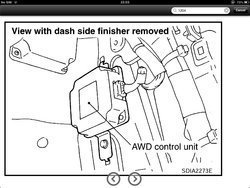
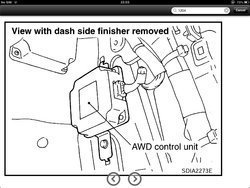
The AWD control unit is on the passenger side under the dash - see below. Pull the cover under the glove compartment down, then remove the side cover and you should get the view below.

ysesu4yb.jpg


But you need to make sure that your issue is same as mine, I had a contact issue - as described earlier - with U1000 and C1204 error codes. Your issue seems to be one of those that would be automatically resolved if you turn the engine off and then on again.

I would suggest to scan first and see what DTC you get, let me know how it goes.


Sent from my iPad

---------- Post added at 01:13 AM ---------- Previous post was at 01:09 AM ----------

I use autoenginuity PC based scan tool with licensed Nissan expansion to read and clear DTC's, it is a good tool to troubleshoot as well.


Sent from my iPad
 

Attachments

  • ysesu4yb.jpg
    ysesu4yb.jpg
    110.6 KB · Views: 10,863
This just happened to me today. I was braking hard to avoid a massive pothole and vdc, slip, abs, awd came on. What do I have to do to clear them, it's driving me nuts!!!


Sent from my iPhone


---------- Post added at 05:51 PM ---------- Previous post was at 05:50 PM ----------

Where is the awd control unit???


Sent from my iPhone

Matrix, the exact same thing hap[pened to me with my 07 G35X. Due to the hard braking my brake fluid in the master cylinder all sloshed forward and tripped my low brake fluid sensor. The fluid was not too low but low enough to trigger the sensor under hard braking. Top the fluid up a bit if it is a bit low.
 
Cool it's in my hands now what contact points did you sand and clean?


Sent from my iPhone

Try what GEE35FX suggested first, it would be easier.

What you need to sand is the two contact points fixing the unit in place, undo the two 1/4" bolts, sand off these two contact points on both sides (the unit side and the chassis side) and then fix the unit back. What you are doing is that you are making sure that the unit ground (its body) is in good contact with the chassis. Check also if the AWD connector is loose as well and try to push it in.


Sent from my iPad
 
I topped it off and I pulled off the awd unit and sanded the contact points and they are still on. Don't know maybe I'll pull it off again tomorrow and sand them down again. All of this for avoiding a pothole, I should just hit it next time. Thanks guys.


Sent from my iPhone
 
cant do it with the regular scanner I have, and i have a good one. D i need a certain scan tool?

---------- Post added at 09:00 PM ---------- Previous post was at 08:45 PM ----------

Oh yeah forgot to add that when I put my scanner on I dont get any codes at all but my lights are on. Never ever happened before.
 
Back
Top