One step closer to finalizing my in-car tablet/network install research!

I really like the HTC, I bought my first one for a little over $500 when they were still new to the scene but then got a second one more recently for just $229, hell of a piece at that price and it has an awesome display. again the 3g/4g built in radio is a big advantage even without actually activating service on it because of the fact that it still connects to the network and provides network location giving you that plus gps as opposed to just gps on non built in radio units... this is a big consideration for our use
 
so as im reading more about ur setup turbo, this still requires ur tablet to have either 3/4g or wifi or tethered with ur phone.. unless im reading something wrong?

---------- Post added at 02:18 PM ---------- Previous post was at 02:14 PM ----------

the Seagates's GoFlex Satellite Mobile Wireless Storage that i wrote about in the beginning actually provides the wifi signal, so in reality u don't need to be connected to wifi or tethered thru ur phone.. you just have to have a peripheral that accepts wifi and it uses the web browser to play the media
 
no, the tablet having the 3g/4g radio built in is only so it gets network location, it does this regardless of whether the radio is "activated" and has a data plan or not. I do NOT have any data plan at all on the tablet, that would be a big waste.

the tablet functions fine and accesses the media drive all without ANY internet connectivity. I do then tether my phone to the av3000 when I want internet, but it is not required at all and everything would still work fine locally with NO external data services at all...
 
John, that's a real nice setup with the suggestion above. It chance of you making more of the overhead console that would fit the oem orange display. That's holding me up on dive in on adding a tablet to my car.
 
the seagate you linked provides it's own wifi, the seagate I linked needs the bridge to provide that, BUT the bridge brings many advantages, like allowing the OPTION of using a data connection AND the media drive at the same time IF you happen to have tethering, if not then it would still provide ALL the same functionality as the first seagate you linked, and still have the added advantage of accessing additional media through the on board usb port. you get nothing less with my setup than you would with the one you linked, but you do get more on top of it with my setup, larger drive and usb ports and the POSSIBILTY of using it as a wifi passthrough only IF/WHEN you happen to have tethering available

---------- Post added at 02:31 PM ---------- Previous post was at 02:27 PM ----------

ha, they don't call you handy andy for nothing man, you can do it :wink (2): I'd be happy to give you advice and guidance and help but I don't know when I'd ever get a chance to actually build one for you, you will need the screen and the overhead console on hand to build it... you can do this...
 
Bodywork and paint brand new to me. I have read through pages and pages of your car-pc built. I thought I throw it out there, maybe you have a prototype seating somewhere:smile (2):. From the readings, I have a pretty good idea on building one.
 
John, that's a real nice setup with the suggestion above. It chance of you making more of the overhead console that would fit the oem orange display. That's holding me up on dive in on adding a tablet to my car.


it is an insane setup and actually a fraction of the price of buying a multimedia double din head unit (which by the looks of it doesnt seem to fit all that great)..

i've done a shit load of research and im sure john has also and i concluded that this is the best way to go.. the tablet can handle all of the multimedia and have access to gps and internet as well... the only holdback was the removeable storage factor which we've both have covered and straightened out.. Internet connectivity is simply achieved thru ur smartphone so it covers all you could possibly want in a in-car infotainment system.. expandability is even crazier as well.. they make those bluetooth obdII scanners that connect with the tablet to give u readout of all of ur engines performance specs.. so yea.. im excited and i cant wait to put some money together to pull the trigger!

---------- Post added at 02:44 PM ---------- Previous post was at 02:41 PM ----------

and again turbo, thank you for ur patience and detailed explanations.. i know i learned alot and im sure this information is gonna come in real "handy" to a few :smug:
 
no problem man, glad to help. I thought to start a thread about my install but didn't really want to because it's not in an FX...

it is an insane setup though, I'd be lost without it, so many things at your fingertips, so customizable and upgradable, so many apps that can be useful in a car, it's cool to have the latest greatest technology even in an older car, todays technology changes so fast that the infotainment systems that are in place in even a 5-6 year old car are antiques in comparison to todays stuff. with this you can have all the latest greatest stuff that comes in only the brand new cars like pandora, live traffic etc... I love it and it's def the best mod I did to my benz by far :)
 
Question. Once the tablet is mounted behind the panel, how you press the power button on the side of tablet?
 
thats one of those "things" i gotta figure out.. im sure its gonna involve some sort of actuator or mechanical contraption to push the button
 
man I've been thinking of this thing every night but I'm always home to late to go digging through storage. I have a complete head unit packed away with the whole bezel and everything but it's in a box that's buried in a stack of other boxes and that's behind even bigger boxes... I'll def get to it this weekend though.


once the tablet is set up you really won't need to access the power button often, but will def need to on some occasions
 
Kind of off track but my wife loves to spend time on her iPad on trips but it doesn't have 3G. I have a third cell phone line with sprint that I used to use for work. I have since rooted it and now use it as a hotspot for my car. I only pay 30 bills a month for this data line and it gets 4g speeds when in the area of one. I have it plugged in the power outlet in the arm rest. Just an idea for those who want to save some cash.
 
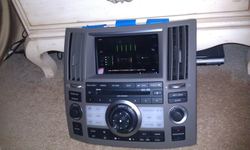
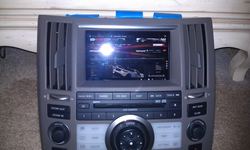
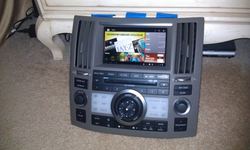
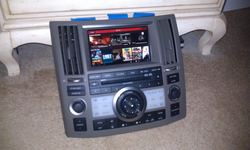
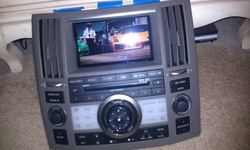
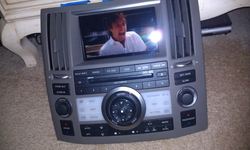
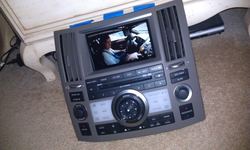
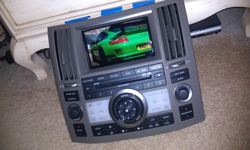
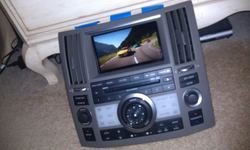
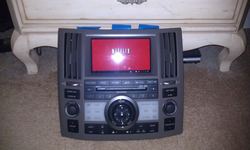
hey man, took a while but I was able to test fit my tablet to the fx bezel and the fit is absolutely perfect. the screen opening is exactly the same size as the 7" tablet screen, it fits edge to edge boarder to boarder like it was made for it. the only slight concern I have is if the very bottom part of the tablet *may* touch the top edge of the headunit itself upon reassembly with the screen perfectly centered. I can't confirm this because I don't have an assembled dash to test this with. if it did contact then worse case the head unit could be modified a bit to clear I'm sure, most likely it won't need any modification but I can't be 100% sure wether it will or not.

as far as the on/off button, it lines up with the edge of the ac vent. I believe it would be possible to make a little hole inside the ac vent and access the on/off button that way as an easy crude way of doing it, or else there are def other ways around this too, an electric actuator physically pushing the button may be what I would suggest to really do it right.

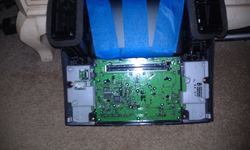
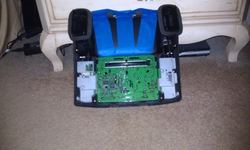
I don't have any good pictures but snapped a few with my cellphone, I'll try to get you better shots but here is what I have so far...

IMAG0241.jpg

IMAG0242.jpg

IMAG0245.jpg

IMAG0240.jpg

IMAG0247.jpg

IMAG0237.jpg

IMAG0235.jpg

IMAG0232.jpg

IMAG0221.jpg

IMAG0223.jpg

IMAG0226.jpg

IMAG0227.jpg

IMAG0229.jpg

IMAG0230.jpg

IMAG0208.jpg

IMAG0219.jpg

---------- Post added at 01:50 PM ---------- Previous post was at 01:38 PM ----------

I also did some more playing around with the in car network, I confirmed that the tablet will connect to and play media just fine even without an internet connection but honestly if your pretty sure your not going to tether for internet in the car at all then honestly the seagate satellite drive may be better and easier for you. personally I wouldn't want that because as I've said before, your wifi will connect to the satellite and the satellite only so you'd have to switch back and forth between the satellite and other wifi when you wanted internet, but in your case with no internet it might make some sense. personally I still say though that having live data is what really makes this thing so cool, you should really consider tethering and going with the pass through network extender setup instead of the seagate satellite but your call there...
 
yes, many 7" tablets should fit but you have to avoid anything that winds up having any plug or jack along the bottom, you need to at least make sure whatever you use has everything on the sides because the bottom will be tight to the head unit. even this one may need a slight modification to the vent for room to plug in from the side but that shouldn't be much of a problem really.
 
yes, many 7" tablets should fit but you have to avoid anything that winds up having any plug or jack along the bottom, you need to at least make sure whatever you use has everything on the sides because the bottom will be tight to the head unit. even this one may need a slight modification to the vent for room to plug in from the side but that shouldn't be much of a problem really.

thats what i'm talking about!.. so that works great, is their clearance for headphone jack and usb charger plug in the rear?
 
Back
Top