Nissan OEM IPOD install

That would be awesome.. Can one actually do that, watch the iPhone on the main screen? And about the stock DVD we defenely need a DIY for it..


Jailbreak it and you can do #1, #2, #5, #8 & #9.. My 3G iPhone is now
-software unlocked (free & works perfectly)
-I can search through sms, e-mails, address book using one application only
-can change themes, application backgrounds (like sms) etc, can record video
-can copy, delete, move files from the phone itself
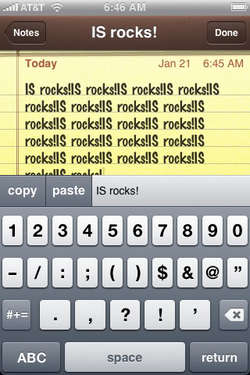
-can copy & paste DIRECTLY through keyboard (not through safari bookmarks like some other apps do)
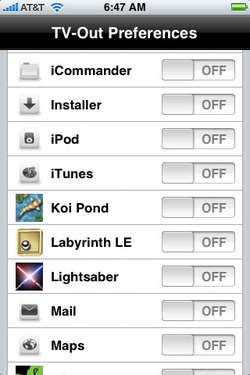
-can output ANY application through VIDEO-OUT. Couple it with NAVTV and you have google maps on your NAV screen :tup::tup:
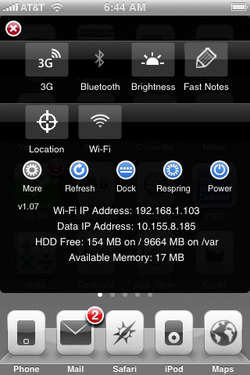
-can switch on/off wi-fi, 3g, edge, bluetooth, location services, brightness using ONE swipe accross the top
9f49b884.jpg
4384ad75.jpg6739f2a7.jpg
Top 10 things we hate about the iPhone - InfinitiScene.com

:tup::biggrin:
 
Let me see if I can clarify this further.

Initially this kit was only available to be installed in the rear (trunk) of the car, patched in to the sat cable. This made it difficult to locate the ipod up front. But remember, This was not made for the FX, it is an adaptation of a Nissan option.

The guy that sells it now makes a harness that allows you to install it up front. There are two front kits available, one if you have sat radio, and one without sat radio. There are also two rear kits available, both with and without sat as well. They are slightly cheaper than the front kits. I'm not sure if the '03s had the sat cable (front to rear) pre-installed.

The '04 does have the sat cable that runs to the back, and basically it was left unplugged since I don't have sat radio. If I did have sat radio, then I would would have gotten the kit that includes another adapter cable. This adapter cable allows you to plug in the factory sat cable in to the open slot on the back of the ipod adapter. You can see the open slot in the picture.

This whole thing took a lot of research, even though I got most of my information intially from infinitifx.org, it is not easy to understand. There is a 600+postings/25 page thread there that is very confusing because it follows the whole history which changes over time. They tried to clarify it slightly by adding another post about the part numbers, but IMO it still isn't clear enough. I hope this clears it up for you as well as for anyone who considers installing this in the future. If not, I will continue to entertain any questions, feel free to ask.

So Massive, since you have had the adapter for awhile, can you shed some light on how to work the radio buttons to control the ipod? I still haven't had a chance to sit down and figure it out.

I had it post on another part of this site.

///2631&highlight=ipod
 
You may be SAT capable, buy don't have satellite service, its not free. I think I pay something 30+ dollars a quarter for the service, not too bad since XM/SIRIUS combined. They have a few packages to choose from, monthly, quarterly, yearly, or one lifetime charge I think.


Hmm. Well I guess I'll just be curious and pull out the HU to see what's back there. :err: I've taken off the panels before when I upgraded the shifter to the 06', so shouldn't take long.
 
So the parts I need for Video out and Iphone/Ipod intergration (on a 05 w/ nav) is

*NAVTV,
*the iPod interface (the front mount type) ??
*Clarion cable (CCA-673) (does not charge)

right?

Clarion cable will not charge the newer gen iPhones/iPods because the interface voltage is different. You'll either need to use an adapter or Kensington 4-in-1 or similar. I posted the links & info about it on the other thread about iPhone and interface. Btw, as far as I know (based on JohnMax's posts), the clarion cable will play videos on the iPod/iPhone without the need for the jailbreak.
 
That would be awesome.. Can one actually do that, watch the iPhone on the main screen? And about the stock DVD we defenely need a DIY for it..

I have a NAV/TV and I bought the Apple AV component cable and plugged it to the RCA outlet that came with my NAV/TV and im able to watch youtube and all my videos in my iPhone thru my nav.
 
Bill you need to give us a update on how this mod is working to you.. Have you learn how to use it well.
 
I have a NAV/TV and I bought the Apple AV component cable and plugged it to the RCA outlet that came with my NAV/TV and im able to watch youtube and all my videos in my iPhone thru my nav.

How do you get sound with this set up? Do you use an AUX device?
 
Thanks for the write-up. I ended up installing the kit this past weekend and everything works great. I taped my box down behind the clock area instead of behind the screen.

I'm not sure if you've figured out the radio controls yet, but it's pretty similar to the instructions. By the way, I have the Bose system w/o the tech package (i.e. Orange Screen).

Seek/Track - select, activate, go to previous/next song, or FF (press and hold >| to FF)

TUNE/REWFF - scroll through menus (same as tune knob, but i find it easier to use since it's right below the seek/track button to select a menu option)

PROG/RPT - scroll through menu (you'll need to push this button first before you can scroll using the TUNE/REWFF or tune knob)

Tune Knob - turn to scroll through menus, push to select screen display and adjust bass/treble/etc. (same as how you would change what your screen displays during CD playback)

Steering Wheel Control - hold UP/DOWN to go to next or previous song (I was surprised to find out this actually works), tapping UP/DOWN will go through your radio presets

For example, if you want to select a different playlist:

Press PROG/PRT
- continue pressing PROG/RPT or use TUNE/REWFF or the Tune Knob until PLAYLIST shows up
- press SEEK/TRACK to activate
- press PROG/RPT again (Your first playlist should now be displayed)
- keep pressing PROG/RPT or use TUNE/REWFF or the Tune Knob to find the playlist you want.
- press SEEK/TRACK and the first song from the new playlist should play

This basic process applies for all menu items.

The only thing that I haven't figured out is how to rewind a song, but I don't think that's an option because it's not in the NISSAN Ipod user guide either.


Let me see if I can clarify this further.

Initially this kit was only available to be installed in the rear (trunk) of the car, patched in to the sat cable. This made it difficult to locate the ipod up front. But remember, This was not made for the FX, it is an adaptation of a Nissan option.

The guy that sells it now makes a harness that allows you to install it up front. There are two front kits available, one if you have sat radio, and one without sat radio. There are also two rear kits available, both with and without sat as well. They are slightly cheaper than the front kits. I'm not sure if the '03s had the sat cable (front to rear) pre-installed.

The '04 does have the sat cable that runs to the back, and basically it was left unplugged since I don't have sat radio. If I did have sat radio, then I would would have gotten the kit that includes another adapter cable. This adapter cable allows you to plug in the factory sat cable in to the open slot on the back of the ipod adapter. You can see the open slot in the picture.

This whole thing took a lot of research, even though I got most of my information intially from infinitifx.org, it is not easy to understand. There is a 600+postings/25 page thread there that is very confusing because it follows the whole history which changes over time. They tried to clarify it slightly by adding another post about the part numbers, but IMO it still isn't clear enough. I hope this clears it up for you as well as for anyone who considers installing this in the future. If not, I will continue to entertain any questions, feel free to ask.

So Massive, since you have had the adapter for awhile, can you shed some light on how to work the radio buttons to control the ipod? I still haven't had a chance to sit down and figure it out.
 
Last edited:
Nice dodgersfanjeff.. Thanks for the update on the kit's funtions.. I'm glad this thread helped you out!
 
These threads get way to confusing sometimes in trying to figure out what the heck you need. If i have a 2nd gen touch, how do I get this to play songs and videos through the nav screen of an '05 fx? Is my only option upgrading to to the rear dvd unit?
 
These threads get way to confusing sometimes in trying to figure out what the heck you need. If i have a 2nd gen touch, how do I get this to play songs and videos through the nav screen of an '05 fx? Is my only option upgrading to to the rear dvd unit?


for anything to show on the main NAV screen (stock) you will need a device to tap into the video and allow you to toggle between NAV and your video input.
Search 'nav tv help'

as for the Ipod, I dont own one....(may need a special cable on Apple sells, figures. tha can output video and audio)
 
nissanipod

:k:does this ipod interface also charge the new ipodtouch 2gen while plugged in?

---------- Post added at 12:15 PM ---------- Previous post was at 10:52 AM ----------

Don't bother asking that question? Found the answer on old thread. Sorry! One question? I don't need to to buy the harness for interface from that site? Just the interface?
 
ipod

Thanks! If I buy this interface for front, and wanted to watch tv or video input from nav/tv I would have to buy that product from avproducts with 4in1 to do so?
 
Yes.. The interface for the front does not bring the cable for the tv/video input.. So you will need to get them from other source.
 
Back
Top