
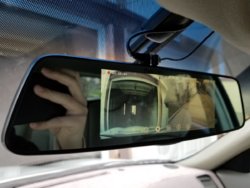
My 2004 FX35 base was desperately in need of some tech upgrades so got one of these touchscreen all-in-one dash/backup cam mirrors that clip-on to the oem rearview mirror a few months ago from Amazon and just wanted to share some info and install tips.
https://www.amazon.com/PRUVEEO-D700...g/dp/B073WFJ7HV/ref=sr_1_6?crid=2W2LA64M0T6SJ
IMPRESSIONS
This particular unit seems straightforward and easy to use. Touchscreen is responsive as you can easily access the different menus and settings even while driving. Screen quality quality could be better, but can't complain for $60.
Front dashcam - Quality is decent so far as it is 1080p, but no 60fps unfortunately.
Backup cam - The field-of-vision (90 degrees) and picture quality is definitely lacking. Currently looking for a better quality camera, but the harness on this unit has a small 4-pin connector so it hasn't been easy finding one so far. Most of the ones I see use a yellow rca and 2 power wires. Any other solutions out there that won't break the bank?
INSTALL NOTES
The mirror installs over the oem rearview with some rubber straps that are secure, but I think it needs to be a bit tighter as the mirror can slightly shake when going over rough/uneven roads. I plan on adding some type of cushions behind the unit to firm up the tension.
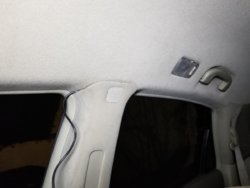
I ran the power wire by tucking it into the roof lining, then in the a-pillar (gotta unclip), down to under the glovebox (removed black under cover), into the side of the center console, and finally connecting to the front 12v outlet. No sign of any wire except near the outlet.
I attached some pics of the backup cam install so they are pretty self-explanatory. The interior tailgate cover needs to be removed to run the wiring.
To mount the backup cam, I only drilled one hole as I used one of the preexisting screws from the license plate lamp covers. The 4 pin connector from the cam didn't fit through any openings from the outside so I fed it through the other lamp cover as you can see in the pics.
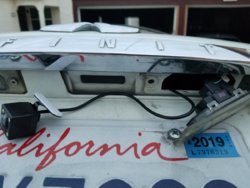
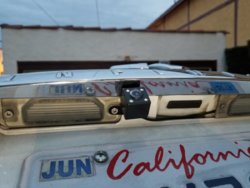
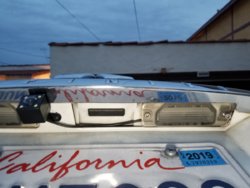
Next, I needed to tap into the reverse lamp so that the backup cam will automatically turn on when I put it in reverse. The passenger side wiring had one red and one black wire so couldn't be any easier. As a note, you can still manually press a button to show the backup cam whether tapping into these wires or not.
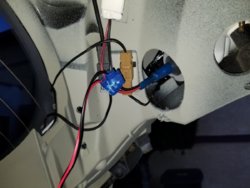
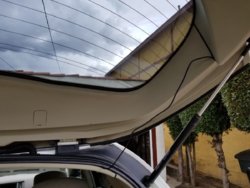
Finally, I had to run the wiring from the tailgate to the unit at the front. Unfortunately, I could not find a way to feed the wire through the upper interior tailgate so there is a portion of wire that is exposed and just hanging there for now as you can see in the pic. If anyone knows of a way without hacking stuff up I would love to hear it. The rest of the wiring on the interior leading up to the front was hidden as I just tucked it along the pillars and interior trims all the way to the front.
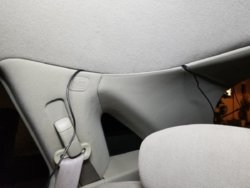
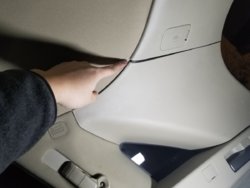
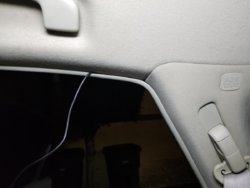
Hope this is useful for someone out there that is considering installing one of these or something similar!
https://www.amazon.com/PRUVEEO-D700...g/dp/B073WFJ7HV/ref=sr_1_6?crid=2W2LA64M0T6SJ
IMPRESSIONS
This particular unit seems straightforward and easy to use. Touchscreen is responsive as you can easily access the different menus and settings even while driving. Screen quality quality could be better, but can't complain for $60.
Front dashcam - Quality is decent so far as it is 1080p, but no 60fps unfortunately.
Backup cam - The field-of-vision (90 degrees) and picture quality is definitely lacking. Currently looking for a better quality camera, but the harness on this unit has a small 4-pin connector so it hasn't been easy finding one so far. Most of the ones I see use a yellow rca and 2 power wires. Any other solutions out there that won't break the bank?
INSTALL NOTES
The mirror installs over the oem rearview with some rubber straps that are secure, but I think it needs to be a bit tighter as the mirror can slightly shake when going over rough/uneven roads. I plan on adding some type of cushions behind the unit to firm up the tension.
I ran the power wire by tucking it into the roof lining, then in the a-pillar (gotta unclip), down to under the glovebox (removed black under cover), into the side of the center console, and finally connecting to the front 12v outlet. No sign of any wire except near the outlet.
I attached some pics of the backup cam install so they are pretty self-explanatory. The interior tailgate cover needs to be removed to run the wiring.
To mount the backup cam, I only drilled one hole as I used one of the preexisting screws from the license plate lamp covers. The 4 pin connector from the cam didn't fit through any openings from the outside so I fed it through the other lamp cover as you can see in the pics.
Next, I needed to tap into the reverse lamp so that the backup cam will automatically turn on when I put it in reverse. The passenger side wiring had one red and one black wire so couldn't be any easier. As a note, you can still manually press a button to show the backup cam whether tapping into these wires or not.
Finally, I had to run the wiring from the tailgate to the unit at the front. Unfortunately, I could not find a way to feed the wire through the upper interior tailgate so there is a portion of wire that is exposed and just hanging there for now as you can see in the pic. If anyone knows of a way without hacking stuff up I would love to hear it. The rest of the wiring on the interior leading up to the front was hidden as I just tucked it along the pillars and interior trims all the way to the front.
Hope this is useful for someone out there that is considering installing one of these or something similar!