
Help: How do you give thanks to a poster

h94403

Member
I get a lot of good information here and would like to thank posters. How do I give thanks.
The search function returns a too many posts without the procedure.
Thanks
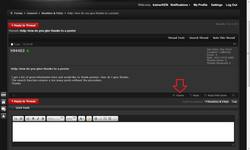
 
There is a "+ thanks button" on the left of the black bar situated on the bottom right of each post screen, just click it.

Nice Ken.....
 
trainerKEN - Thank you for the screen capture.
Right side of black bar has reply and reply with Quote buttons only.
I don't have a Thank you button and can't post a picture of my screen.
Does it appear after 10 posts?
 
Hi Logan. Thanks for your reply. I don't have that button.
May be it appears after 10 posts. I have only 2 more to go and will find out.

---------- Post added at 01:53 AM ---------- Previous post was at 01:39 AM ----------

Thanks g0ldm4g3. It should appear after this tenth post.

---------- Post added at 02:52 AM ---------- Previous post was at 01:53 AM ----------

The +Thanks button appears when you login after your tenth post.
 
Seems pretty restrictive to not allow someone to thank someone else without having 10 posts - there is a ton of good stuff I have read, learned and saved me a lot of time, yet this is only my 7th post so cannot do it yet... not complaining, just don't follow the logic, seems it would get people more active right off the bat...
 
Of all the things you are limited from until you get 10 posts, "thanking" someone is very minimal.
 
Perhaps it can be changed. I understand how someone that doesn't post much would want this. I also, can quote the entire post and say thanks :-)


TapaTalkin'
 
I would like to promote posting and not hiding in the shadows, 10 posts really isn't that much and once you hit 10 posts the "real magic" starts to happen. :wink:
 
....besides don't you want to get rid of this on the top of every page?

///10073[/ATTACH]
 
Did you ever get an answer. I also would like to know how this is done.

never mind I see it now
 
Last edited:
Back
Top