scottvt
Member
So you swap out all the bulbs in your interior for nice, modern, crisp white lights. Then maybe notice a few bulbs you didn't even know you had. The door pull lights! (Ambient lighting) They are an ugly drab yellow, and totally clash with the new LEDs. So now what? FIX IT! Here's how.
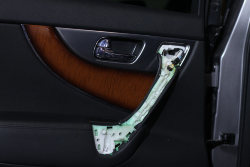
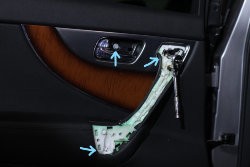
First, pop off the outer cover of the interior door pull, and the small cover behind the actual door lever. For the door pull, I like to start around the bottom as there is a bit more to grip. For the cover behind the lever, just take a flat head, wrap some tape around it, and pry out on the lip right by the door lever/lock tab. Pops right out. Behind these covers you will access three bolts.
 IMG_2092_LI by Scott Van Thiel, on Flickr
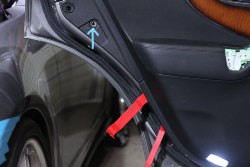
After the (3) 10mm bolts have been removed, the little rubber bumper needs to come out, and the you can start popping clips. Again, here I like to start at the bottom using two levers. One to kind of feel around and the other to do the popping.
 IMG_2094_LI by Scott Van Thiel, on Flickr
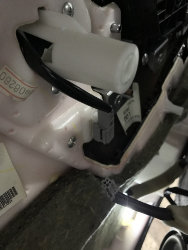
Once all the clips are popped and the panel is loose, unplug the gray harness and pull the light out.
 thumbnail_IMG_4083 by Scott Van Thiel, on Flickr
Once you have the light out, you need to cut the bulb from the plug and add the new bulb socket.
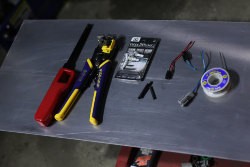 IMG_2081 by Scott Van Thiel, on Flickr
Here I used T5 LEDS from Diode Dynamics, and some sockets I found on Amazon. A pack of 10 for $5, and they are built how you would expect a $.50 harness to be built. Just cheap. The terminals weren't crimped very well, a couple of them literally fell apart. I re-crimped them, and put a healthy dab of hot glue on them to hold the terminals in the plastic housing as they were very loose as well.
Next, solder the connections and use heat shrink tubing to protect your work. At this point, wire color, and polarity do not matter. LED bulbs do have a positive and negative side, but not being labeled on the bulb itself, you will not know until you install the bulb.
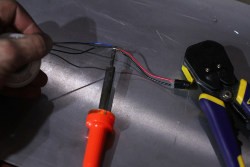 IMG_2096 by Scott Van Thiel, on Flickr
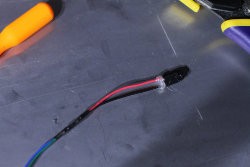 IMG_2097 by Scott Van Thiel, on Flickr
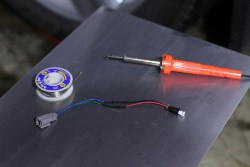 IMG_2087 by Scott Van Thiel, on Flickr
Next it is time to reinstall everything. Slip your new harness thru the hole in the door panel and reconnect the harness. The door panel goes on in just the same fashion it came off. Start popping the clips back in, reinsert the rubber bumper and bolt it up.
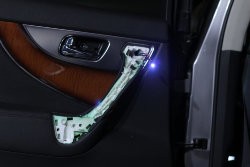
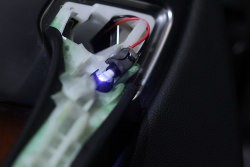
Now this light socket will not fit as the OEM one did. All I did was a wrap of 2 sided 3M tape to hold it in place. So far so good.
 IMG_2098 by Scott Van Thiel, on Flickr
 IMG_2100 by Scott Van Thiel, on Flickr
At this time, if the bulb isn't lit up, make sure the rest of the lights are illuminated. If the door stays open too long, the lights go out to avoid draining the battery. If the rest of the interior lights are out, simply shut the door and open it back up, or just push the button on the door jamb. If the lights are on, pull the new LED out and rotate it 180* and re-install into the socket. SHOULD be on now!
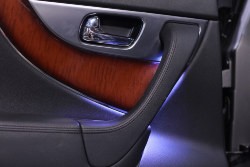
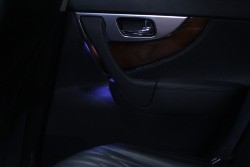
After that's all situated, reinstall the cover behind the door lever and the outer door pull cover, sit back and admire.
 IMG_2101 by Scott Van Thiel, on Flickr
 IMG_2108 by Scott Van Thiel, on Flickr
Please note this writeup was done on the back door. The process for the front is exactly the same. Bolt locations and everything is the same.
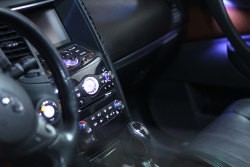 IMG_2115 by Scott Van Thiel, on Flickr
Good luck, and I am NOT responsible if you screw anything up!
First, pop off the outer cover of the interior door pull, and the small cover behind the actual door lever. For the door pull, I like to start around the bottom as there is a bit more to grip. For the cover behind the lever, just take a flat head, wrap some tape around it, and pry out on the lip right by the door lever/lock tab. Pops right out. Behind these covers you will access three bolts.
IMG_2092_LI by Scott Van Thiel, on FlickrAfter the (3) 10mm bolts have been removed, the little rubber bumper needs to come out, and the you can start popping clips. Again, here I like to start at the bottom using two levers. One to kind of feel around and the other to do the popping.
IMG_2094_LI by Scott Van Thiel, on FlickrOnce all the clips are popped and the panel is loose, unplug the gray harness and pull the light out.
thumbnail_IMG_4083 by Scott Van Thiel, on FlickrOnce you have the light out, you need to cut the bulb from the plug and add the new bulb socket.
IMG_2081 by Scott Van Thiel, on FlickrHere I used T5 LEDS from Diode Dynamics, and some sockets I found on Amazon. A pack of 10 for $5, and they are built how you would expect a $.50 harness to be built. Just cheap. The terminals weren't crimped very well, a couple of them literally fell apart. I re-crimped them, and put a healthy dab of hot glue on them to hold the terminals in the plastic housing as they were very loose as well.
Next, solder the connections and use heat shrink tubing to protect your work. At this point, wire color, and polarity do not matter. LED bulbs do have a positive and negative side, but not being labeled on the bulb itself, you will not know until you install the bulb.
IMG_2096 by Scott Van Thiel, on FlickrIMG_2097 by Scott Van Thiel, on FlickrIMG_2087 by Scott Van Thiel, on FlickrNext it is time to reinstall everything. Slip your new harness thru the hole in the door panel and reconnect the harness. The door panel goes on in just the same fashion it came off. Start popping the clips back in, reinsert the rubber bumper and bolt it up.
Now this light socket will not fit as the OEM one did. All I did was a wrap of 2 sided 3M tape to hold it in place. So far so good.
IMG_2098 by Scott Van Thiel, on FlickrIMG_2100 by Scott Van Thiel, on FlickrAt this time, if the bulb isn't lit up, make sure the rest of the lights are illuminated. If the door stays open too long, the lights go out to avoid draining the battery. If the rest of the interior lights are out, simply shut the door and open it back up, or just push the button on the door jamb. If the lights are on, pull the new LED out and rotate it 180* and re-install into the socket. SHOULD be on now!
After that's all situated, reinstall the cover behind the door lever and the outer door pull cover, sit back and admire.
IMG_2101 by Scott Van Thiel, on FlickrIMG_2108 by Scott Van Thiel, on FlickrPlease note this writeup was done on the back door. The process for the front is exactly the same. Bolt locations and everything is the same.
IMG_2115 by Scott Van Thiel, on FlickrGood luck, and I am NOT responsible if you screw anything up!
Last edited: