Car Computer for Infotainment, GPS, MP3

Goma29

Member
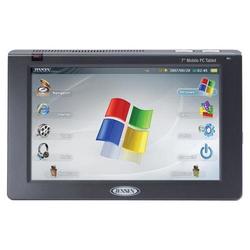
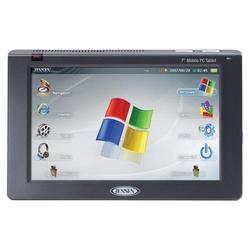
Who's who have car computer in their rides? I know TurboCad6 has one and the best example of a re-package Laptop/Tablet by far. I am planning on installing one on my ride mainly for GPS and listening music (MP3). I have searched and cannot find wiring diagrams behind the stock radio/HVAC console. Any suggestion where to look?:ever:
 
Last edited:
Don't know where to look but I have a carputer also. Problem was my touch screen mounting... I couldn't do it so I'm gonna send off a new screen and my center console to John. He should be a much more informative source than myself :tup:
 
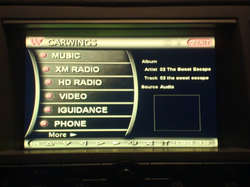
I almost have all my parts, 7" LCd touchscreen, Carnetix PSU, wires, USB extension, VGA extension. I am just waiting for my aux. input adaptor for the stock radio and GMPC with sensor. Planning on installing everything after Christmas. What Front End are you using? I am using RoadRunner with the Carwings Dynamic
 
RR here also.... what do you mean aux input adapter? If it's anything like the PAC Turbo Line Driver, I have one sitting around... oh and your avatar is my carputer's desktop background when RR isn't up... I think it matches the amber interior lighting perfectly
 
Peripheral has this aux input adapter to add two aux inputs to the stock radio. When installed, both inputs accessible thru the unused SAT button (don't have SAT Radio). What a coincidence, I do used the same background for my carputer desktop. Plus Carwings blends and matches with our interior amber/orange lighting theme.
 
an adaptor like that is probably the best way to bring the audio in, I'm guessing you have an orange screen fx? where are you putting the screen? lately I've been using centrafuse, haven't had time to make a custom orange skin yet though:smile:


you should be able to find diagrams at infinitihelp.com I think it is, I have 03 diagrams but they may be different in some areas of like color codes & stuff, but if you get the periferal unit & ithink it comes with everything you need
 
I have a carputer. Just an old laptop under the passenger seat with a 7" touch screen up front. I'm using iGuidance for GPS with Roadrunner. What are you guys using for GPS?
 
Turbo...I am modifying my sunglass holder just like Viet's. Plastic welding just like you did with your dash console/bezel. I did learned a lot from that thread and was practicing the skill lately.

shralp...I will be using GMPC
 
I've used iguidance, but now I use destinator. overhead is a nice way of adding the screen without chopping up the dash. viets overhead is for his original orange screen, he has it pretty flush with the headliner & facing kinda down, won't work too well for a color lcd that you want to use while driving. you'll need to face the screen much more facing back towards you, meaning it'll have to stick out more to be usable. another user here did similar overhead with a lilliput, here is what his looked like, he had a thread here but it seems to be gone now..


0_0_d415d83b44d19b877c4a374f2e893a70_1.jpg


heres what I'm doing with mine, not a pc screen but a good angle for use...


1
 

Attachments

  • 0_0_d415d83b44d19b877c4a374f2e893a70_1.jpg
    0_0_d415d83b44d19b877c4a374f2e893a70_1.jpg
    15.9 KB · Views: 13
I've used iguidance, but now I use destinator. overhead is a nice way of adding the screen without chopping up the dash. viets overhead is for his original orange screen, he has it pretty flush with the headliner & facing kinda down, won't work too well for a color lcd that you want to use while driving. you'll need to face the screen much more facing back towards you, meaning it'll have to stick out more to be usable. another user here did similar overhead with a lilliput, here is what his looked like, he had a thread here but it seems to be gone now..


0_0_d415d83b44d19b877c4a374f2e893a70_1.jpg


heres what I'm doing with mine, not a pc screen but a good angle for use...


1
That's a good spot for an entertainment system, this way the ppl in the backseat have a better viewing angle:tup:
 

Attachments

  • 0_0_d415d83b44d19b877c4a374f2e893a70_1.jpg
    0_0_d415d83b44d19b877c4a374f2e893a70_1.jpg
    15.9 KB · Views: 13
DSC02244.jpg

DSC02242.jpg

DSC02246.jpg

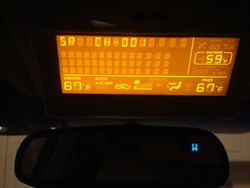
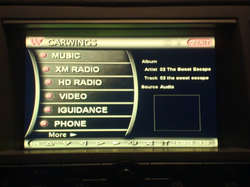
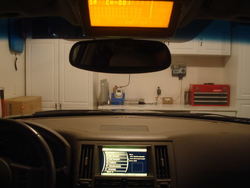
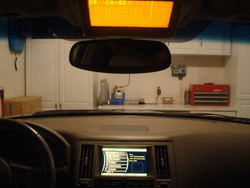
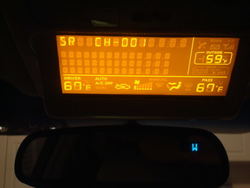
Carputer, center dash touchscreen and OEM info display re-located on the sunglass holder installed.Carputer running Roadrunner (Carwings Dynamic Skin). I just finished the project this evening and took pictures. It is alittle dark, I will post pictures with daylight tommorow.
 

Attachments

  • DSC02246.jpg
    DSC02246.jpg
    41 KB · Views: 11
  • DSC02242.jpg
    DSC02242.jpg
    37.6 KB · Views: 9
  • DSC02244.jpg
    DSC02244.jpg
    33.6 KB · Views: 8
Last edited:
About 8 hours day for two days on modding the sunglass holder to fit the OEM info display screen. Lots of plastic welding and prepping for paint.

About 30 to 45 minutes to solder 15 wires or that is 30 solder points. I used an aftermarket stereo install wire harness (minimum 15 pins). I cut the OEM harness, solder the aftermarket wire harness to one end, extended wires and solder OEM harness on the other end. It is not hard to make, if you know how to solder. hard part is matching wire to each pin on the OEM harness plug.

I have not seen the harness on the color screen, but most probably doable.
 
^^^

looks awesome!


How long did it take you? Is the extension harness hard to make?

Wonder if the color screen is do able?

dude, the post right above his, the picture right above his, that's the color screen relocated in mine, it's doable:smile:


looks great goma, the fx just became so much better with that little swap :)
 
Last edited:
Back
Top