FX Gen1 Audi A4 mirror indicator retrofit.
The idea and inspiration was influenced by a member on here, Raymond, who did that exact mod back in 2009 --> https://www.infinitiscene.com/search/1/?q=5644-New-style-Audi-Side-Blinker-in-Mirror-Capshttps://www.infinitiscene.com/search/1/?q=5644-New-style-Audi-Side-Blinker-in-Mirror-Caps.
I just wanted to take a moment to write a more step by step DIY including tools and part numbers needed for any of you, who might want to take upon that task. The whole project took about 2 days all together, day one creating the covers, day two putting it all back together and hooking them up. First cover from start to finish took me nearly 4 hours, second one 3. Running the wires and reassembly of the FX took about an hour. So you're looking at roughly 9 hours of doing this mod.
Parts needed:
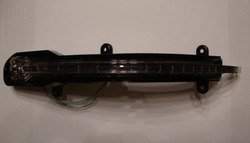
Audi A4 mirror indicators (turn signals), 8K0-949-102-C - passenger, -B - driver.
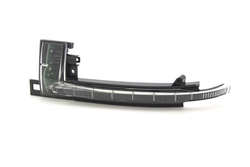
The price range on that part is anywhere between $59 - $89. Shop around at your local dealerships, it helps if there is more than one, or on line. I got mine from http://www.jimellisaudiparts.comhttp://www.jimellisaudiparts.com.
There is also another type of indicator that I discovered after the fact I was done, which might actually be much easier to fit onto the covers, for Audi Q5, 4L0-949-101 / -102. This one is however more expensive and runs between $89 - $120.
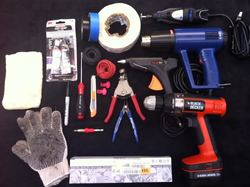
Tools needed:
A lot of patience and time!
* if you never used a dremel before, I strongly suggest practicing first to avoid any mistakes or surprises.
Getting started:
I started by just working on the covers first, without removing the entire mirror assembly. I didn’t want to be stuck with no mirrors in case I needed to drive somewhere.
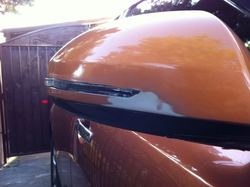
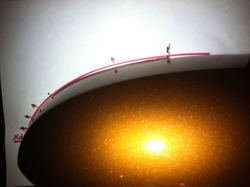
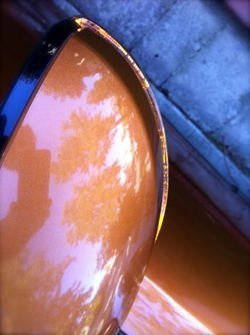
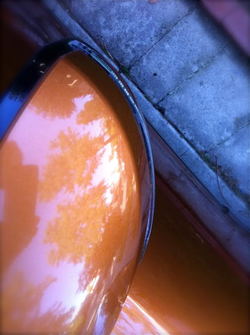
The Audi indicator will need to be twisted and bent using a heat gun, as well as some plastic parts cut and trimmed in order to make it fit. There is no way of attaching it to the cover with screws except using wether a glue (heat gun reference), epoxy or strong tape. Your choice. The tricky part is to not only give it the same curve as the FX mirror cover but also ensure that the LED board will have enough room to fit in. To show the difference I drew a line of the mirror and then of the indicator. As you can see it is quite off.
View attachment 252236
Working on the cover: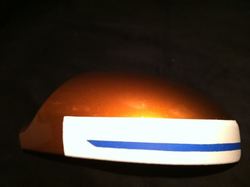
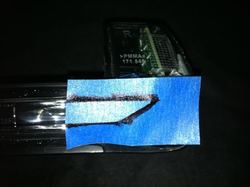
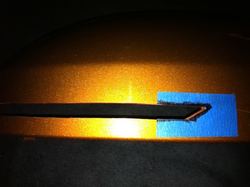
The tape is to prevent scratches or damage to the paint in case the dremel slips of your hand etc. I cut the opening slightly smaller than the indicator itself, to make sure I have room to shave/sand excess of plastic off to make a snug fit. Take your time with the dremel, it will get hot and will melt the plastic so do it in left to right motion slowly cutting deeper, also adjust the speed, start slow and go faster as you make the cut deeper. Use the scalper or utility knife to smooth the edges and the nail file/sand paper to create rounded corners. You will also need to cut off the middle bottom hook on the cover, at least I did, it was in the way. When this is done, you can take the tape off and start molding the indicator plastic.
Molding and heating up:
The process of getting the right shape took me on both indicators almost 2 hours. It’s made out of both strong yet easily breakable acrylic and plastic backing, so you really want to go slow. The bottom part is more adaptable to heat and bending, the acrylic part is a bit harder and will require longer heating time and very steady application of force to bend it outward. Whatever you do, do not apply the heat from the heat gun directly onto the acrylic to avoid melting or discoloration. Try to focus the heating on the back side and sides, but not so much on the top of it. using steady motions up and down until it becomes flexible to the touch. Use gloves to prevent burning your hands. Work back and forth between the cover and the heat gun to see if you’re getting the right curve.
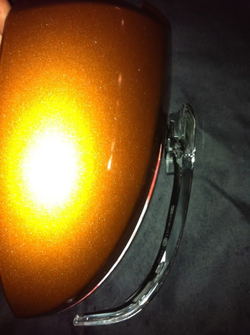
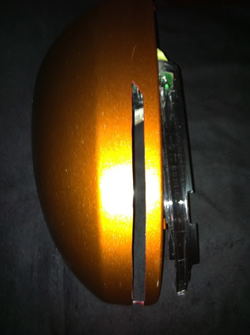
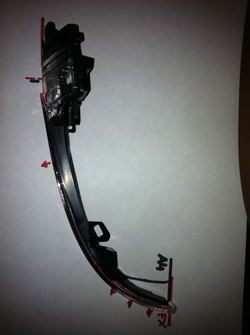
FYI: Bending it outwards will not give you a straight outline, it will slightly curve down, so you will also have to bend it upwards if you don’t want to get the look of the indicator pointing down. I can describe the motion as twist and bend at the same time.
When you finally achieve the right shape and it fits in the cover with some additional sanding etc, trim away the screw holes and the side of the plastic along the edge of the acrylic LED board. You also want to shave off/sand off the top part of the acrylic part (where LED board is, and make it as flat as you can, so it can flush against the cover.
Using a heat gun, glue, epoxy or tape attach the indicator to the cover.
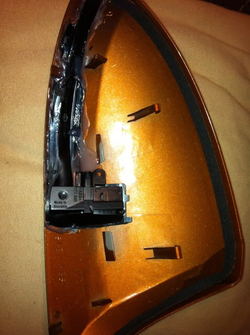
Now you’re ready to mount it onto the mirror assembly and your FX.
Attaching the cover to the mirror:
In order to get the LED to work you need to run the wires through the mirror harness to the interior of your FX. Remove the door panels and triangle mirror panel to expose the bolts and proceed with mirror removal, see instruction below.
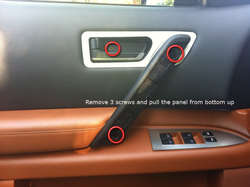
Door panel removal info:
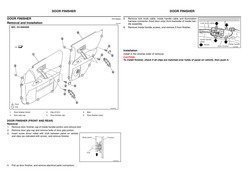
Mirror removal info:
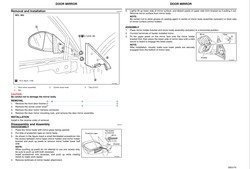
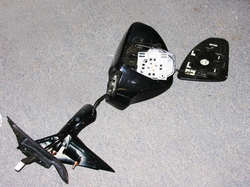
The cover will not fit without cutting out the opening for the LED board part and the rest of the indicator to make it fit in the mirror assembly. With the mirror safely taken off the FX do the following:
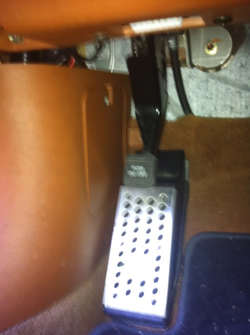
With the mirror in place, all it’s left is to run the wires through the door into the cabin and all the way to the fuse panel by the dead pedal on the driver’s side.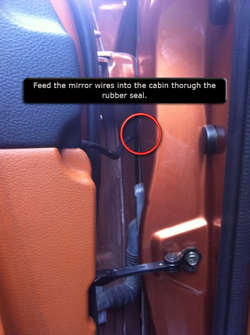
Hope I covered everything. If you are unsure about any steps or have questions, let me know.
Good luck.
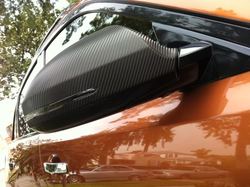
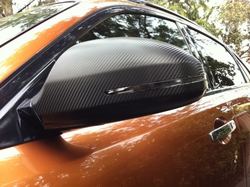
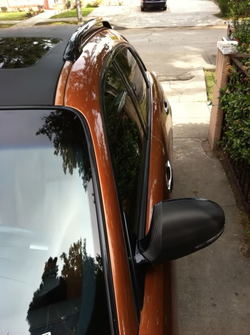
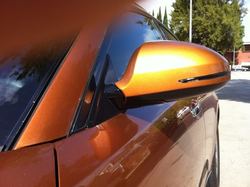
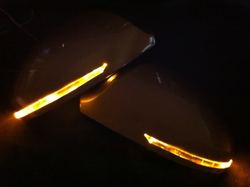
Here is the finished project. I know it is a long write up, thanks for reading!

The idea and inspiration was influenced by a member on here, Raymond, who did that exact mod back in 2009 --> https://www.infinitiscene.com/search/1/?q=5644-New-style-Audi-Side-Blinker-in-Mirror-Capshttps://www.infinitiscene.com/search/1/?q=5644-New-style-Audi-Side-Blinker-in-Mirror-Caps.
I just wanted to take a moment to write a more step by step DIY including tools and part numbers needed for any of you, who might want to take upon that task. The whole project took about 2 days all together, day one creating the covers, day two putting it all back together and hooking them up. First cover from start to finish took me nearly 4 hours, second one 3. Running the wires and reassembly of the FX took about an hour. So you're looking at roughly 9 hours of doing this mod.
Parts needed:
Audi A4 mirror indicators (turn signals), 8K0-949-102-C - passenger, -B - driver.
The price range on that part is anywhere between $59 - $89. Shop around at your local dealerships, it helps if there is more than one, or on line. I got mine from http://www.jimellisaudiparts.comhttp://www.jimellisaudiparts.com.
There is also another type of indicator that I discovered after the fact I was done, which might actually be much easier to fit onto the covers, for Audi Q5, 4L0-949-101 / -102. This one is however more expensive and runs between $89 - $120.
Tools needed:
- Heat gun
- Glue gun
- Dremel *
- Utility knife or/and scalpel
- Nail file for founded edges or/and sand paper
- 14 gauge wire (red/black) or whatever color you have/like
- 2x tap splices
- 1x ring terminal
- 2 x wire connectors, in case you ever have to take your mirrors out and can easily unplug the turn signals with the rest of the wiring.
- How-to-Use-Electrical-Wire-Connectors.jpg
- wire strippers
- electrical tape
- masking tape
- gloves
A lot of patience and time!
* if you never used a dremel before, I strongly suggest practicing first to avoid any mistakes or surprises.
Getting started:
I started by just working on the covers first, without removing the entire mirror assembly. I didn’t want to be stuck with no mirrors in case I needed to drive somewhere.
The Audi indicator will need to be twisted and bent using a heat gun, as well as some plastic parts cut and trimmed in order to make it fit. There is no way of attaching it to the cover with screws except using wether a glue (heat gun reference), epoxy or strong tape. Your choice. The tricky part is to not only give it the same curve as the FX mirror cover but also ensure that the LED board will have enough room to fit in. To show the difference I drew a line of the mirror and then of the indicator. As you can see it is quite off.
View attachment 252236
Working on the cover:
- Trace the outline of the indicator onto the cover. They way I did it was by using a blue masking tape. I applied it onto the indicator traced the outline with a sharpie then cut it out and transferred it onto the cover. My goal was to make as clean of a cut as possible, without having to repaint or mold the cover itself, but focus all of my work on the indicator and making it fit.
- I applied industrial tape onto the part of the cover I was going to make the cut in. Then I placed the blue tape outline of the indicator on top of it.
The tape is to prevent scratches or damage to the paint in case the dremel slips of your hand etc. I cut the opening slightly smaller than the indicator itself, to make sure I have room to shave/sand excess of plastic off to make a snug fit. Take your time with the dremel, it will get hot and will melt the plastic so do it in left to right motion slowly cutting deeper, also adjust the speed, start slow and go faster as you make the cut deeper. Use the scalper or utility knife to smooth the edges and the nail file/sand paper to create rounded corners. You will also need to cut off the middle bottom hook on the cover, at least I did, it was in the way. When this is done, you can take the tape off and start molding the indicator plastic.
Molding and heating up:
The process of getting the right shape took me on both indicators almost 2 hours. It’s made out of both strong yet easily breakable acrylic and plastic backing, so you really want to go slow. The bottom part is more adaptable to heat and bending, the acrylic part is a bit harder and will require longer heating time and very steady application of force to bend it outward. Whatever you do, do not apply the heat from the heat gun directly onto the acrylic to avoid melting or discoloration. Try to focus the heating on the back side and sides, but not so much on the top of it. using steady motions up and down until it becomes flexible to the touch. Use gloves to prevent burning your hands. Work back and forth between the cover and the heat gun to see if you’re getting the right curve.
FYI: Bending it outwards will not give you a straight outline, it will slightly curve down, so you will also have to bend it upwards if you don’t want to get the look of the indicator pointing down. I can describe the motion as twist and bend at the same time.
When you finally achieve the right shape and it fits in the cover with some additional sanding etc, trim away the screw holes and the side of the plastic along the edge of the acrylic LED board. You also want to shave off/sand off the top part of the acrylic part (where LED board is, and make it as flat as you can, so it can flush against the cover.
Using a heat gun, glue, epoxy or tape attach the indicator to the cover.
Now you’re ready to mount it onto the mirror assembly and your FX.
Attaching the cover to the mirror:
In order to get the LED to work you need to run the wires through the mirror harness to the interior of your FX. Remove the door panels and triangle mirror panel to expose the bolts and proceed with mirror removal, see instruction below.
Door panel removal info:
Mirror removal info:
The cover will not fit without cutting out the opening for the LED board part and the rest of the indicator to make it fit in the mirror assembly. With the mirror safely taken off the FX do the following:
- Remove the mirror by pulling the rubber insulation off the mirror assembly on the triangular piece. Pull it down the insulated cables, there might be some electrical tape keeping it in place, remove that too.
- Remove 3 screws on the bottom of the assembly. One of them might be covered by a round black sticker, heat it up and it will peel right off, you want to put it back on when done. With the screws gone, wiggle it to separate the assembly from the triangular base.
- Remove the mirror glass by flipping the mirror upside down and using your fingers or plastic tool or a screwdriver wrapped in a cloth to first unsnap the bottom clips and then slide the glass off. Note there are two wires attached to it for the heater, you can disconnect them, just mark with the sharpie one of them, so you know where to plug it back. You might need pliers to pull them, mine were on real tight.
- Remove the mirror motor by unscrewing the 3 outer screws on the black piece, the ones on the white moving part don’t need to be taken out. There is a 4th screw keeping the motor in place. It’s located at the bottom of the pivot piece on the exposed metal part.
- Detach the white plug from the back of the motor piece, the black sensor that is held by 2 screws and a brown/white cable. They will need to be placed to the side of the mirror facing the door when putting it together. Those elements are in the way of the LED board piece. Trim down the area where the black sensor and white plug was till it’s flat enough for the cover to slide in.
- Thread the LED cover wires through the existing wire out in the mirror assembly.
- You will also need to trim down the bottom part of the assembly where the skinny LED parts will go.
- When all the fitting and cutting is done, you can put the entire mirror back together and place it back on the FX.
With the mirror in place, all it’s left is to run the wires through the door into the cabin and all the way to the fuse panel by the dead pedal on the driver’s side.
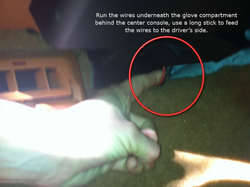
- Run the cables into the car through a small round rubber seal. From the passenger side, remove the glove compartment to grab the wires and pull them behind under the dash to the driver’s side.
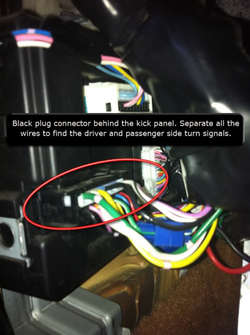
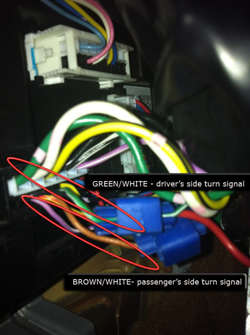
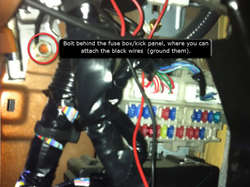
- Wires from both mirrors should be now at the fuse box. Remove the kick panel to expose wires that connect to the car. Look for a black plug. Locate the following wires: Driver side turn signal green/white, passenger turn signal brown/white.
- Connect the red cable from both mirrors to their respective sides using the tap splices. Twist the black wires together and using a ring terminal attach them to the body of the FX, there is a bold right behind the fuse box that’s perfect for that.
- Start the car and test the signals.
- If everything works, put all the panels back on and enjoy.
Hope I covered everything. If you are unsure about any steps or have questions, let me know.
Good luck.
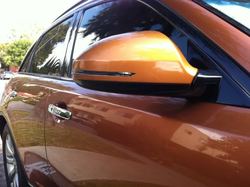
Here is the finished project. I know it is a long write up, thanks for reading!