
You are using an out of date browser. It may not display this or other websites correctly.
You should upgrade or use an alternative browser.
You should upgrade or use an alternative browser.
Alpine ICS-X8 with rear camera, distance park and angel eyes
- Thread starter kang
- Start date
kang
Member
- Location
- Miex, Valais, Switzerland
- Car
- FX45 2004
Voilà, the project continue with the rear sensors and camera installation.
How to remove the bumper, thanks to Rookie:
https://www.infinitiscene.com/search/1/?q=141-FX-Rear-Bumper-Assembly
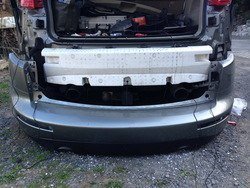
After installing the sensors and camera on the bumper, we need to modify the white part to pass the cable to be able to avoid the high temperature from the exhaust. So, tree holes in the white part like in the picture:
Then, it's better to pass the cable inside the white part to climb and enter the car.
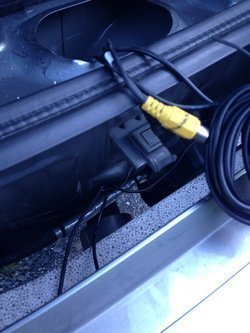
On the right, just under the bumper clip, we enter the center right and right sensor's cables and the rear camera:
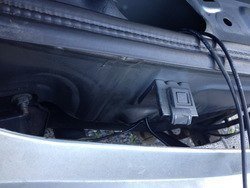
On the left, just under the bumper clip, we enter the center let and left sensor's cables:
And finally, with the bumper installed back onto the car:
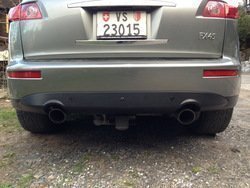
So, I choose to cover the corner and the center from the back of the car with the sensors and install on the middle the rear camera to be able to see the ball to attach the trailer.
Now I need to connect the power from the reverse light for the camera and figure it out how to connect the reverse to the Alpine.
Does anyone have a link from the wiring of the shift panel or near the fuse box and also the wiring from the tail reverse light?
I thing I find something interesting here:
http://x.infinitihelp.com/forum/local_links.php?action=jump&catid=43&id=143
How to remove the bumper, thanks to Rookie:
https://www.infinitiscene.com/search/1/?q=141-FX-Rear-Bumper-Assembly
After installing the sensors and camera on the bumper, we need to modify the white part to pass the cable to be able to avoid the high temperature from the exhaust. So, tree holes in the white part like in the picture:
Then, it's better to pass the cable inside the white part to climb and enter the car.
On the right, just under the bumper clip, we enter the center right and right sensor's cables and the rear camera:
On the left, just under the bumper clip, we enter the center let and left sensor's cables:
And finally, with the bumper installed back onto the car:
So, I choose to cover the corner and the center from the back of the car with the sensors and install on the middle the rear camera to be able to see the ball to attach the trailer.
Now I need to connect the power from the reverse light for the camera and figure it out how to connect the reverse to the Alpine.
Does anyone have a link from the wiring of the shift panel or near the fuse box and also the wiring from the tail reverse light?
I thing I find something interesting here:
http://x.infinitihelp.com/forum/local_links.php?action=jump&catid=43&id=143
Last edited:
kang
Member
- Location
- Miex, Valais, Switzerland
- Car
- FX45 2004
Actually, I got a problem to find the reverse signal as explain on this thread:
https://www.infinitiscene.com/search/1/?q=19499-Where-to-take-the-reverse-signal
So the Alpine sound system is like this in the waiting time:
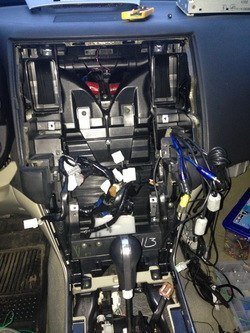
Hope we can find a solution soon, so I can build back the centre console.
https://www.infinitiscene.com/search/1/?q=19499-Where-to-take-the-reverse-signal
So the Alpine sound system is like this in the waiting time:
Hope we can find a solution soon, so I can build back the centre console.

- Location
- Miami
- Car
- 2004 Infiniti FX35 Supercharged
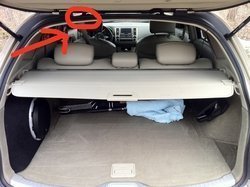
I got mine tapped to reverse wire by the hatch rubber grommet, under the roof liner.
mishanja
Member
- Location
- Sugar Land, TX
- Car
- 2013 BMW X5
Kang, which parking sensor system did you buy? Just curious, might be something I would put on my car....
kang
Member
- Location
- Miex, Valais, Switzerland
- Car
- FX45 2004
@Kyty3off
I buy the parking sensor on Ricardo. It's a place as same as ebay in Switzerland.
Here you will find the link:
http://auto.fr.ricardo.ch/acheter/a...rksensor/v/an708562176/?ABTestedFeatureKey=59
For sure you can find something similar on ebay for a quite good price.
I buy the parking sensor on Ricardo. It's a place as same as ebay in Switzerland.
Here you will find the link:
http://auto.fr.ricardo.ch/acheter/a...rksensor/v/an708562176/?ABTestedFeatureKey=59
For sure you can find something similar on ebay for a quite good price.
kang
Member
- Location
- Miex, Valais, Switzerland
- Car
- FX45 2004
Finally the Alpine ICS-X8 sound system, the rear view camera and all the plug are build in.
It take me a few hours to find the good place to connect the reverse signal, but with the help from Zebra555 and Slamming45 , I choose to use the Back-Up Lamp Relay (B44 - terminal 5 - Light Green) as explain in this thread
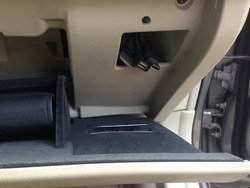
The iPod, Female USB connector for USB devices and the Male USB connector to update the NVE-M300P are in the glove box:
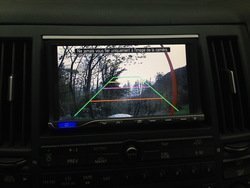
The rear view camera let me show correctly the rear part, but also the ball from the towing kit:
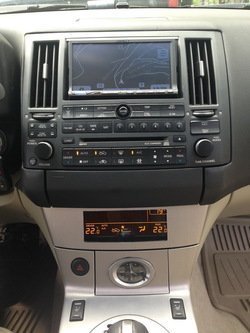
The orange screen is relocated where the clock was, the clock is relocated in the ashtray (Thanks to my Sis).
I'll still need to do some adjustment for the orange screen, but the first impression is fine for now:
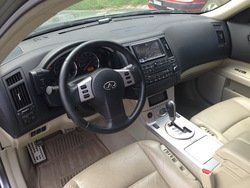
The inside look now pretty match done:
The next step will be to setup the integrated Imprint for the driver, the passenger and the centre places. The basic setup will be made with the useful tool from Alpine:
http://soundsetting.alpine.com/eu/top
When, we will use the specific kit to have a perfect "pink noise".
The goal for the next week will be to install the front sensors and connect the front and rear distance park controller.
Connect the amplifier Alpine PDX-2.150 for the additional subwoofer, and connect the steering wheel control system.
In the mean time, I'll need to find the good Switchback LED Turn Signal and the good Angel Eyes. Your advise will be appreciate
It take me a few hours to find the good place to connect the reverse signal, but with the help from Zebra555 and Slamming45 , I choose to use the Back-Up Lamp Relay (B44 - terminal 5 - Light Green) as explain in this thread
The iPod, Female USB connector for USB devices and the Male USB connector to update the NVE-M300P are in the glove box:
The rear view camera let me show correctly the rear part, but also the ball from the towing kit:
The orange screen is relocated where the clock was, the clock is relocated in the ashtray (Thanks to my Sis).
I'll still need to do some adjustment for the orange screen, but the first impression is fine for now:
The inside look now pretty match done:
The next step will be to setup the integrated Imprint for the driver, the passenger and the centre places. The basic setup will be made with the useful tool from Alpine:
http://soundsetting.alpine.com/eu/top
When, we will use the specific kit to have a perfect "pink noise".
The goal for the next week will be to install the front sensors and connect the front and rear distance park controller.
Connect the amplifier Alpine PDX-2.150 for the additional subwoofer, and connect the steering wheel control system.
In the mean time, I'll need to find the good Switchback LED Turn Signal and the good Angel Eyes. Your advise will be appreciate
Last edited:
jakisbck
Member
- Location
- washington dc
thats looking good man and you know if you wanted to install the lighter bck, you could install it next to the clock on the rightside only if you wanted to reinstall it. othewise it looks great:good:
mishanja
Member
- Location
- Sugar Land, TX
- Car
- 2013 BMW X5
Where did you mount your parking sensor monitors?
kang
Member
- Location
- Miex, Valais, Switzerland
- Car
- FX45 2004
@jakisbck: It's quiet complicate to install the lighter here. We need to cut a lot the rear part of the ashtray to place it here.
@KyTy3OFF: For now, the display for the parking sensor is not mounted. I think to integrate it where the tape of the Bose system is.
@KyTy3OFF: For now, the display for the parking sensor is not mounted. I think to integrate it where the tape of the Bose system is.
mishanja
Member
- Location
- Sugar Land, TX
- Car
- 2013 BMW X5
Interesting, post some pictures once you have mounted them
@jakisbck: It's quiet complicate to install the lighter here. We need to cut a lot the rear part of the ashtray to place it here.
@KyTy3OFF: For now, the display for the parking sensor is not mounted. I think to integrate it where the tape of the Bose system is.
- Location
- Miami
- Car
- 2004 Infiniti FX35 Supercharged
Nice progress. Are you working on the car everyday?
• •
• •

Looks great ...I like how you kept the clock :good:
kang
Member
- Location
- Miex, Valais, Switzerland
- Car
- FX45 2004
Thanks for your comments guys
To answer Zebra555: I work most likely every day 2 to 4 hours to try to be done asap.
Today, front sensors:
So remove the bumper with this help:
https://www.infinitiscene.com/search/1/?q=4590-Front-Bumper-Removal
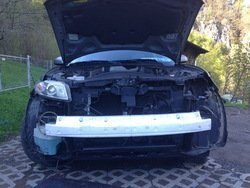
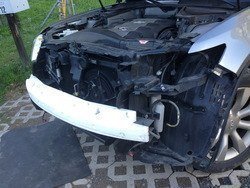
By the way, when I was searching around to find the best place for the front sensor I see this Infiniti FX35 near my place:
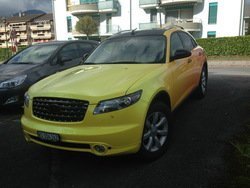
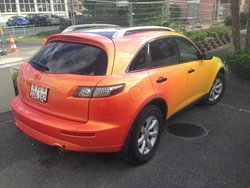
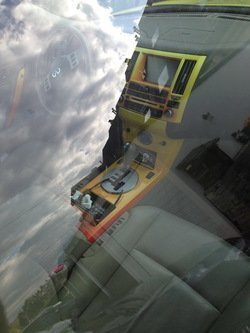
Excuse me for the quality of the last one :-(
Keep you soon in touch when the bumper is back in place.
Wish you all an excellent weekend.
To answer Zebra555: I work most likely every day 2 to 4 hours to try to be done asap.
Today, front sensors:
So remove the bumper with this help:
https://www.infinitiscene.com/search/1/?q=4590-Front-Bumper-Removal
By the way, when I was searching around to find the best place for the front sensor I see this Infiniti FX35 near my place:
Excuse me for the quality of the last one :-(
Keep you soon in touch when the bumper is back in place.
Wish you all an excellent weekend.
kang
Member
- Location
- Miex, Valais, Switzerland
- Car
- FX45 2004
Once again, an update of the work done this weekend.
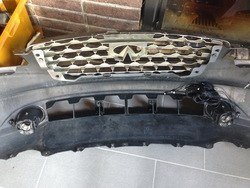
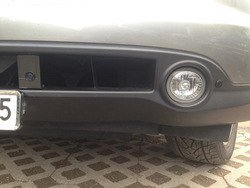
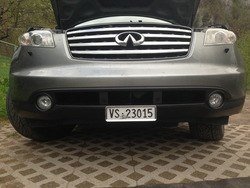
It was a bit difficult to figure out how to install the 2 centre front sensors knowing that the 2 others will cover the corner. I decided to create 2 parts to integrate as well as possible in the centre.
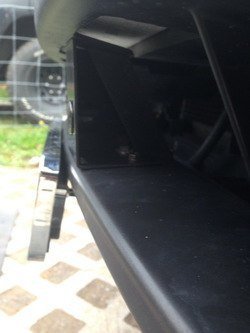
The back of the bumper look like this:
From the front, it seems to look good:
Tomorrow, I can't work on the car, but on Tuesday, I'll need to connect the front and rear sensors to the control unit. It will be in the trunk near the amplifier.
For the screen, I plan to integrate it into the place for the "old" tape in the centre part of the dash. Hope it fit.
It was a bit difficult to figure out how to install the 2 centre front sensors knowing that the 2 others will cover the corner. I decided to create 2 parts to integrate as well as possible in the centre.
The back of the bumper look like this:
From the front, it seems to look good:
Tomorrow, I can't work on the car, but on Tuesday, I'll need to connect the front and rear sensors to the control unit. It will be in the trunk near the amplifier.
For the screen, I plan to integrate it into the place for the "old" tape in the centre part of the dash. Hope it fit.
Last edited:
kang
Member
- Location
- Miex, Valais, Switzerland
- Car
- FX45 2004
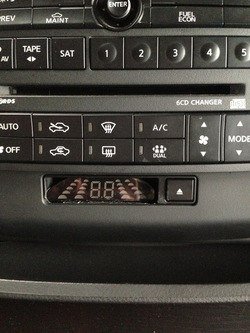
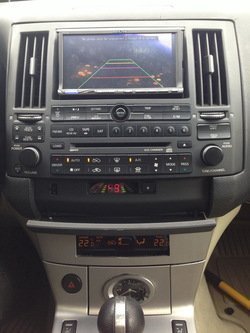
After a few hours of work with my friend "Dremel", I integrate the small display from the sensors in the tape hole from the Bose system:
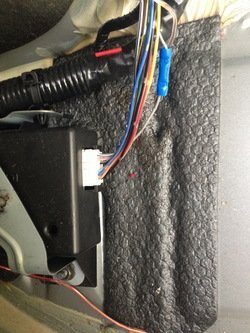
The brake signal is taken directly on the Rear Combination Lamp Control Unit (B64 - terminal 3 - LightGrey)
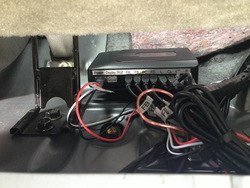
The distance park control unit is located under the rear passengers seat on the right:
The dash look now fine with:
Alpine ICS-X8 integrated
Alpine NVE-M300P with adjusted latest IGO version
Orange screen is relocated where the clock was
Clock is relocated into the ashtray
The sensors display and buzzer is relocated on the tape hole from the Bose system
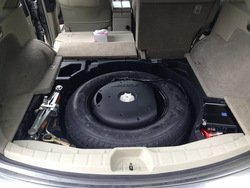
The next will be less visual:
Fix and connect the steering wheel control to the Alpine via the InCarTec 29-674
Setup the Time Correction for the driver, the passenger and the centre position
Setup the "Pink noise"
Test a wiring to keep the original Bose sub controlled by the Alpine integrate Imprint
Test with an additional passive subwoofer connected to the Alpine PDX-2.150. The subwoofer is a Phonocar Thunder.
Wish you all an excellent Sunday.
Take care
The brake signal is taken directly on the Rear Combination Lamp Control Unit (B64 - terminal 3 - LightGrey)
The distance park control unit is located under the rear passengers seat on the right:
The dash look now fine with:
Alpine ICS-X8 integrated
Alpine NVE-M300P with adjusted latest IGO version
Orange screen is relocated where the clock was
Clock is relocated into the ashtray
The sensors display and buzzer is relocated on the tape hole from the Bose system
The next will be less visual:
Fix and connect the steering wheel control to the Alpine via the InCarTec 29-674
Setup the Time Correction for the driver, the passenger and the centre position
Setup the "Pink noise"
Test a wiring to keep the original Bose sub controlled by the Alpine integrate Imprint
Test with an additional passive subwoofer connected to the Alpine PDX-2.150. The subwoofer is a Phonocar Thunder.
Wish you all an excellent Sunday.
Take care

Nebz
Member
- Location
- Orlando, FL
Wow you are getting after it. Great way to utilize the tape deck area.
kang
Member
- Location
- Miex, Valais, Switzerland
- Car
- FX45 2004
Oh yes, finally the harness selected for the connection between the Inifniti plugs and the ISO from the Alpine works fine.
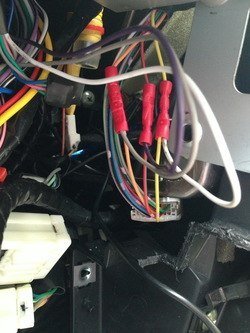
Harness: InCarTec 29-674: Nissan 350z Bose steering control interface + InCarTec 29-001: Alpine patch lead
To connect the steering control unit, you need to search for the plug M64 (A/C and AV switch connector)
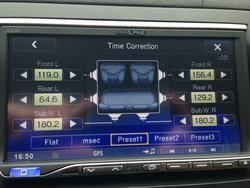
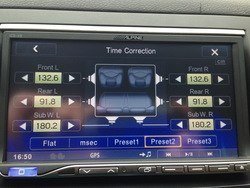
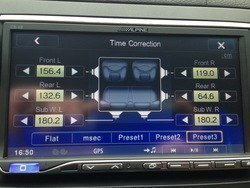
Time correction is now made for the 3 positions:
Driver:
Centre (4 persons):
Passenger:
With the application from Alpine, we can do a basic setup before doing the "pink noise" setup.
Desktop version: http://soundsetting.alpine.com/eu/top/?l=en
Mobile version: http://www.alpine.co.uk/p/Products/app3982/tuneit
Wish you a good weekend.
Harness: InCarTec 29-674: Nissan 350z Bose steering control interface + InCarTec 29-001: Alpine patch lead
To connect the steering control unit, you need to search for the plug M64 (A/C and AV switch connector)
Time correction is now made for the 3 positions:
Driver:
Centre (4 persons):
Passenger:
With the application from Alpine, we can do a basic setup before doing the "pink noise" setup.
Desktop version: http://soundsetting.alpine.com/eu/top/?l=en
Mobile version: http://www.alpine.co.uk/p/Products/app3982/tuneit
Wish you a good weekend.
Adeo
Member
- Location
- United States
- Car
- FX45
This is looking good! I especially like how you incorporated the parking display in the old cassette spot ..... keeping the clock was a nice touch ..... your ride is coming together
Share: