Sirius xm radio! Attn: All users

Hi Guys,

First foremost, apologies in advance as I am a complete novice with this topic and even after searching and reading it, I just don't fully understand so I will ask hopefully for a basic answer.

I want to have SIRIUS XM RADIO in my 2004 Infiniti FX45 Sport-Tech (us model)

How do I go about this? I noticed our cars have that SAT button however mine does nothing when I click it except say NO SAT. I know a subscription is required and I can do that after I get everything set up..hardware and such.

I would like to run everything off my stock oem unit if that's possible.

Can someone give me a clear concrete instructions as to what I need Ie. Each individual software.

AND what is the purpose of our SAT button?

Thank you so much. Cheers. J.
 
There should be a code that comes up on the screen I believe, and this is what you use to sign up online. I guess it recognizes your vehicle based on this code.
 
darn all i get is "NO SAT" when i bought the car it came with that aftermarket IPOD THING.. could this be the case? do i need a receiver or some accessories?

---------- Post added at 03:21 PM ---------- Previous post was at 03:20 PM ----------

There should be a code that comes up on the screen I believe, and this is what you use to sign up online. I guess it recognizes your vehicle based on this code.


@@ stulax
 
One sec, I'll go see what mine does. Maybe I'm thinking of a different car.

When I hit the radio button it switches between AM, FM, and 'Radio ID' and lists some letters and numbers. I don't have a SAT button though in the '06+.
 
Last edited:
It looks like satellite radio was an option with the Tech package. Either yours did not come with it, or someone disconnected it (?).
 
Yes I have tech package and it definitely has a SAT button. when I click it it says NO SAT. I do have an aftermarket IPOD integration thing in the glovebox does that affect my sat button functionality?

---------- Post added at 03:53 PM ---------- Previous post was at 03:53 PM ----------

It looks like satellite radio was an option with the Tech package. Either yours did not come with it, or someone disconnected it (?).

see above
 
If you have the iPod interface, it uses the SAT connector to allow you to play it. Meaning that the SAT receiver is unplugged in the back. If you want Sirius you will loose iPod.

---------- Post added at 04:47 PM ---------- Previous post was at 04:46 PM ----------

You have to remove the head unit and reconnect SAT after you disconnect iPod controller box

---------- Post added at 04:53 PM ---------- Previous post was at 04:47 PM ----------

Also to be certain that the car has the tuner/receiver, in the trunk remove the right part of the plastic trim where the spare wheel is, underneath you should see a silver box with 3 bar codes. That's your xm/Sirius receiver. If it's not there it wasn't installed, even though you have the tech package it doesn't mean it was a part of the package
 
I have Sat radio installed and all I had to do was call XM and give them the Radio ID found on Channel 1.

I don't quite understand the comment on not being able to utilize the iPod if Sat if working. I can run Sat and it will recognize my sons iPod just fine, without wire swapping.
 
That's right Ge0rge, unless the iPod interface OP has installed doesn't have additional plug to by pass SAT and allow to use both.
 
Stupid question, but do you have an OEM Sirius receiver? Since OP's is '04, he probably does not have any iPod integration; thus, if he get "NO SAT", I wonder if he does not have a unit (or its bad)
 
Last edited:
Stupid question, but do you have an OEM Sirius receiver? Since OP's is '04, he probably does not have any iPod integration; thus, if he get "NO SAT", I wonder if he does not have a unit (or its bad)

He said he has aftermarket iPod in the glovebox, so that was probably ran through the SAT.
 
My bet is that he just does not have a receiver. I had an 04 Y34 M45, they all had the SAT button but not all had a receiver. I had to install the Infiniti receiver after the fact....not difficult. Until I installed the receiver the screen would say NO SAT.
 
thanks boys! appreciate it man you guys made it really concrete and clear what I need and not need! after reviewing im such an idiot my SAT button doesn't say NO SAT it just switches to ipod!!
but in the process of switching to ipod (pressing SAT button) it temporarily displays the characters ''XM1' before ipod integrates
'

---------- Post added at 08:36 AM ---------- Previous post was at 08:26 AM ----------

frick I really don't wanna take this to the dealership to get them to unplug a few things and plug back a wire. is this a difficult job? or a diy?

---------- Post added at 08:37 AM ---------- Previous post was at 08:36 AM ----------

do any you folks know the item I need to host both SAT AND XM if its difficult then I am willing to give up ipod its not a necessity at this point.
 
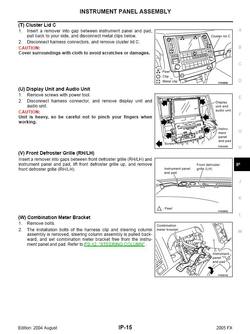
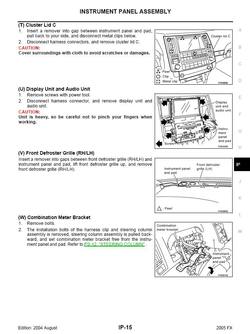
It is easy, just pull away the front panel, gently, it's held by a few clips and then there is a ribbon cable that needs to be unplugged to completely set it aside, with that out of the way you will see the entire radio, you might be able to follow the iPod cable and unplug it without removing the radio, however if the XM/Sirius cable got tucked away behind it, then you might have to.
Here is a diagram:
dash_3.jpg
 

Attachments

  • dash_3.jpg
    dash_3.jpg
    97.5 KB · Views: 42
Sounds to me that your after market iPod thing is using the stock headunit XM receiver port. If your after market iPod thing as an XM input port you can certainly connect your XM receiver there.
 
Sounds to me that your after market iPod thing is using the stock headunit XM receiver port. If your after market iPod thing as an XM input port you can certainly connect your XM receiver there.

thx! LA ! im assuming like others have said this ipod thing is somewhere in the back of the car??

---------- Post added at 10:55 AM ---------- Previous post was at 10:52 AM ----------

even tho the ipod connects in the glovebox area!
 
Back
Top