HELP!!!! I cannot remove front rotor

mishanja

Member
Location
Sugar Land, TX
Car
2013 BMW X5
So I finally got around to upgrading my front brakes to Akebonos. I got a set of new StopTech rotors to go with the brake calipers. I removed my OEM calipers just fine, but for life of me cannot remove the stock rotors. PLEASE HELP!!!! I AM STUCK!!!! I removed all the bolts on the back of rotor that I thought might some way connect assembly, but no luck... What am I doing wrong????? I have rear wheel drive, btw...

---------- Post added at 01:39 PM ---------- Previous post was at 01:37 PM ----------

Does parking brake needs to be off???? (just read it somewhere, because mine is on) :eek.:
time to run and check.....
 
if the front wheel and caliper are removed, place back 2 lug nuts and smack the stock rotor with a hammer in loosing the rust. only rear has parking brake from the hat area.
 
Last edited:
Yep, just like soonster said. If both fronts are off the ground, it helps to turn the rotor and hit it at different spot. Nothing else is holding it back other then the rust.
 
Get a dead blow hammer and smack them off from the backside. I ran into this when changing mine out. Remember this when putting on the new rotors. I always put a thin coat of high-temp bearing grease on the hub and the inside of the rotor where it meets the hub. Never had issues after doing this.
 
Thanks guys, that is what I tried, hit it several times at different spots, it it came off... :rotfl: Unfortunately, now I have another problem... :disapointed: I changed both sides, and was super happy, got in, and my car would not drive.... When I put it in a gear, it feels like it being on the parking brake, but its not... I tried putting park brake on/off did not help... If I try to go, i hear as if something is scrapping (kinda when parking brake is on).... ANY IDEAS???? Or, I did not remove OEM dust shields, DID I NEED TO?????

---------- Post added at 06:21 PM ---------- Previous post was at 04:31 PM ----------

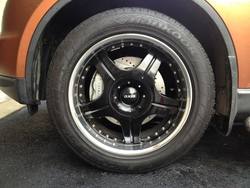
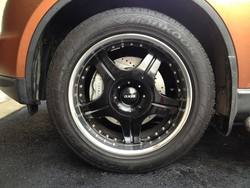
Blonde moment... BOING!!!! Got it fix, finally... Turns out, when I got my Akebonos, the seller included 22mm bolts that screw caliper to the bracket. Of course, I did not bother checking lengths, so I just unbolt my OEM calipers and OEM rotors, put new rotors on, and bolted Akebono calipers using provided bolts. Well, as it turns out, Gen 2 22mm bolts are about 10mm longer then stock Gen 1 bolts... That difference caused longer bolts press all the way against back side of rotors, causing wheels not to spin, causing the "effect" of parking brake. Went out an hour ago, swapped bolts with Gen 1 22mm bolts, all is perfect... SUPER HAPPY!!!!
444043E0442043E04330440043004440438044F05_zps4d6ba2de.jpg
 

Attachments

  • 444043E0442043E04330440043004440438044F05_zps4d6ba2de.jpg
    444043E0442043E04330440043004440438044F05_zps4d6ba2de.jpg
    115.5 KB · Views: 5
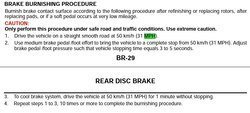
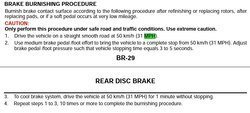
very nice.. make sure you bleed them right, also new pad and rotor bed-in procedures. :good:
 
What is the proper procedure to bleed Gen 2 brakes? There are two bleeders at the top, one on each side of rotor. I did the inner first, then outer... What are rotor "bed-in" procedures????
very nice.. make sure you bleed them right, also new pad and rotor bed-in procedures. :good:
 
So just to confirm, the stock gen1 caliper bolts thread right into the akebono caliper right? Last night, I was bolting the new calipers on and for some reason, my caliper bolts were binding. Felt like I was cross threading both of them and it was late so I called it. Don't know if it's paint in the threads or what. Wanted to make sure that the thread pitch is the same for old/new. Thanks.
 
On my BBK's, I had re-used the stock bolts. Check your bolt or threads on the front knuckle.
 
Back
Top