SteadiFX
Member
- Location
- Orlando, FL
There is a new iPod/iPhone integration kit that just came out of Beta for the Infiniti/Nissan vehicles, and I believe I am the first on this forum to install it. So therefore, I think it deserves a review.
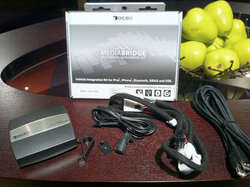
It is the MediaBridge from DICE Electronics, and it is the FIRST iPod/iPhone USB integration kit for the 03-08 FX’s. Here are the specs:
Manufacturer Website:
http://diceelectronics.com/mediabridge-ipod-iphone-bluetooth-nissan.html
Product Features
Technical Details
Brand Name: Dice
Model: MBR-1503-NIS
Product Dimensions: 9 x 4 x 6 inches ; 2 pounds
ASIN: B004Q3RDCU
Item model number: MBR-1503-NIS
Compatibility Notes
So on with the review..
Hands down the best iPod interface I've used in the FX to date. I've had the DICE FM-RDS-USB Pro which was nice because it worked over USB and displayed text on the radio via FM-RDS. But it's still FM Modulation which doesn't give you true Right and Left audio, nor is it as clear. I've also had the USA Spec PA15-NIS which offers crystal clear audio, but works over the Serial Rx/Tx lines in the iDevice Dock Connectors. This not only means that there is an inherent delay between hitting "next track" on the radio and getting a response from the device (just a simple fault of Serial communication). It is also an analog means of communication.
The DICE MediaBridge line of products has been around for a while, but this module (MBR-1503-NIS) just came out of Beta testing for Nissan/Infiniti vehicles. I spoke with the technical folks at DICE Electronics when I caught a rumbling of it and explained my intentions for the device. I want to be able to mirror my iPhone display on my NavTV system while streaming the audio from the device to the factory radio, maintaining track controls and text display on the factory LCD for when I'm not using the NavTV. Needless to say they weren't fully confident that it would do everything that I wanted. Well I'm here to tell you that I installed it and it far surpasses my minimum requirements.
Being a DICE product, this also means that some of their G2 iPod/iPhone cradles are geared specifically towards it. The DCR-150 looks as if it will let you get audio and video out of an 1/8" jack on the cradle via supplied cable, as well as connecting to the MediaBridge via USB. I questioned this idea on the basis that it is a known fact that newer Apple products will not output video without an Authentication Chip. I asked DICE and they sent me the following reply:
Like the specs indicate, it is also a Bluetooth Handsfree unit with Text-to-Speech and A2DP audio streaming and AVRCP wireless track control. The 1000 series models came without this, but for the Nissan/Infiniti module, they are only offering the 1500 series which comes bundled with Bluetooth. While I may never use it since I like the steering wheel controls of my factory Bluetooth Handsfree, it does offer some cool perks for normal USB usage. For instance, there is a kind British lady that informs you if you are in "USB", "Bluetooth", or "Auxiliary" mode. Like the USA Spec, the MediaBridge uses the radio station presets to change how you browse the iPod. As you go down the line, the kind British lady announces "Song mode", "Playlist mode", "Artist mode", "Album mode", "Podcast mode", or "Audiobook mode".
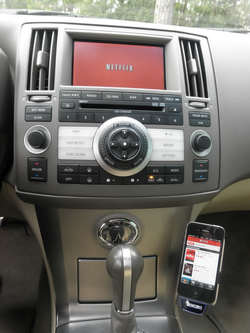
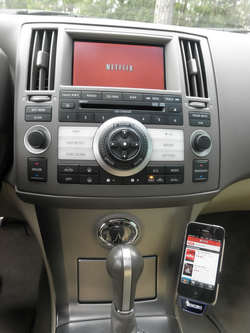
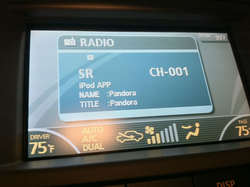
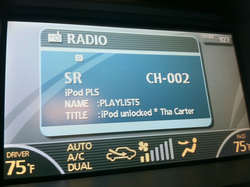
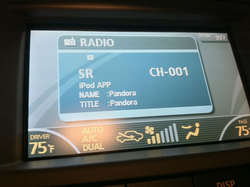
With the USB control, you are 100% free to roam the entire iPhone or iPod Touch and play audio out of Apps other than the iPod. There is no special setting or button to press like USA Spec's "Direct Mode", just navigate how you want when you want and everything works. You get the smooth audio crossfade when you start playing another source (or a call comes in) that you have come to expect. If you're navigating on your iPhone, you get the dipping music with navigation announcements like you're used to. And if any sort of notification happens, you get the quick audio dip for the notification like you're used to. A fun little bonus that comes with digital control like USB, instead of song information, you get "iPod APP" and "Pandora" or "Netflix" or "iheartradio" on your screen. Check it out:
The Install
The install was very simple. Let me immediately inform you that you cannot use your factory satellite radio with the MediaBridge, so if you need that functionality, you might as well stop here. You can plug in an aftermarket Sirius unit to the MediaBridge however. For me, it's not a deal breaker because if I ever want to pay a monthly fee for yet more media, I'll just use the XM app for iPhone.
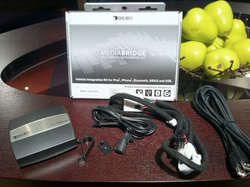
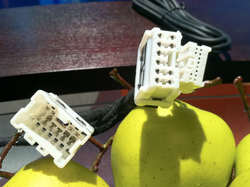
Here is the harness:
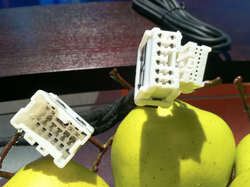
While it uses the same ports on the radio as the PA15-NIS, you'll notice that it does not pass-through the 12pin Sat Radio harness (the smaller connector in the picture). You simply leave the factory 12pin harness unplugged. The larger 10pin plug only serves the purpose of tapping into 12+ constant, Ignition, and GND for the MediaBridge.
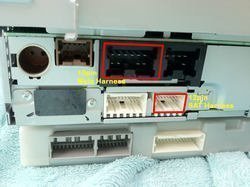
Here's the back of my 2006 FX35 radio, not sure if they all look the same:
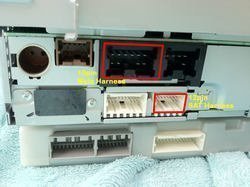
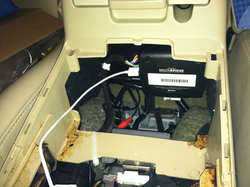
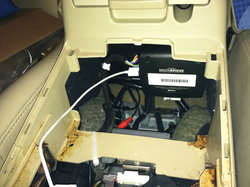
The harness easily has enough lead to travel behind the clock, next to the shifter, to the front of the center console. I mounted it with industrial velcro on the forward facing side of the center console, there is clearance here for the cupholder/shifter piece to go back in without interference. It essentially fits between the back of the cupholder and the front of the center console box. I chose to mount it here for 2 reasons, (1) I don't have to remove the radio when I need to get to it for a firmware update, and (2) It's within reach of the glovebox as well as my Kuda Mount with a standard 3ft iPhone USB cable.
~~~~~~~~~~
So finally there is a kit that that allows your iDevice to function as it should!
Pros:
Cons:
AND MOST IMPORTANTLY TO ME...
The Serial Rx/Tx lines in the dock connector are freed up for Video Chip Authentication, so now I can stream audio and video out of my iPhone simultaneously!!!
Just like the newer Infiniti's that offer factory USB iPod control, we can buy one simple cable to connect our iDevices to our NavTV devices and the radio SIMULTANEOUSLY! Don't spend $50 on that apple tax though, I recommend this one:
http://www.spider-foot.com/audio-vi...4-p-711.html?zenid=8i2k7q3vum1i5fl026m9c13g40
---------- Post added at 01:55 PM ---------- Previous post was at 01:51 PM ----------
More pictures
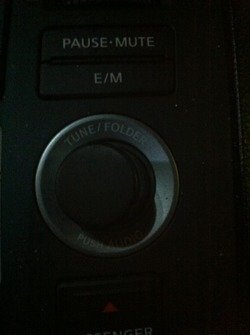
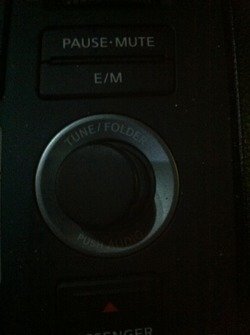
Close-up of the mounting location:
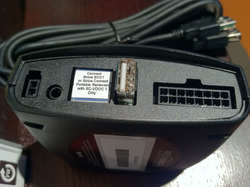
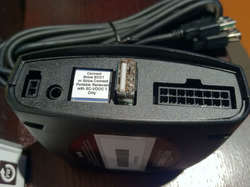
MBR-1503-NIS ports. From left to right:
Bluetooth Mic, Aux In, Sirius Satellite Tuner In, iPod/iPhone USB In, Wiring Harness
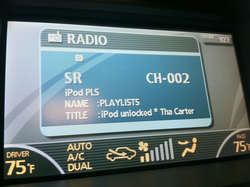
Text display in Playlist Mode with device unlocked:
~~~~~~~~~~
Also, check out this YouTube demo of functionalityn on a BMW:
DICE Mediabridge/DUO for BMW - User's Guide by BSW (Bavsound) - YouTube
It is the MediaBridge from DICE Electronics, and it is the FIRST iPod/iPhone USB integration kit for the 03-08 FX’s. Here are the specs:
Manufacturer Website:
http://diceelectronics.com/mediabridge-ipod-iphone-bluetooth-nissan.html
Product Features
- Connects Bluetooth enabled phones for hands-free operation and audio streaming from A2DP enabled devices. Microphone included.
- Text-to-speech announces incoming caller ID from paired Bluetooth cell phone, song information from iPod/iPhone and interface selections
- Charging for all iPod and iPhone models
- Can be controlled from the iPod, radio and steering wheel
- Song Title, Album, Artist, Playlist are shown on the head unit's display
Technical Details
Brand Name: Dice
Model: MBR-1503-NIS
Product Dimensions: 9 x 4 x 6 inches ; 2 pounds
ASIN: B004Q3RDCU
Item model number: MBR-1503-NIS
Compatibility Notes
~~~~~~~~~~Make Model Year Part Number Compatible Radios Limitations
Infiniti FX35/45 03-08 MBR-1503-NIS Radios w/ "CAT" button 1, 2, 3, 4
Infiniti G35 04-06 MBR-1503-NIS Radios w/ "CAT" button 1, 2, 3, 4
Infiniti G35 Coupe 07 MBR-1503-NIS Radios w/ "CAT" button 1, 2, 3, 4
Infiniti G35 Sedan 07 MBR-1502-NIS Radios w/ "CAT" button 1, 2, 3, 4, 5
Infiniti G35 07-08 MBR-1502-NIS Radios w/ "CAT" button 1, 2, 3, 4, 5
Infiniti G37 08 MBR-1502-NIS Radios w/ "CAT" button 1, 2, 3, 4, 5
Infiniti M35/45 06-07 MBR-1502-NIS Radios w/ "CAT" button 1, 2, 3, 4
Infiniti QX56 04-07 MBR-1503-NIS Radios w/ "CAT" button 1, 2, 3, 4
Make Model Year Part Number Compatible Radios Limitations
Nissan 350Z 05-08 MBR-1503-NIS Radios w/ "CAT" button 1, 2, 3, 4
Nissan 350Z 09-11 MBR-1502-NIS Radios w/ "CAT" button 1, 2, 3, 4, 5
Nissan Altima 05-06 MBR-1503-NIS Radios w/ "CAT" button 1, 2, 3, 4
Nissan Altima 07-11 MBR-1502-NIS Radios w/ "CAT" button 1, 2, 3, 4, 5
Nissan Armada 07 MBR-1503-NIS Radios w/ "CAT" button 1, 2, 3, 4,
Nissan Armada 08-11 MBR-1502-NIS Radios w/ "CAT" button 1, 2, 3, 4, 5
Nissan Cube 09-10 MBR-1502-NIS Radios w/ "CAT" button 1, 2, 3, 4
Nissan Frontier 07-11 MBR-1503-NIS Radios w/ "CAT" button 1, 2, 3, 4
Nissan Juke 11 MBR-1502-NIS Radios w/ "CAT" button 1, 2, 3, 4, 5
Nissan Maxima 05-06 MBR-1503-NIS Radios w/ "CAT" button 1, 2, 3, 4
Nissan Maxima 07-08 MBR-1503-NIS NAV w/ "CAT" button 1, 2, 3, 4
Nissan Maxima 07-08 MBR-1502-NIS Non NAV w/ "CAT" button 1, 2, 3, 4
Nissan Maxima 09-11 MBR-1502-NIS Non NAV w/ "CAT" button 1, 2, 3, 4, 5
Nissan Murano 04-07 MBR-1503-NIS Radios w/ "CAT" button 1, 2, 3, 4
Nissan Murano 09-11 MBR-1502-NIS Radios w/ "CAT" button 1, 2, 3, 4, 5
Nissan Pathfinder 08-11 MBR-1502-NIS Radios w/ "CAT" button 1, 2, 3, 4, 5
Nissan Quest 07-09 MBR-1503-NIS Radios w/ "CAT" button 1, 2, 3, 4
Nissan Rogue 07-11 MBR-1502-NIS Radios w/ "CAT" button 1, 2, 3
Nissan Sentra 07-11 MBR-1502-NIS Radios w/ "CAT" button 1, 2, 3
Nissan Titan 04-11 MBR-1503-NIS Radios w/ "CAT" button 1, 2, 3, 4
Nissan Versa 07-11 MBR-1502-NIS Radios w/ "CAT" button 1, 2, 3, 4
Nissan Xterra 07-11 MBR-1503-NIS Radios w/ "CAT" button 1, 2, 3, 4
Note: 1- Not compatible with radios with the "iPod" button on the face plate.
Note: 2- Radio must have the "CAT" or "CATEGORY" feature somewhere on the radio and
must have a 12-pin SAT connector and 10-pin main harness.
Note: 3- If vehicle is equipped with factory SAT and you wish to maintain the SAT function, use
part numbers: DUO-100-NIS and ACC-012_EXT to install at the SAT tuner location.
Note: 4- Not compatible with systems with an integrated SAT tuner.
Note: 5- Not compatible with factory navigation.
So on with the review..
Hands down the best iPod interface I've used in the FX to date. I've had the DICE FM-RDS-USB Pro which was nice because it worked over USB and displayed text on the radio via FM-RDS. But it's still FM Modulation which doesn't give you true Right and Left audio, nor is it as clear. I've also had the USA Spec PA15-NIS which offers crystal clear audio, but works over the Serial Rx/Tx lines in the iDevice Dock Connectors. This not only means that there is an inherent delay between hitting "next track" on the radio and getting a response from the device (just a simple fault of Serial communication). It is also an analog means of communication.
The DICE MediaBridge line of products has been around for a while, but this module (MBR-1503-NIS) just came out of Beta testing for Nissan/Infiniti vehicles. I spoke with the technical folks at DICE Electronics when I caught a rumbling of it and explained my intentions for the device. I want to be able to mirror my iPhone display on my NavTV system while streaming the audio from the device to the factory radio, maintaining track controls and text display on the factory LCD for when I'm not using the NavTV. Needless to say they weren't fully confident that it would do everything that I wanted. Well I'm here to tell you that I installed it and it far surpasses my minimum requirements.
Being a DICE product, this also means that some of their G2 iPod/iPhone cradles are geared specifically towards it. The DCR-150 looks as if it will let you get audio and video out of an 1/8" jack on the cradle via supplied cable, as well as connecting to the MediaBridge via USB. I questioned this idea on the basis that it is a known fact that newer Apple products will not output video without an Authentication Chip. I asked DICE and they sent me the following reply:
THIS METHOD IS UNCONFIRMED! I remain skeptical because I first tried my custom made video cable without the Authentication Chip but connected to the MediaBridge, and it did not output video. I have not tried the DCR-150 Cradle though.Hello Mike,
The DCR-150 itself does not have the authentication chip, no. The DCR-150 must be connected via USB to a product that does contain the Apple Authentication Chip such as our MediaBridge.
Best Regards,
________________________________________
Jessie Wise | DICE Electronics, LLC
Like the specs indicate, it is also a Bluetooth Handsfree unit with Text-to-Speech and A2DP audio streaming and AVRCP wireless track control. The 1000 series models came without this, but for the Nissan/Infiniti module, they are only offering the 1500 series which comes bundled with Bluetooth. While I may never use it since I like the steering wheel controls of my factory Bluetooth Handsfree, it does offer some cool perks for normal USB usage. For instance, there is a kind British lady that informs you if you are in "USB", "Bluetooth", or "Auxiliary" mode. Like the USA Spec, the MediaBridge uses the radio station presets to change how you browse the iPod. As you go down the line, the kind British lady announces "Song mode", "Playlist mode", "Artist mode", "Album mode", "Podcast mode", or "Audiobook mode".
With the USB control, you are 100% free to roam the entire iPhone or iPod Touch and play audio out of Apps other than the iPod. There is no special setting or button to press like USA Spec's "Direct Mode", just navigate how you want when you want and everything works. You get the smooth audio crossfade when you start playing another source (or a call comes in) that you have come to expect. If you're navigating on your iPhone, you get the dipping music with navigation announcements like you're used to. And if any sort of notification happens, you get the quick audio dip for the notification like you're used to. A fun little bonus that comes with digital control like USB, instead of song information, you get "iPod APP" and "Pandora" or "Netflix" or "iheartradio" on your screen. Check it out:
The Install
The install was very simple. Let me immediately inform you that you cannot use your factory satellite radio with the MediaBridge, so if you need that functionality, you might as well stop here. You can plug in an aftermarket Sirius unit to the MediaBridge however. For me, it's not a deal breaker because if I ever want to pay a monthly fee for yet more media, I'll just use the XM app for iPhone.
Here is the harness:
While it uses the same ports on the radio as the PA15-NIS, you'll notice that it does not pass-through the 12pin Sat Radio harness (the smaller connector in the picture). You simply leave the factory 12pin harness unplugged. The larger 10pin plug only serves the purpose of tapping into 12+ constant, Ignition, and GND for the MediaBridge.
Here's the back of my 2006 FX35 radio, not sure if they all look the same:
The harness easily has enough lead to travel behind the clock, next to the shifter, to the front of the center console. I mounted it with industrial velcro on the forward facing side of the center console, there is clearance here for the cupholder/shifter piece to go back in without interference. It essentially fits between the back of the cupholder and the front of the center console box. I chose to mount it here for 2 reasons, (1) I don't have to remove the radio when I need to get to it for a firmware update, and (2) It's within reach of the glovebox as well as my Kuda Mount with a standard 3ft iPhone USB cable.
~~~~~~~~~~
So finally there is a kit that that allows your iDevice to function as it should!
Pros:
- Full track/playlist control from the radio
- Device/Song/Playlist info Text Display on factory LCD
- Digital, low delay, USB connection to your iDevice
- Text-to-Speech of your selections
- Streaming Bluetooth and Handsfree if you want it
- Expansion for an aftermarket Sirius tuner if you want it
- 1/8" Auxiliary audio input (headphone jack size) if you want it
Cons:
- Most expensive of the iPod Integration Kits to date
AND MOST IMPORTANTLY TO ME...
The Serial Rx/Tx lines in the dock connector are freed up for Video Chip Authentication, so now I can stream audio and video out of my iPhone simultaneously!!!
Just like the newer Infiniti's that offer factory USB iPod control, we can buy one simple cable to connect our iDevices to our NavTV devices and the radio SIMULTANEOUSLY! Don't spend $50 on that apple tax though, I recommend this one:
http://www.spider-foot.com/audio-vi...4-p-711.html?zenid=8i2k7q3vum1i5fl026m9c13g40
---------- Post added at 01:55 PM ---------- Previous post was at 01:51 PM ----------
More pictures
Close-up of the mounting location:
MBR-1503-NIS ports. From left to right:
Bluetooth Mic, Aux In, Sirius Satellite Tuner In, iPod/iPhone USB In, Wiring Harness
Text display in Playlist Mode with device unlocked:
~~~~~~~~~~
Also, check out this YouTube demo of functionalityn on a BMW:
DICE Mediabridge/DUO for BMW - User's Guide by BSW (Bavsound) - YouTube
Attachments
Last edited:

 all things FX