
06FX35
Member
- Location
- Rhode Island
- Car
- 2006 FX35 AWD
It was frustrating looking for info on the install so I decided to post my work up for other people to reference.
This is the basic installation that only required the tapping of accessory power source only. Since my DVD player has an FM modulator, I didn't need to connect any audio wiring. But this can be used as a starting point for other DVD models.
The DVD Player/Monitor
Audiobahn AVM3102DVD
Feautures critical for this install
- FM modulation (unit can send FM signal to your radio station)
- Dual dome lights
1) Remove the rear center dome light. You can either clip the harness or retain it and use wire taps instead.
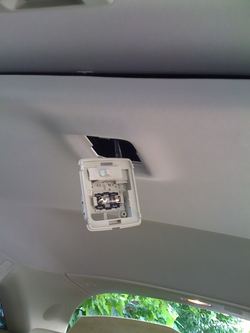
2) Once the dome light is removed, you can check what's behind the headliner by pulling down on the headliner where the sunroof retracts. Note that there is already a factory bracket for DVD package. I started here. There are four screw holes on this factory bracket that I can modify my DVD bracket to bolt up to.
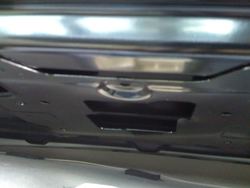
3) To minimize cutting of the headliner I only trim around the dome light area to expose the factory bracket so I can work with it. Notice the bottom of the picture where the dome light harness is located is the front of the FX.
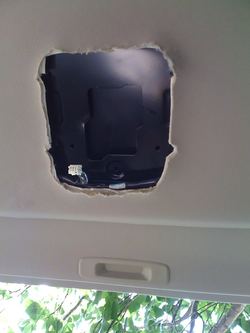
4) I need to translate the location of the four screw holes on the factory bracket to the bracket included with my DVD player. So I used a plain sheet of 8.5 X 11 piece of paper. The end of the paper is where I want the end of my DVD bracket to line up to in order to leave enough space for the headliner velcros to stick back on after the install.
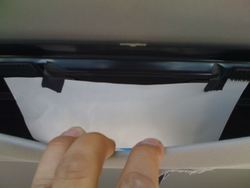
5) The using either a screwdriver or pen tip, I poked holes in the paper that aligned with the four holes on the factory bracket.
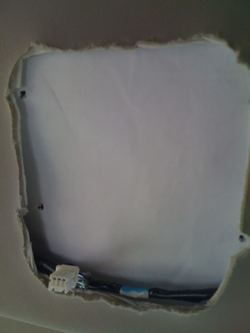
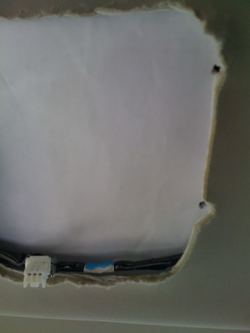
6) After the holes are located and translated onto the paper, I removed the paper and lined it up with my DVD bracket and marked the holes for drilling. Make sure that the drill bit size has a diameter just enough to clear screws that will fit into the factory bracket holes.
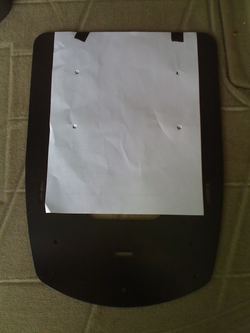
Note the alignment of the factory bracket holes to the existing holes on my DVD bracket. I minimized drilling effort by aligning one of the holes with the mark on the paper. Once all of the holes are drilled set the bracket aside and start working on the wiring.
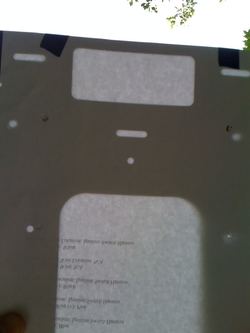
7) To access the wiring harness on the steering column, open up the steering column cover.
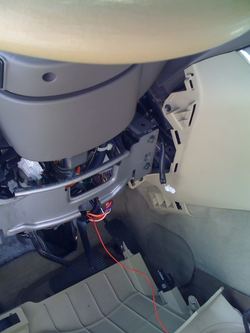
8) There is a white harness that leads to the starter. I only needed the accessory wire so the white wire is what I need to tap my DVD positive power source to. After the power tap, I installed a fuse linkage onto the line and run the wire behind the steering column cover and up through the driver side pillar. Not shown here but at the top of the pillar the side impact airbag starts. Instead of running the wire along this airbag, I crossed it over to the opening of the sun roof area and ran the wire close to the roof opening to avoid having any interference with the proper operation of the airbag.
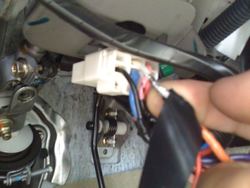
9) I ran the tapped accessory power wire between the headliner and the roof (shown in thick black here). Then I bolted the drilled bracket right onto the factory bracket (notice the silver bolts on the left side of the opening in the headliner. After the bracket is secured, instead of cutting up additional headliner to the size of my DVD bracket, I simply poke holes to line up with the the screw holes for the DVD to attach to its bracket (six holes were made for this).
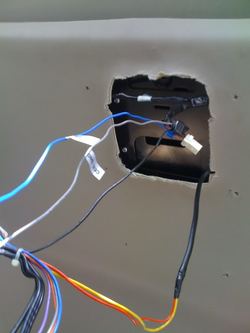
10) With the bracket and power source in place and connected, I tucked all the wiring into the DVD cavity and secure the DVD onto it's bracket. I also ran the DVD FM modulator wire along the edge of the sunroof to maximize signal transmission to the radio.
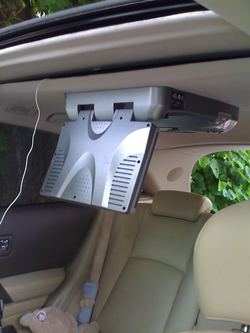
12) Once the DVD bolts are tightened firmly onto the bracket it actually help secured the headliner in place allowing the headliner velcros to attach firmly in place. And here are some pixs of the finished install:
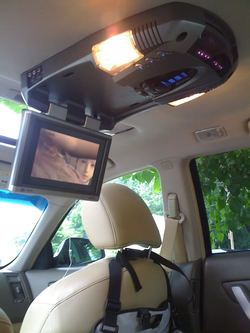
Note the infrared signal captured by the camera. These infrared are for the two headphones included in the DVD kit.
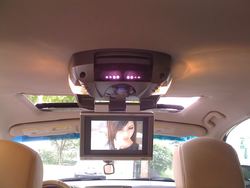
This is the basic installation that only required the tapping of accessory power source only. Since my DVD player has an FM modulator, I didn't need to connect any audio wiring. But this can be used as a starting point for other DVD models.
The DVD Player/Monitor
Audiobahn AVM3102DVD
Feautures critical for this install
- FM modulation (unit can send FM signal to your radio station)
- Dual dome lights
1) Remove the rear center dome light. You can either clip the harness or retain it and use wire taps instead.
2) Once the dome light is removed, you can check what's behind the headliner by pulling down on the headliner where the sunroof retracts. Note that there is already a factory bracket for DVD package. I started here. There are four screw holes on this factory bracket that I can modify my DVD bracket to bolt up to.
3) To minimize cutting of the headliner I only trim around the dome light area to expose the factory bracket so I can work with it. Notice the bottom of the picture where the dome light harness is located is the front of the FX.
4) I need to translate the location of the four screw holes on the factory bracket to the bracket included with my DVD player. So I used a plain sheet of 8.5 X 11 piece of paper. The end of the paper is where I want the end of my DVD bracket to line up to in order to leave enough space for the headliner velcros to stick back on after the install.
5) The using either a screwdriver or pen tip, I poked holes in the paper that aligned with the four holes on the factory bracket.
6) After the holes are located and translated onto the paper, I removed the paper and lined it up with my DVD bracket and marked the holes for drilling. Make sure that the drill bit size has a diameter just enough to clear screws that will fit into the factory bracket holes.
Note the alignment of the factory bracket holes to the existing holes on my DVD bracket. I minimized drilling effort by aligning one of the holes with the mark on the paper. Once all of the holes are drilled set the bracket aside and start working on the wiring.
7) To access the wiring harness on the steering column, open up the steering column cover.
8) There is a white harness that leads to the starter. I only needed the accessory wire so the white wire is what I need to tap my DVD positive power source to. After the power tap, I installed a fuse linkage onto the line and run the wire behind the steering column cover and up through the driver side pillar. Not shown here but at the top of the pillar the side impact airbag starts. Instead of running the wire along this airbag, I crossed it over to the opening of the sun roof area and ran the wire close to the roof opening to avoid having any interference with the proper operation of the airbag.
9) I ran the tapped accessory power wire between the headliner and the roof (shown in thick black here). Then I bolted the drilled bracket right onto the factory bracket (notice the silver bolts on the left side of the opening in the headliner. After the bracket is secured, instead of cutting up additional headliner to the size of my DVD bracket, I simply poke holes to line up with the the screw holes for the DVD to attach to its bracket (six holes were made for this).
10) With the bracket and power source in place and connected, I tucked all the wiring into the DVD cavity and secure the DVD onto it's bracket. I also ran the DVD FM modulator wire along the edge of the sunroof to maximize signal transmission to the radio.
12) Once the DVD bolts are tightened firmly onto the bracket it actually help secured the headliner in place allowing the headliner velcros to attach firmly in place. And here are some pixs of the finished install:
Note the infrared signal captured by the camera. These infrared are for the two headphones included in the DVD kit.
Last edited:


