stock alarm is half dead... what do i do?

mishanja

Member
Location
Sugar Land, TX
Car
2013 BMW X5
So here is the problem. My alarm does not sound when car is in "alarmed" state: so, basically, if it is locked and I open the door there is silence, HOWEVER, my headlights are flashing, as they should. Does anyone had this ever happened to them? I took car to the dealership, and they said "it was working for them", however, when I was picking it up at the end of the day, no one could get it to work. So, what are my options? I don't know, but is there a fuse responsible for alarm's horn? If not, did anyone replaced the stock alarm, or is it cheaper to go aftermarket at that point?
 
Might be a long shot but have you checked the settings for alarm? I have mine set up so it doesn't make any sound when using the key but only when I pull the handle. So basically remote -silent, convenience - beep.
 
As stated above rhere is a serting that allow the alarm to horn or not

I believe you hold on to unclock or the lock bottom for like 5 secs and it does that

Maybe someone who remembers can chime in on the exact how tos
 
I have an aftermarket alarm setup using the factory key fobs. I have the Viper 5104 1-Way Security and Remote Start System, with a Smart Start module for Android Phones and a digital tilt sensor. I love it. It uses the factory key fobs and all of the buttons are still fully functional, I also lost no functionality in the cars systems such as the auto headlights. I press the lock button twice to remote start from the factory key fob and it has a surprisingly decent range, more than enough to start you car from approx. about a half block distance, definetly enough to start from inside your house is your car close. Though I rarley use the key fob since I have the Smart Start module and I can use my cell phone to lock/unlock/start my car from anywhere as long as my car is in an area where my cell phone sevice provider, Verizon, is providing service. I primarily had it hooked up to my factory key fobs to avoid having to carry two remotes around. The only downside to going this route is that you will have to find someone you know is really good installing this kind of alarm since the installation would invole splicing/cutting factory wires. I went to a shop that does them for a lot of high end dealers like Lexus and Audi and has been in business for a long time. I made the mistake of letting Best Buy attempt to install this type of set up for me when I had my Gen 1 and after going back three times they ended up removing it and refunding my money. My set up wasn't cheap because of the Samrt Start and digital tilt sensor but it you just want the Viper alarm with remote start, it won't be as expensive. If you do go aftermarket make sure they hook your horn up to the alarm so it sounds in conjuntion with the alarm if it is triggered.
 
Last edited:
I do
do u have the technology package?


---------- Post added at 09:49 AM ---------- Previous post was at 09:48 AM ----------

OK, tried the suggestions above - no luck. When I hold unlock button for 5 seconds, passenger and driver mirrors roll down; if I hold lock button for 5 seconds, car locks, and my remote keep flashing until i release button :disapointed:
Anyone has more suggestions?
 
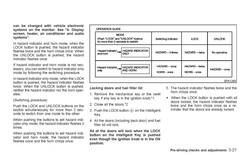
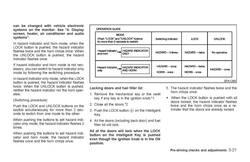
OK then check the preference settings via the display console.
FX3545SecOpts_zps4a0761ec.jpg

---------- Post added at 10:54 AM ---------- Previous post was at 10:51 AM ----------

I know the above is to set the arm/dis-arm preference, just try to change it to trick it to switch mode and see if that makes a difference.
 

Attachments

  • FX3545SecOpts_zps4a0761ec.jpg
    FX3545SecOpts_zps4a0761ec.jpg
    110.4 KB · Views: 14
OK, tried it at lunch. My car was in "hazard indicator only" mode, since when I was unlocking it, I had no hazard light flashing. I changed it couple times from hazard only to hazard and horn, it works, but my horn is still dead - no sound on locking or unlocking. I tried my horn button, and the horn works fine. What do I do next???? :at-wits-end:
 
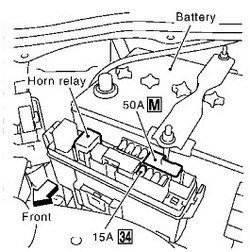
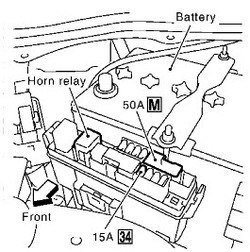
Ok check the 15A fuse #34.
HornFuseRelay_zpsd8540b02.jpg

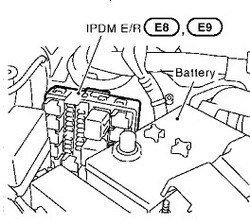
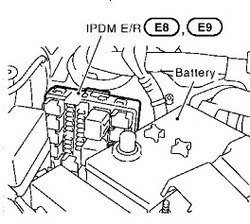
Check the fuse in the "third" fuse box behind the battery compartment. You have to remove the battery crowl cover complete and then remove the fuse box cover and you will see something like this.
HornFuseRelay2_zps861cfbfa.jpg

Check 10A fuse #71
View attachment 279085
 

Attachments

  • HornFuseRelay_zpsd8540b02.jpg
    HornFuseRelay_zpsd8540b02.jpg
    27.2 KB · Views: 7
  • HornFuseRelay2_zps861cfbfa.jpg
    HornFuseRelay2_zps861cfbfa.jpg
    21.6 KB · Views: 6
Back
Top