
SCY7H3
Member
- Location
- Toronto, Ontario
- Car
- 2012 FX35S AWD
A few weeks back I picked up this neat tool that lets you program TPMS sensors to any car. Might have heard of it, called ATEQ TPMS QuickSet.
Read about it online though have not seen any one use it...many of you have gone to the dealer to program your TPMS sensors on each swap of tire sets.
Since I'll have two sets of wheels on my 2nd gen, I figured, what the heck, I might as well buy it and tell you guys all about it. Maybe if there's enough interest, we can get a group buy going.
Honestly, this is one tool I wouldn't pass up on because it can program most car brands. You can setup five profiles (cars) using the included software which runs on Windows. The unit itself stores one profile of both winter and summer TPMS sensor sets.
I picked it up locally at the ATEQ headoffice and the manager at the location (btw great guy) answered all my questions, showed me how to use it on the PC and we even tested it on my FX.
Basically it's a small handheld device with two buttons on it. One for setting your winter TPMS IDs and the other for your summer IDs.
You can even set the tool to read off the TPMS IDs that are currently stored just in case you don't have the existing TPMS IDs available. It does not read TPMS sensors directly, it just interfaces with the car's computer.
So if you don't know the individual IDs of each sensor before you mount the tires, you'll need to get someone to scan the sensors off. But its a one time deal and you can swap tire sets anytime.
Basically you install the software, configure your year, make and model. Either set the tool to read your existing TPMS sensors that are currently installed which you will need to plug the tool in your OBD2 port, hit the button where you want the existing IDs stored then plug the tool into your laptop with the included USB cable. Or if you know your summer and winter TPMS IDs, you set them up in the software, save them to the tool via USB cable.
With the car off, plug in the tool, an orange LED will start blinking, hit the ignition switch twice to get it to the "ON" position without holding the brake pedal (don't start the car), then hold the button on the tool associated with the set of tires you wish to program. The LED will blink orange then turn solid green. That means your new TPMS IDs are set.
And voila! You're done! Your car will now read the new sensor IDs.
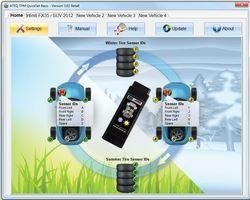
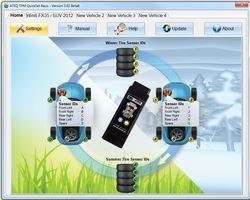
Here's the main screen, you can update the tool and software as well. Free lifetime updates:
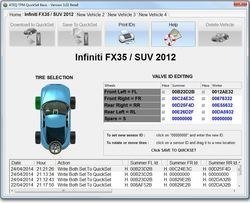
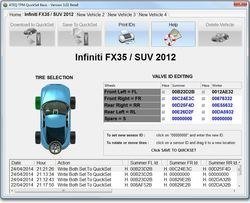
Here's the profile of my FX showing the two sets of sensors. You can see it has the option for a spare tire but that applies to vehicles that allow for that. Edit your IDs here :
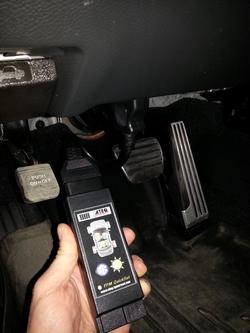
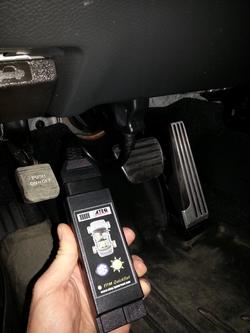
Showing the tool interfacing with OBD2:
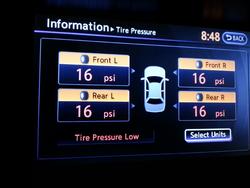
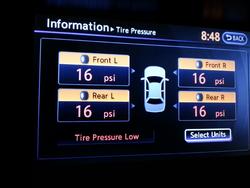
Here's an example of my summer TPMS sensors showing up on the display after being programmed:
Read about it online though have not seen any one use it...many of you have gone to the dealer to program your TPMS sensors on each swap of tire sets.
Since I'll have two sets of wheels on my 2nd gen, I figured, what the heck, I might as well buy it and tell you guys all about it. Maybe if there's enough interest, we can get a group buy going.
Honestly, this is one tool I wouldn't pass up on because it can program most car brands. You can setup five profiles (cars) using the included software which runs on Windows. The unit itself stores one profile of both winter and summer TPMS sensor sets.
I picked it up locally at the ATEQ headoffice and the manager at the location (btw great guy) answered all my questions, showed me how to use it on the PC and we even tested it on my FX.
Basically it's a small handheld device with two buttons on it. One for setting your winter TPMS IDs and the other for your summer IDs.
You can even set the tool to read off the TPMS IDs that are currently stored just in case you don't have the existing TPMS IDs available. It does not read TPMS sensors directly, it just interfaces with the car's computer.
So if you don't know the individual IDs of each sensor before you mount the tires, you'll need to get someone to scan the sensors off. But its a one time deal and you can swap tire sets anytime.
Basically you install the software, configure your year, make and model. Either set the tool to read your existing TPMS sensors that are currently installed which you will need to plug the tool in your OBD2 port, hit the button where you want the existing IDs stored then plug the tool into your laptop with the included USB cable. Or if you know your summer and winter TPMS IDs, you set them up in the software, save them to the tool via USB cable.
With the car off, plug in the tool, an orange LED will start blinking, hit the ignition switch twice to get it to the "ON" position without holding the brake pedal (don't start the car), then hold the button on the tool associated with the set of tires you wish to program. The LED will blink orange then turn solid green. That means your new TPMS IDs are set.
And voila! You're done! Your car will now read the new sensor IDs.
Here's the main screen, you can update the tool and software as well. Free lifetime updates:
Here's the profile of my FX showing the two sets of sensors. You can see it has the option for a spare tire but that applies to vehicles that allow for that. Edit your IDs here :
Showing the tool interfacing with OBD2:
Here's an example of my summer TPMS sensors showing up on the display after being programmed:
Attachments
Last edited:

