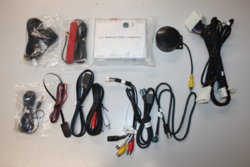
Android Box on Original Screen

Fouad

Member
Car
2009 FX50S
Name
Fouad
Hello,

I have been looking around for a way to have decent multimedia without really messing with the factory installation on my 2009 FX50S. I have seen the mirroring box option using the Aux connection in the center console, but this one lacks the control from the navigation wheel / arrows and the touch screen.

I came across some cool looking stuff from a Russian website, but it is weird that i can't find any reference for these outside Russia.

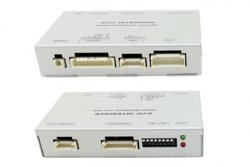
Their solution is to use a car specific video interface (Transcoder) to intercept all the audio / video / control / touch connections and allow its diversion to another Multemdia source. They claim a pin to pin connection without the need of cutting or welding any wire.

Here is the Nissan / Infiniti transcoder :
Транскодер GVIF ABC Korea для Nissan / Infiniti (производитель — BGT) | GVIF ИНТЕРФЕЙСЫ в интернет-магазине BGT Tuning Shop

They have this Android Box that would work on any car screen by connecting it to the specific Transcoder.

Here is the android box:
НАВИГАЦИОННЫЙ БЛОК С HDMI НА OC ANDROID 5.1.1 ROIK-OCTA (производитель — ) | Навигационные устройства в интернет-магазине BGT Tuning Shop

Here is a video of the end result:

I want to know if anyone is familiar with these ? And is there anything similar to this sold in the US or in Europe ?
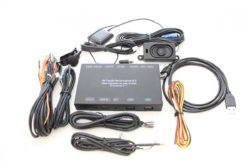
Android Box.JPG


Transcoder.jpg
 
Looks good! Those Russians REALLY love the FX in 1st and 2nd Gen... Done a lot of neat things with them... I just wonder if you get that stuff, if you can switch it to ENGLISH and if it would be proper English... :)
 
No experience with that unit, but I did recently do an audio upgrade to my 2006 4runner, and purchased a unit called the iDataLink Maestro RR which looks very similar to that Russian one. I was able to wire it into my new double DIN head unit to use Android Auto while retaining all factory steering wheel controls, etc. Worked like a champ.

It appears that the Maestro RR is compatible with the FX's controls, but it would require changing out the head unit to a Kenwood/JVC/Alpine or other compatible unit. Probably more trouble than it's worth.

My 2009 FX doesn't support audio over bluetooth so I just have an inexpensive bluetooth receiver (https://www.amazon.com/TaoTronics-B...r=8-13&keywords=taotronics+bluetooth+receiver) plugged into the AUX jack and control the music from my phone. As you observed it doesn't allow me the steering wheel controls, but it's a quick and happy medium.
 
I m sorry I did not update this thread, but I had lot of work lately.
In fact I have purchased the necessary equipment fromTaiwan and got it shipped and installed.
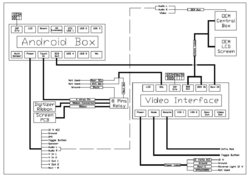
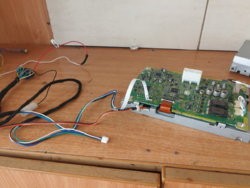
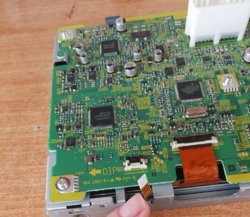
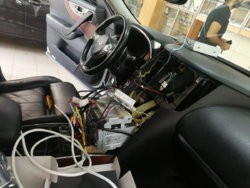
I went to professional installation shop because i was worried about dismantling of the dashboard. The installation shop was not familiar with the units, so I prepared a wiring diagram in advance and double checked all connections. I would say that everything is plug and play excluding the connection of the touch. In fact, the most time consuming part of the installation is to remove the OEM LCD screen.. open it from the back to reach the PCB and disconnect the 4 wires flat cable of the touch digitizer. Once disconnected, these 4 wires are connected to a switch. This switch will divert the touch signal to the OEM head unit when the original screen is displayed and to the android box, when the android box is displayed. This is how you get to control the android box once installed.
I have attached the wiring diagram if someone i curious to know how it works. I have also attached some photos of the installation. I took us like 6 hours. But If I am to do it again , it will not take more than 2 hours.
As a summary:
1- Removing lot of the interior panels in order to reach the head unit and lcd screen.
2- Tapping to Aux 12 V , reverse signal from reverse light and ground connection.
3- Routing the wires and audio cables to the central box where the Auxiliary audio connection is located.
4- Finding the space behind the head unit to install the android box and the video interface unit.
5- Opening the LCD unit in order to intercept the touch signal and installing the 12 volts switch that will be toggling the OEM LCD Touch Digitizer Signal between the head unit and the android box.
6- Completing the wiring as per the wiring diagram ( all the needed cables and plugs are provided with the android box and video interface unit).
7- Installing all the panel and dashboard parts back.

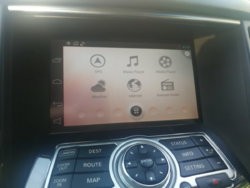
When all of this is done, the result is amazing (at least for me). What i have now is complete android OS, displayed on the OEM screen and controlled form the OEM screen touch.
The original screen menu is always there.. and a simple toggle button does the transfer between the android menu and original FX menu.
If you are on the android menu, and you shift to reverse, the LCD display will flip to the original menu ( which by default is showing the rear cam when on reverse). Of course the audio is not disturbed. And once you change back to N or D or P , the android menu will show again (check the video: Dropbox - Reverse.mp4 ).
The touch is good for a resistive touch. It s not that easy to zoom in and out.. but it is fine.
No audio lag. The video quality is very good.
All in all, i am more than satisfied about the outcome.
I can provide more details if needed.
 

Attachments

  • Android Box Wiring Diagram.jpg
    Android Box Wiring Diagram.jpg
    102.5 KB · Views: 793
  • Main Menu.jpg
    Main Menu.jpg
    98.8 KB · Views: 905
  • OEM Screen Cables.jpg
    OEM Screen Cables.jpg
    186.1 KB · Views: 781
  • OEM Screen.jpg
    OEM Screen.jpg
    314.2 KB · Views: 781
  • Photo1.jpg
    Photo1.jpg
    168.9 KB · Views: 784
Last edited:
Good job! But i can offer kit for plug and play installation, need not disassemble display unit , need not cut any wires, but Android is 4.2
If you have that available, you might want to add a link to where people can buy it. I'm sure there's a few people interested!

I would be interested in learning more if you have a link to the specs on that kit!
 
Hello

Is it connecting with mobile by bluetooth or has it a slot for SIM card?
I'm looking for device that do not require to connect with phone. Do you know if something like this even exist?
In described device is there an option that shows A/C temperature?

Simon12 how can I get your plug and play device android 4.2 ?

Thanks in advance!
Greetings Lucas
 
Back
Top